

If you’re curious about mobile communication history, you’ve probably asked: What is a PDA? This question takes you back to days before smartphones. That period shaped mobile computing’s roots. To understand today’s phone revolution, you must know the story of these palm-sized computers.
For years, I’ve worked on enterprise mobility projects. For example, I’ve done inventory counts in warehouses with Zebra handheld terminals. Also, I’ve set up Honeywell mobile computer solutions for field teams. Now I’ll share the spirit of this mobile assistant. You’ll learn its link to modern mobile devices and its role in 2026.
Plus, I’ll blend all this with current data. Ready? Let’s dive into the fascinating world of the portable computer. Let’s discover how these devices shaped modern mobile evolution!
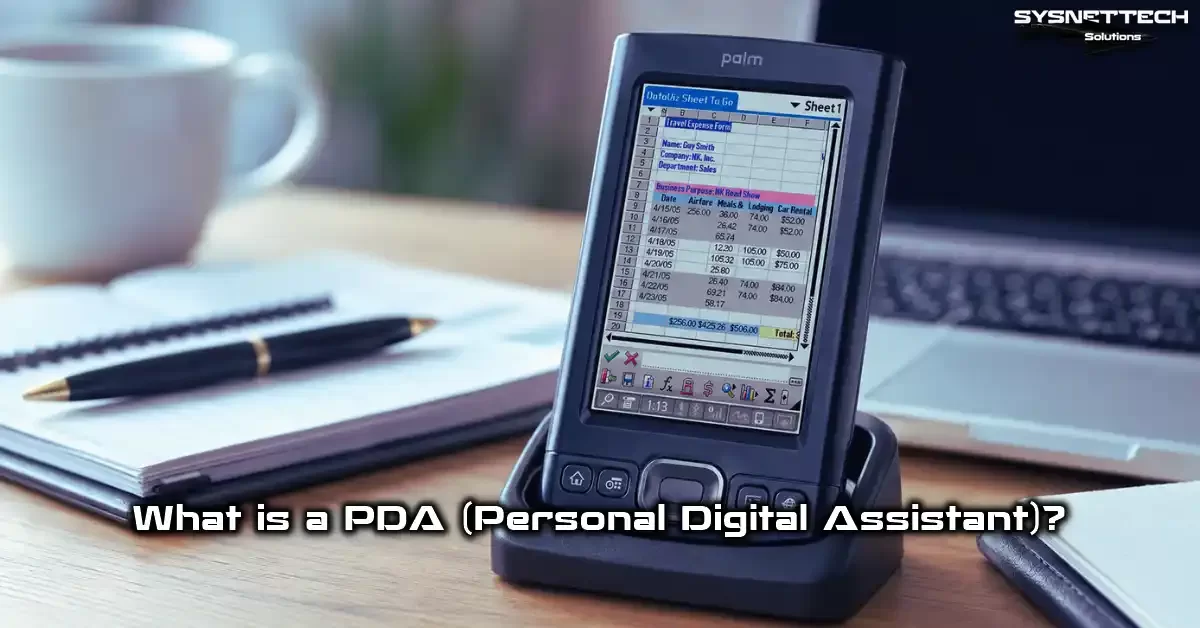
What is a PDA (Personal Digital Assistant)?
PDA Meaning and Basic Definition
If you’re wondering what PDA stands for, the answer is clear: Personal Digital Assistant. Actually, this portable computer was small enough to fit in your palm. Unlike today’s mobile devices, its main job wasn’t voice calls. It worked as a personal information manager.
First, I must stress: this device was not a modern mobile phone. Its core job was to combine mobile productivity tools into one device. Calendar, contacts, notes, and task tracking were among these tools.
They all ran on touchscreens. Moreover, on most models, you could enter precise data with a stylus. Indeed, this device was among the first examples of the touchscreen planner concept.
Looking back today, these devices laid the groundwork for the smartphone concept because developers tested touch interfaces on this platform for the first time.
Mobile operating systems and app ecosystems also took shape here. Plus, these gadgets were not just consumer electronics. Manufacturers positioned these models as enterprise digital assistants. Businesses used them for a wide range of applications, from warehouse management to field sales.
The Birth of the Palmtop: PDA’s Place in Mobile Computing
When we talk about mobile computing evolution, this pocket-sized computer category opens a golden page. In the early 1990s, desktops were bulky. Even laptops were heavy by today’s mobility standards. That’s exactly where the palmtop form factor entered the scene. Thus, it truly launched the mobile office era.
Users suddenly started carrying all their personal organization data in their pockets. This started an era I call the pre-instant digital experience.
Back then, there was no concept of being always online. You synced consciously, then used the device as a standalone mobile computer. This created a mobile office setting with nonstop power.
Also, these devices served as a lab for user interface evolution. Everyone learned to use a touch stylus. This directly influenced the next generation of touchscreen device designs.
Therefore, today the lines between cell phone and computer have blurred. We owe this a bit to these pioneering mobile assistants. They showed us that mobile computing isn’t just about communication. They also taught us it’s about productivity.
PDA’s Rich History: From Apple Newton to Palm Pilot
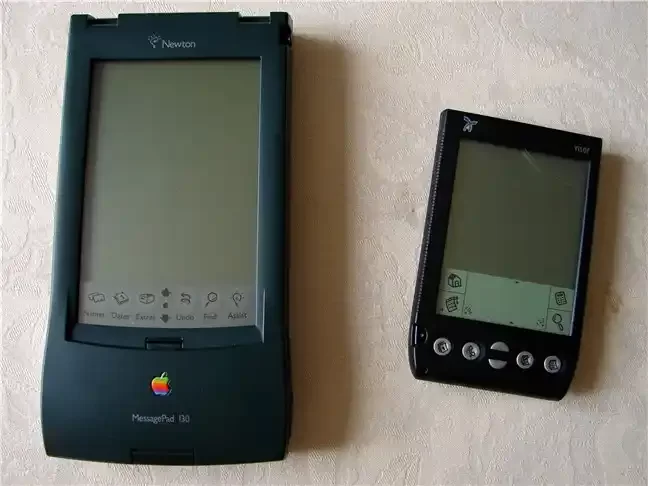
Which Was the First PDA? The Apple Newton Failure Story
The question of which was the first PDA sparks a technical debate. Some point to the Psion Organiser. However, the mobile industry highlights the Apple Newton MessagePad.
The industry accepts this device as the first true personal digital assistant. Apple launched it with a big event in 1993. But things didn’t go as planned.
If you ask why Apple Newton failed, the answer lies in the handwriting recognition disaster. The system couldn’t accurately turn users’ notes into digital text. Moreover, for a mobile device, it was quite large. Its price was also high.
Despite this, Newton OS went down in history as a graphical user interface pioneer. This embedded operating system inspired the next generation of mobile device software.
However, commercial failure caused Apple to shelve the project in 1998. Yet Newton’s legacy still lives on today.
For example, the fingerprints of modern tablets and smartphones are hidden in this failed but visionary project. Then, Apple created a huge mobile revolution with the iPhone in later years. The company built that revolution on lessons learned from the Newton project.
Palm Pilot Success Story and the Golden Age of PDAs
Apple Newton’s stumble set the perfect stage for the Palm Pilot success story. Palm Computing released the Palm Pilot 1000 in 1996. This pocket-sized computer instantly became a phenomenon because it offered exactly what mobile users wanted: simplicity and instant access.
For the Palm Pilot, Palm Computing developed a simplified alphabet called Graffiti. It replaced complex handwriting recognition. The device turned on instantly. The battery lasted for weeks. Thus, millions of professionals said goodbye to paper planners. Meanwhile, Palm OS became one of the first mobile platforms to allow third-party software.
Thousands of developers contributed to this ecosystem. As a result, mobile tools like calendar apps, email clients, and primitive web browsers became common.
Historians call this period the golden age of PDAs. It’s a critical turning point in mobile technology history. This period also laid the foundation for today’s MDM and enterprise mobility solutions.
Critical Differences Between PDA and Smartphone, Tablet, and Computer
Many people wonder: Is my phone a PDA? Actually, modern smartphones are direct descendants of these old devices. However, there are critical mobile communication and hardware differences between them.
Let’s start with why you can’t insert a SIM card into a PDA: manufacturers didn’t design these devices for voice calls over cellular networks.
PDAs didn’t focus on cellular calling. At that time, GSM infrastructure was for voice transmission. In fact, data services were still in their infancy. That’s why manufacturers skipped the SIM card.
Manufacturers positioned them as information organization devices. You would use Wi-Fi, Bluetooth, or GPRS for data connections. But making calls over a mobile network wasn’t a core feature.
The table below clearly shows the smartphone-PDA difference. It draws the line with modern mobile devices.
| Feature | PDA (Consumer Model) | Modern Smartphone |
|---|---|---|
| Primary Purpose | Personal information management | Versatile mobile communication and media |
| Mobile Network | Usually none or Wi-Fi | 5G, LTE, VoLTE integrated mobile connection |
| Operating System | Palm OS, Windows Mobile | Modern mobile platforms like Android, iOS |
| App Store | Limited, third-party installation | Millions of mobile apps |
| Input Method | Stylus, physical keys | Capacitive touch, voice commands |
| Battery Life | Weekly charge (monochrome screen) | Daily charge |
| Notification Management | Passive, user-controlled | Instant, intense mobile notification flow |
The table clearly shows: The difference in PDA notification management is one of the biggest distinctions. These mobile assistants don’t interrupt you; you control them.
Also, you can use them with gloves thanks to the resistive touchscreen. This is a major difference from capacitive screens. Moreover, it provides a big advantage in the industrial mobile field.
Difference Between PDA, AI Assistant, and Tablet
The difference between a PDA and an AI assistant comes up often in 2026. Tools like Siri, Gemini, or ChatGPT are virtual mobile software layers. They have no hardware presence.
But a personal digital assistant uses a physical mobile hardware architecture. In contrast, the difference between a PDA and a tablet is clearer. Tablets are large-screen, multimedia-focused mobile devices.
If you wonder whether to choose a PDA or a tablet, the answer depends on your use case. PDAs are ideal for one-handed use and instant data entry, while tablets offer a visual experience.
Similarly, the differences between a PDA and a computer are clear. These handheld computer models are portable tech marvels focused on specific mobile tasks. They excel in areas like logistics automation and inventory management. They are far more practical than a laptop.
PDA Hardware Architecture and Durability Certifications
Hardware Components and Processor Architecture
In a typical palmtop, you’ll find a mobile processor and RAM. Also, these devices contain a memory card slot and a rechargeable battery. The processor architecture is usually ARM-based. This ensures maximum mobile energy efficiency.
Additionally, PDA network connectivity features were quite advanced for their time. Wireless technologies like infrared data transfer (IrDA), Bluetooth, and Wi-Fi were standard.
PDA models with physical keyboards were indispensable for mobile professionals doing heavy text input. Additionally, you could expand storage with CompactFlash expansion and SD card slots.
In today’s industrial models, however, the PDA hardware structure is much more advanced. Laser barcode reader terminals, integrated barcode scanners, and RFID reader integration are standard.
Thanks to the user-replaceable battery design, field operations continue uninterrupted. With modern mobile processors and Android Enterprise platform support, these devices are full-fledged mobile computers.
PDA Durability Certifications: What Do IP67, IP68, and MIL-STD Mean?
In industrial settings, an IP67 rating for PDAs is vital. The IP67 protection class indicates the device provides full dust protection. Also, it certifies that it can withstand 30 minutes in water at a depth of 1 meter.
An IP68-rated handheld terminal offers deeper and longer underwater durability. These certifications are a must for harsh mobile working environments such as logistics PDA devices.
Moreover, the MIL-STD military durability certification is on a whole different level. This standard proves the device’s resistance to drops and vibration. It also documents the device’s tolerance to extreme temperatures and humidity.
Industrial PDA durability testing processes are completely different from consumer electronics. Drop-resistant handheld devices from manufacturers survive repeated drops onto concrete from 1.5 meters.
If you ask about PDA charging time, it’s important in this rugged mobile device ecosystem. Thanks to the hot-swappable battery feature, you can change the battery without turning off the device.
This ensures uninterrupted mobile operation, especially on models you use as warehouse inventory computers. Ultimately, the industrial design with a rugged case stands out. Frankly, this structure is the strongest answer regarding PDAs’ security advantages.
PDA Operating Systems and the Software World

Classic Operating Systems: Palm OS and Windows Mobile History
PDA operating systems open one of the most colorful pages in mobile software history. Two giant platforms fought for the throne for years: Palm OS and Windows Mobile.
Palm OS represented the peak of simplicity with its minimalist philosophy and Graffiti handwriting recognition system. In addition, desktop synchronization with Palm Desktop software was extremely simple.
On the other hand, Windows Mobile’s history is more complex. Microsoft entered the mobile market with the Pocket PC and Windows CE operating systems. This platform targeted the enterprise mobility world with multitasking support and Office compatibility.
Windows Mobile was essentially a pocket-sized Windows experience. With a Start menu, File Explorer, and Registry structure, it was a true miniature mobile computer.
In addition, Windows Embedded Handheld offered powerful features. Moreover, this system provided specialized security and management layers for the industrial mobile space.
However, modern mobile systems rose quickly. Nevertheless, both platforms exited the stage of history during this process. Still, this legacy continues thanks to PDA Android devices. With tools like the StyleTap emulator, you can run old Palm OS software on modern mobile hardware.
PDA Synchronization and Troubleshooting Guide
PDA synchronization is the backbone of these devices. A sync cradle usually handled the data flow between the desktop and the handheld terminal. Also, you would use a cradle connection for this process.
ActiveSync software was the standard mobile sync tool for Windows Mobile devices. Palm devices, on the other hand, used a method called HotSync.
However, fixing PDA ActiveSync errors and HotSync issues was users’ biggest nightmare. Users often faced serial port sync or USB connection problems.
Fortunately, community-based third-party drivers exist today for Palm Desktop compatibility with Windows 10. You can troubleshoot by following the steps below.
- Check the charging and data transfer station connection physically. Also, clean the contact points with isopropyl alcohol.
- Make sure you have the correct ActiveSync version installed. At this point, there is a compatibility difference between 32-bit and 64-bit Windows versions.
- Verify that firewall and antivirus software don’t block mobile sync ports.
- If you’re struggling to find an old PDA charger, stick to the original voltage and amperage values.
- As a last resort, do a manual file transfer via the SD card slot. This method overcomes wired data transfer issues.
Also, you should periodically calibrate PDAs with resistive touchscreens. You can restore accuracy by touching specific points on the screen with the stylus.
This process significantly improves the touch-sensitive screen performance. Additionally, it improves the mobile usage experience.
From Consumer PDA to Industrial PDA: An In-Depth Comparison of Two Different Universes

What is an Industrial PDA and What Does an Enterprise Digital Assistant Do?
An industrial PDA is critical for those who understand the language of enterprise mobility. Unlike consumer models, manufacturers optimize these devices for a specific workflow.
An enterprise digital assistant comes with barcode scanning optics, RFID reader integration, and a ruggedized case.
Moreover, I can describe a PDA data collection device this way: it’s a specialized mobile computer. It enables real-time inventory tracking. Thanks to PDA use in warehouse management, stock errors drop nearly to zero.
In field service, it’s a field automation tool. Technicians instantly receive and close work orders with it. In healthcare, it appears as a point-of-care data entry device.
When you research Zebra PDA models, you encounter enterprise data terminals. In fact, manufacturers design these devices as healthcare and retail inventory management tools. You manage these devices with EMM platforms. In short, they withstand the toughest mobile working conditions.
Industrial PDA vs. Consumer PDA Comparison Table
An industrial PDA vs. a consumer PDA is like a Formula 1 car versus a city car. Both have wheels. But their purposes, durability, and costs are entirely separate.
The comparison table below clearly explains the differences between PDA types.
| Criteria | Consumer PDA | Industrial PDA |
|---|---|---|
| Purpose | Personal organization, note-taking | Data collection hardware, inventory counting device |
| Durability | Standard plastic case | IP65 and IP67 protection class, MIL-STD certification |
| Barcode Reader | None | Integrated 1D and 2D barcode reader, laser or imager |
| Battery | Internal, non-user-replaceable | Hot-swappable battery, high capacity |
| Operating System | Palm OS, Windows Mobile (old) | Android industrial operating system, sometimes Windows |
| Screen | Resistive touchscreen, stylus | Capacitive or resistive, glove-friendly |
| Price Range | Collector value: $50–$200 | New: $800–$2,500 |
| Connectivity | Wi-Fi, Bluetooth, IrDA | Wi-Fi 6E, 5G, Bluetooth 5.3, radio frequency hardware |
We should specifically mention the barcode reader in PDA devices. These models integrate the barcode scanner function at the motherboard level. They do this thanks to automatic identification technology. The difference between a handheld terminal and a PDA becomes clear here.
If you ask if these two devices are the same: every handheld terminal is a PDA. But not every PDA is a handheld terminal. Manufacturers design handheld terminals specifically for industrial use. Therefore, it’s a rugged, industrial design marvel.
PDA Buying Guide in 2026: Hobby or Professional Solution?
What to Look for When Buying a Used PDA? (Checklist)
Whether buying a PDA makes sense depends on your purpose. For a retro hobby, absolutely yes. But for professional mobile use, you should only choose industrial models.
Buying a used PDA is a risk management matter in itself. Therefore, be sure to follow the checklist below.
- Screen Condition: Resistive screen technology loses sensitivity over time. PDA screen repair is expensive and difficult. In short, test every point of the screen by touching it with the stylus.
- Battery Health: On devices over 20 years old, battery life is a serious problem. Finding a compatible battery can be hard. Also, if it doesn’t hold a charge, negotiate.
- Sync Cradle: The PDA cradle connection and cables must be complete. Today, finding these accessories later is almost impossible.
- Memory Card Compatibility: PDA memory card compatibility is limited. Some models don’t support SD cards over 2 GB. Therefore, prefer ones with a CompactFlash expansion slot.
- Cosmetic Condition: The hinge, buttons, and stylus slot must be intact.
- Operating System: You must clarify the Windows Mobile PDA setup or Palm OS version.
Also, used PDA prices in 2026 range from $50 to $300 depending on the model’s rarity. Especially models with physical keyboards and monochrome screens are prized among collectors. In short, if you research well, a great mobile retro experience awaits you.
Best Industrial PDA Models for Field Operations (Zebra, Honeywell, Datalogic)
If you’re looking for professional solutions in field operations, three giant brands offer the best PDA models.
Zebra PDA models, especially the TC series, set the mobile standard. They dominate retail and warehouse management. Zebra Technologies offers an Android industrial operating system. Also, it simplifies enterprise mobility management with Mobility DNA tools.
In contrast, Honeywell PDA features push the limits of durability. Users often choose Honeywell ScanPal and mobile computer series. Especially in harsh conditions such as cold storage warehouses, they prefer these models.
Datalogic PDA models stand out with the Datalogic Memor series. To explain, this series offers excellent ergonomics in retail and light industrial areas. Below, I’ve compared the standout models of 2026.
| Model | Brand | Highlight Feature | Target Sector |
|---|---|---|---|
| Zebra TC58 | Zebra | 5G, Wi-Fi 6E, 6 GB RAM | Retail, field sales |
| Zebra MC9400 | Zebra | Ultra-durable, 2D imager | Heavy industry, warehouse |
| Honeywell CT47 | Honeywell | MIL-STD-810H, 8-core | Logistics, cold chain |
| Honeywell EDA52 | Honeywell | Affordable, Android 13 | Field service, SME |
| Datalogic Memor 20 | Datalogic | Green Spot technology | Retail, in-store |
| Datalogic Skorpio X5 | Datalogic | Versatile, multi-connectivity | Warehouse, manufacturing |
For PDA use in warehouse management, Zebra MC9400 or Honeywell CT47 models are unrivaled. A long-range barcode scanner is a key feature of a warehouse handheld terminal. Also, we can count high drop resistance and a hot-swappable battery.
You might wonder how inventory management is done. In other words, these mobile devices fully integrate with a warehouse management system (WMS).
For field sales PDA solutions, the Zebra TC58 is ideal. As a mobile barcode reader terminal, it handles the whole process. It covers everything from order taking to payment collection.
Logistics use generally covers cargo tracking terminals and fleet management roles. As a result, if you ask how much PDAs cost, enterprise models range from $800 to $2,500.
Modern Uses of PDAs: Digital Detox, Retro Hobby, and Focused Experience

The Digital Minimalism Tool: A Focused Mobile Experience
The concept of PDAs as digital minimalism tools is surprisingly on the rise in 2026. People are tired of constant mobile notification bombardment. Social media addiction and distraction have peaked. That’s exactly where the search for a distraction-free device brings these old friends back into focus.
The PDA’s focused usage philosophy is the exact opposite of modern smartphones. This mobile assistant doesn’t interrupt you; you control it.
Of course, you can’t use social media on these devices. This makes it stand out as a digital detox tool. Moreover, reading books on a PDA doesn’t strain your eyes thanks to the monochrome screen.
Using GPS and loading maps on a PDA also keeps you away from your smartphone. Its games are also simple and non-addictive. This way, you gain mental clarity and a focused experience.
Using an Old PDA as a Modern Device in 2026
You might think the idea of using an old PDA as a modern device is impossible. But with a few creative steps, this retro tech goes beyond being a hobby device.
Connecting your old PDA to the internet is quite easy. Additionally, you can easily integrate it into your daily mobile workflow.
- Establish Connection: Choose a model with Wi-Fi and Bluetooth integration. You can access basic websites with a WAP browser or Opera Mini. Internet use on a PDA remains limited on modern HTML5 sites.
- Email Setup: For email sync with a PDA, find an email client that supports the IMAP protocol. Old mobile versions of Gmail usually work.
- Productivity Tools: Among PDA software, there are still functional mobile office apps. Additionally, you can edit Excel and Word files with Documents To Go.
- Media and Reading: For reading books, MobiPocket Reader or PalmFiction are great. Additionally, TCPMP is legendary as a multimedia player.
- Backup and Security: Regularly back up to the SD card slot. Additionally, set a device password for security features.
Also, if you compare PDAs with cloud computing, you’ll see these mobile devices rely on local storage. This means your data always stays with you.
Also, don’t ask if WhatsApp works on a PDA; the answer is unfortunately no. But this lack aligns with the focused usage philosophy. For daily use scenarios, it’s limited to note-taking, task tracking, and the calendar.
Further Reading on PDA Technical Architecture
PDA memory management directly affects their performance. Cache is a critical layer that speeds up data access. This section offers resources for you to understand the topic in depth.
- TechTarget – What is a personal digital assistant (PDA)?: Explains the definition, historical development, and basic hardware components of PDAs in detail.
- MakeUseOf – Apple Discontinued the Newton 25 Years Ago: Examines the development stages of Apple Newton. Also, it addresses the technical problems in the process and its contributions to market share.
- Wikipedia – Personal digital assistant: Offers a broad overview summarizing PDA hardware architecture, memory types used, and operating system varieties.
- Tom’s Hardware – Holiday Buyer’s Guide 2006, Part 5: The Mobile Stuff: Comparatively evaluates the memory capacities, performance criteria, and user experiences of popular PDA models of the era.
- Computing History – Apple Newton MessagePad 110: Explains Newton’s ARM processor, SRAM usage, and storage solutions, supported by technical data.
10 Critical Questions About PDA Devices That Cause Confusion
Are PDA devices over, or are they still used?
Why didn’t the Apple Newton catch on?
Can you use WhatsApp or social media on a PDA?
What’s the biggest difference between an industrial and a consumer device?
Can a PDA serve as a digital detox tool?
How can I use my old device as a modern device?
Does a PDA get viruses? What are its security advantages?
How does a PDA collect data?
Is PDA use common in the US?
What should you consider when buying a PDA?
Conclusion: The Past, Present, and Future of the PDA
From PDA to Smartphone: Understanding the Legacy
The PDA’s influence on modern smartphones is an undeniable fact. The phone you carry in your pocket today comes directly from these mobile devices’ family tree.
Developers planted the seeds of the touchscreen, the app store, and the mobile office concepts back then. The PDA family tree forms the DNA of modern mobile computing.
Saying PDAs failed on the consumer side is actually wrong. They didn’t fail; they evolved the mobile landscape. Even though consumer models are gone, their functions and philosophies live on.
You can compare PDAs with modern operating systems. This way, you clearly realize what you’ve lost, especially in notification management.
Moreover, intermediate forms like the BlackBerry phone built the mobile bridge between PDA and phone. With its physical keyboard and instant email, BlackBerry carried the PDA’s enterprise legacy a while longer.
However, everything changed with the iPhone’s launch in 2007. Still, the reason PDAs used a stylus reminds us of an important truth. This especially shows the advantages of resistive screens in industrial settings.
Where Will the PDA Take Us in the Future?
As of 2026, I can say a clear yes: PDAs are still in use. However, this usage progresses in two separate mobile lanes. The first lane is the industrial field.
Logistics 4.0 and smart warehouse concepts are increasing the demand for industrial mobile computers. Devices equipped with IIoT connectivity by manufacturers play a critical role as warehouse automation hardware.
The second lane is the retro hobby and digital detox movement. As people find ways to use old PDAs as modern devices, interest grows.
Moreover, the number of people searching for PDA retro hobby guides is increasing every day. Repair guide videos and blogs are becoming popular. This situation is also positive for sustainable technology and the circular economy. It’s also a meaningful mobile step for e-waste management.
Where will the PDA take us in the future? I think it will take a hybrid mobile form. Foldable screens and modular hardware approaches could revive the focused usage philosophy.
The portable technology legacy never dies; it only changes form. If you also want to explore this mobile legacy, you can use a PDA. It works as an inventory counting device in the warehouse. You can experience this with a Palm Pilot in the library.

Be the first to share your comment