

In this article, I will explain the vision of a host, or the main computer, in networks. I will show why they are essential for keeping LANs safe and fast. We will also look at real, common events with simple examples.
The examples will help you use the concepts well. Plus, they will make it simple to learn actionable knowledge. In short, you will better see why the main computers in a network matter.
In a PC network, a host is any device connected to the LAN. For example, it could be a computer, a server, or a phone. But each one must join the network and get its own unique identifier. So, we usually call this label an IP.
Knowing about host computers is key for people who run today’s networks. It is also vital for pros who plan LANs or fix their issues.

What is a Host Computer in a Network?
In a network, a host is a real or software-made device on a LAN. Furthermore, this device has its own special LAN name. For example, an IP address lets the device talk to others.
These computers can be servers, smartphones, or tablets. Devices that send, get, or use network information are also in this group.
Each host does jobs like sharing facts and running programs. But identifying these right is key to our robust network control. Also, I can say it matters for online safety and fixing problems.
To get started right away, try finding your device’s IP address. First, if you’re using Windows, you need to open CMD (Command Prompt). Then, type ipconfig to see the result.
Suppose you use macOS or Linux, open a terminal, and type ifconfig. This lets you see your device’s IP. But the job you are doing works well with the stuff. You can learn the fundamental steps for finding host computers.
Let’s Understand the Term “Host” with a Real-World Analogy!
To understand the concept of a host, think of the network as a neighborhood. For example, you can see each device as a special home inside it.
Every home (host) has its own street address (IP). This lets mail carriers (data) bring boxes to the right place.
Just like in real life, every home can send and receive mail. So, every host can share information on the network.
In the story, the neighborhood only works if each home has its own number. That is, the network runs right when the homes join in sharing information. So, this shows how a computer LAN runs.
Host & Node: Key Differences
A host is any device on a network that has its own special address. It then works as an endpoint for LAN jobs.
In contrast, a node refers to a device with network access. It may also have an address or join right in talking. While all hosts are nodes, not all nodes can be classified as hosts.
For example, switches and routers are nodes as network devices. Yet, they are not hosts if they do not have network addresses or do not produce or consume data.
Knowing the difference between host and node is essential for network design. Also, it is vital to make an address and security strategy.
Common Examples of Host Computers in Networks
Hosts on a network include desktops, laptops, and servers. Also, phones, tablets, and IoT devices use the web. Because of this, each device gets its own address to send and receive information.

Servers are central hubs for managing resources and services. Also, client devices like computers and phones use those resources.
Smart devices like thermostats, cameras, and speakers are hosts too. These interact with network resources and act as hosts.
For example, a smart thermostat sends heat data to the server. It can then talk through the home network to get new temperature settings.
Two-way talking easily changes the heating and cooling systems. In detail, once you see the examples, your LAN plans and safety steps will get simpler.
How Does a Web Host Work?
The main computers are vital for a LAN to communicate. That’s why they transmit, receive, and process data over the LAN.
Each host works with its own IP address for naming. It also uses a hostname to link with other devices.
Devices that share data let others use files and apps. Thus, this makes smooth talk between clients and servers easy.
How main computers work well changes network speed and trust. In other words, they have an essential job in safety. In short, good setup and care matter in every LAN area.
1. Host Identification: IP Addresses & Names
Each PC in the network needs an identifier to contact and share data. Without this name, they can’t talk to each other right. Thus, the most used methods are IP addresses and host names.
Whether old style or new style, the IP numbers give a special number to each device. Also, this number helps with sending data, making devices talk to each other.
Host names give us easy words to use. The Domain Name System (DNS) also does this job and links them to IP addresses.

Correct naming is a key job for running a network. So, this means it makes fixing problems easier by keeping links between devices safe.
For practical purposes, you can use the “nslookup” or “dig” commands for DNS lookups. As a result, you can also reveal the IP source associated with the hostname.
You can perform DNS queries on Windows and Unix systems. You can use the “nslookup” command. This allows you to find out the server information for a hostname on the LAN. You can also find the numbers linked to it.
On the other hand, you can access more detailed information with the “dig” command. We usually use it on Unix systems. But it has many extra choices for deep study.
For example, you can type “nslookup example.com”. The command will show you the Name: example.com. It will also give you an answer like Address: 23.215.0.138.

In the same way, you can use “dig example.com”. This rule will show you full details about the domain name facts. In the end, these tools are essential for checking DNS setup. They are also beneficial for fixing link problems.
2. The Steps for Sending, Getting, and Working with Data
The host on the network serves an essential function by sending, receiving, and working with data. Also, each device starts talks to send bits of data. It also quickly says yes to asks from other devices.
Host computers help move data. They also control who can use things by reading application-layer information. This way, they run network services well.
They always keep links safe while handling network protocols. In addition, they also make sure the data they send is correct.
Management a host is helpful for a strong network. So, keeping it steady and safe is also very important.
What Are the Types of Hosts?
Different kinds of host computers have unique roles on the network. So, I can say that it is crucial for us to know the related categories. They are vital for control and safety, and are needed for network planning.
1. Client Hosts
Client Host computers are the end-user devices. For example, desktop and laptop machines are in this group. Also, phones or tablets are clients too. These devices make requests for resources on the network. They also start data or service requests.
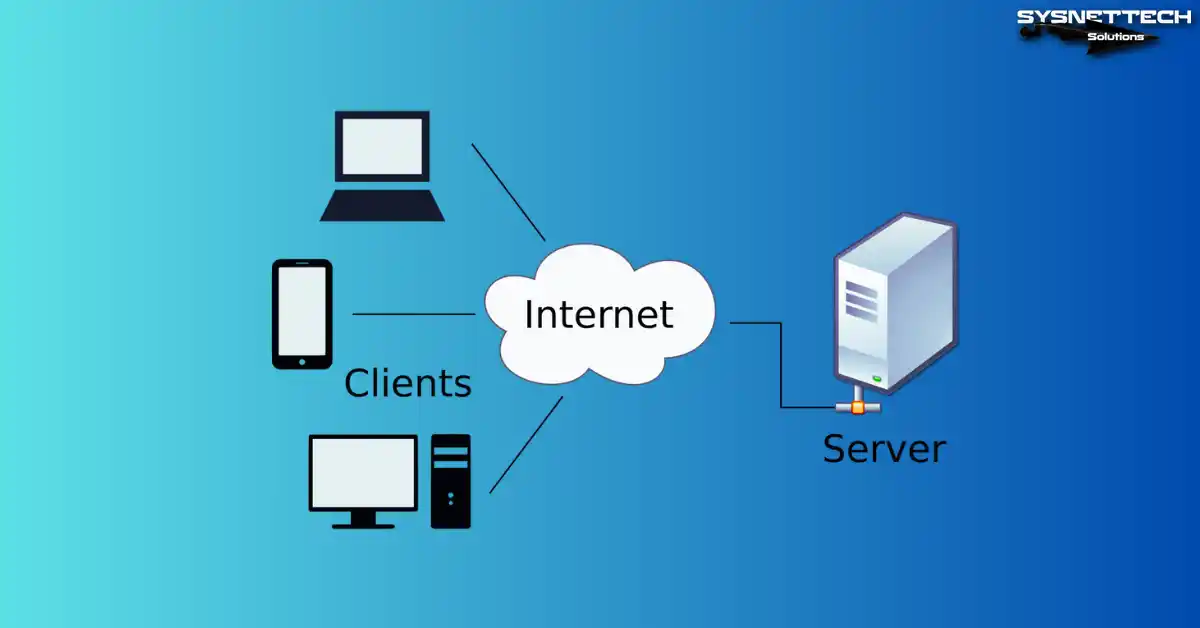
These devices are the main way users interact. They let users reach network apps. They also allow you to get facts and work with online things.
Client computers are vital for the network by generating traffic. They also use the help given by the servers. They help the whole LAN work. Besides, they directly change how the person feels when using it.
Handling devices correctly is essential. You can make the network work better by using the proper settings.
2. Server Hosts
Server computers are special machines. They give things to clients and also send data and network help.
We can also sort servers into different kinds. For example, there are web and data servers. File servers are also in this group. We can add mail and application servers too. In short, each has specific functions within the network.
Engineers design server PCs to handle many links at once. They first handle vast amounts of data well. Then, they make sure help never stops.
These machines use strong hardware while making sure they are always on. They have backup systems and follow strong security rules. This gives a high level of system safety.
When cared for right, we can also use servers for big enterprise apps. In other words, they enable the network to work well by allowing users to share resources. They are also needed for safe work.
3. Peer-to-Peer Hosts
Peer-to-peer (P2P) host PCs act as both clients and servers. In this architecture, each device makes resource requests. At the same time, they also fulfill requests from others. That is, they exchange data directly without the need for a central server.

The spread-out method uses space better by growing easily. It shares the work better across the whole network.
P2P computers are standard in file-sharing tools. We also use them a lot on teamwork sites.
They are best in cases that need flexibility. But we like them more because sharing resources is key. For this reason, I can say that they are also effective in distributed computing environments.
Handling P2P devices well is very important. First, we must keep the network safe. Because of that, we must also make the system stronger by making it work better.
4. Virtual Hosts
Virtual hosts are software-made machines. They act like real computers. They do this using tools like hypervisors. Container platforms also do the same job.
Each virtual host works on its own. For example, it has its own network address. It has its own setup and operating system. But they use the same physical hardware.

This method maximizes the hardware best. So, it makes setting up much easier and grows the network well.
Virtual host PCs allow bendy network work. They also give safe and low-cost solutions. So, they are key to cloud computing work.
In the same way, they are also key for data centers. They are needed a lot in company IT setups.
Network Host Addressing
Host addressing is very important for devices to talk on the LAN. Also, without the correct address, devices cannot find each other.
Also, we can accomplish this job using three main ways. These are: IP addresses, domain names, and MAC addresses.
IP Addresses (IPv4 and IPv6)

We can define IP addresses as unique numbers for hosts on a network. First, IPv4 addresses use a 32-bit format.
On the other hand, IPv6 addresses operate in a 128-bit format. That is, IPv6 can support a much larger number of devices.
If you give the right IP, you send data bits to the correct destination. This lets you do the move both efficiently and safely.
Domain Names and DNS
Domain names give a readable choice to IP numbers. Furthermore, names let us recall addresses with ease.
DNS changes website names into IP numbers. This lets us reach network things using simple names. Plus, this method makes using the Internet even more practical.
Using the proper DNS setup makes it more usable, letting us have steady links on the web.
MAC Addresses
Media Access Control (MAC) addresses are special numbers for a device’s network interface. These numbers work on the data link layer. They let devices talk inside a home LAN.
An example of a MAC address is 00:1A:2B:3C:4D:5E, which is a unique identifier for the network interface. If we handle the address right, we can keep the LAN safe, control who gets in, and follow devices.
You can get the MAC address in Windows by entering the command “ipconfig /all.” Also, the command gives you full details about your local network setup.
The “ifconfig” command displays the MAC address on macOS or Linux OS. Also, you can often see the address under the “ether” line.
Functions and Need for Mainframe Computers
Host devices run today’s networks and perform basic functions. They also push digital change.
Making LAN Traffic Easy
Main computers send, get, and work with data between devices. This gives a strong and steady network link.
The host, working as an endpoint, moves data between networks. So, it also allows smooth sharing for apps, services, and users.
Resource Sharing and Access
The Host PC on the LAN gives critical resources to other devices. Thus, it provides access to files, printers, and apps. With this setup, I can say that data flow is speedy and secure.
Devices control shared access and who can do what. This way, it helps teamwork by making good use of resources.
Running Websites and Apps

Many hosts hold websites and online tools. They also help with Internet services. In this case, it makes our data safe and easy to get.
Furthermore, it helps users by giving content. It allows companies to grow their digital tools by making work easier.
In web and app hosting, the correct setup is fundamental. This way, uptime goes up, and security also gets stronger.
Main Computer Safety Problems
Keeping the host computer security is key to guarding the network. By doing so, we make sure data is correct, private, and there when needed.
Companies use strong protection to keep their computers safe. Plus, they also find common security risks and act to prevent them.
Common Safety Dangers For Host Computers
The host device on the network faces threats like malware and unwanted access. Also, DoS attacks, data leaks, and software holes are risks too.

Attackers act with harmful goals. First, they want to control LAN tools. They also try to take secret data. On top of that, they can stop important work. In the end, they cause significant harm to systems.
Hackers can break into the host without good safety measures. Because of this, current systems can let in destructive attacks. That is, it means attackers can get into bigger networks.
Simple Safety Steps
Good server security starts with simple steps. First, I suggest using firewalls to manage traffic.
Also, you must add antivirus software and keep it current. Next, do not forget system upgrades. So, you must add all security patches quickly.
Network managers must do strong logins. They must also enforce access rules. You must often watch what the host is doing. This way, you find any strange actions quickly.
The best steps will surely lower your risk of attacks. Also, you make the overall network much safer. In short, you help companies be stronger against cyber threats.
What are the Host Application Areas?
1. Hosts in Home Networks
Hosts in home LANs have many kinds of devices. For instance, your desktop or laptop computers are part of it.
Smartphones and tablets are also in this group. Furthermore, smart TVs and game consoles join the same network. And, Internet of Things (IoT) items are a key part. Smart thermostats and security cameras belong to this set.
Each device usually uses wired Ethernet to join the local network. Or, using Wi-Fi is also normal, but a wireless Router runs all links.
Hosts mainly give simple access to the Internet. We also use them to share files. However, while sending video or music, they keep talking to other home devices.
It is essential to keep your home network devices safe to guard private information. Also, you must create a steady link and set it up correctly.
2. Hosts in Corporate LANs
Business networks use a wide variety of hosts. For instance, workstations and servers are fundamental parts. Also, we often use LAN storage drives. Plus, printers and special tools are also part of them.
We can connect such devices with wires and without wires. First, we use them for critical jobs like email, and we also pick them to share files. By giving use of team tools, all business programs work on these.
Organizations want to make sure they are always ready. Therefore, they use a single login system. Dividing the network is also a key step. We make safety much better by using device control tools.
Setting up hosts correctly is essential to make them work together. Also, we must keep the downtime shortly. This is how we can best guard private company facts. So, always watching is very important.
3. Hosts in Cloud Computing Environments
In cloud computing, hosts are usually virtual machines. We also often prefer containers. We can make our current setup bigger when needed.
For one, they give space to keep files since they offer power to do work. So, network services are also a part of this area.
These virtualized host devices run in online server buildings. As a result, they quickly adapt to changing workloads. For one, we can set them up at once and turn them off fast when needed.
Cloud PCs serve all kinds of companies. They let many services work by holding up programs and databases.
This allows for bendy sharing plans. For one, Infrastructure as a Service (IaaS) is a usual plan. In the same way, Platform as a Service (PaaS) & Software as a Service (SaaS) are also in this group.
Handling cloud-based hosts well is crucial. We must make them work best while keeping them safe in changing digital ecosystems. At the same time, we help keep prices low.
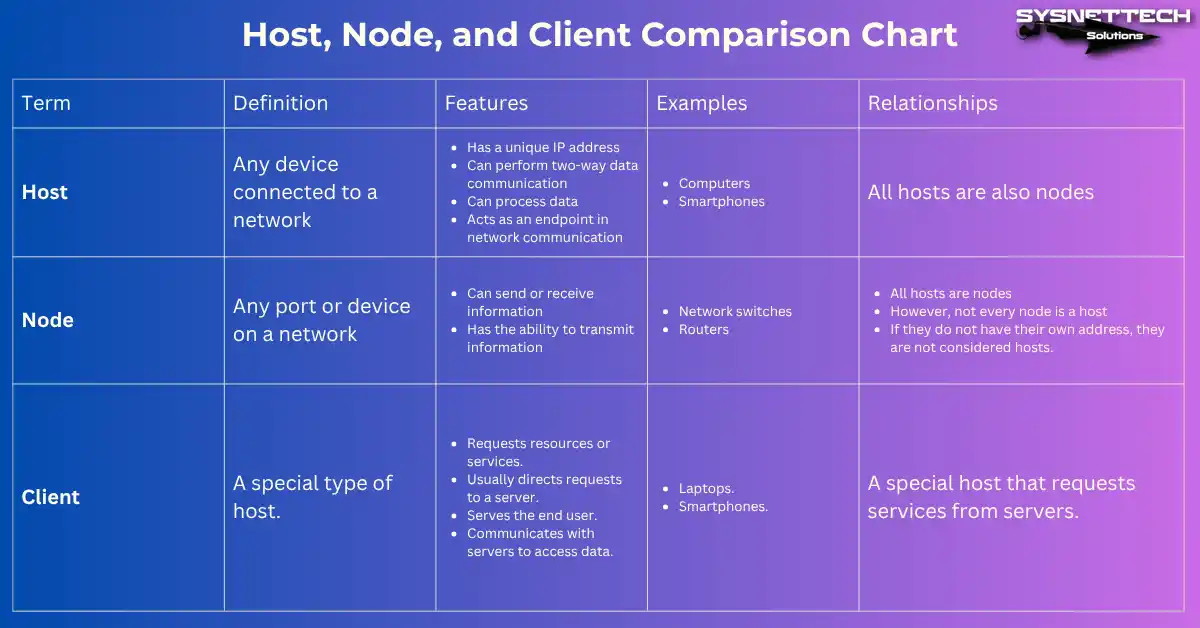
What is the Difference Between a Host, a Node, and a Client?
In web communication, we often confuse the terms host, node, and client. In fact, each has a different meaning.
Moreover, each term has its own specific roles. Therefore, we need to use the concepts correctly.
The host machine is any device linked to the web. For example, we can count laptops or mobile phones.
They often have their own web number (IP). This lets devices send and get information. Because they can also think about data, they work as endpoints for network communication.
A node is any link area or machine on the web. In short, it can send or get information and pass facts along.
An important point is that all host PCs are also nodes. However, not every node is a host. For instance, network switches are usually one.
In the same way, Routers also fit in this class. This is because they guide the traffic. However, if they lack their own web number, they are not seen as hosts. In the end, they do not join in end-to-end communication.
A client is a specific type of host. In short, it asks for help or things. It typically directs these requests to a server.
For example, laptops are common clients. Similarly, smartphones also take on this role. In fact, they serve the end user. They contact with servers to access data.
To end, a host is an addressable device on a LAN. On the other hand, a node is any link spot on a web. Also, a client is a specific PC that requests help from servers.
In brief, we can plan good networks when we know the differences well. In the same way, web care and problem-solving also grow from this base.
Host & Other Network Devices Comparison Chart
| Term | Definition | Features | Examples | Relationships |
|---|---|---|---|---|
| Host | Any device connected to a network |
|
| All hosts are also nodes |
| Node | Any port or device on a network |
|
|
|
| Client | A special type of host. |
|
| A special host that requests services from servers. |
Host PC Watching and Control Tools
Good host management plays a significant role in a website’s good health. It is vital to keep things safe while helping them work their best.
Web managers use special tools to automate their monitoring. That is, this makes their daily jobs easier.
For example, the Simple Network Management Protocol is a standard solution. We know it as SNMP for short. This rule lets us watch hosts from one location. Plus, it allows us to set up LAN devices.
SNMP makes it easy to gather performance metrics. It helps with watching event records, aiding active web upkeep.
1. Nagios
Nagios is a well-liked free tool. IT teams monitor all devices on the LAN in real time. This allows them to track system health and performance.
Nagios gives alerts that you can change. Managers can find problems fast, making sure web work goes on without stopping.

2. Ansible
Ansible is a top automation tool. So, we use it to provision host PCs. That is, it makes configuration management and software deployment.
Ansible utilizes task lists and templates. So, it dramatically cuts down the workload by steadily handling big setups. In brief, it aims to minimize configuration drift.
We have great tools for managing the host. For example, we can set up automatic warnings. We must also keep full logs and plan routine checks. However, when doing so, we must use secure remote access protocols.
3. PingPlotter
You can use a ping tool for a simple check. This way, you can check the availability of your hosts. So, it means you track their response times.
Tools like PingPlotter are ideal on Windows or Linux. Or, you can use the “ping” tool already there. Just open the command box and type “ping [hostname]”. This way, you find possible networking problems.

Another practical task is SNMP. This method allows you to collect LAN device statistics. To do this, install a tool such as “snmpwalk.” Then, run the command “snmpwalk -v2c -c public [IP].” As a result, you will obtain detailed information about the device interfaces.
Using the tools I talked about together is very helpful. Organizations can find problems much sooner. In short, they can react to issues right away.
Frequently Asked Questions (FAQ) About Hosting
- What makes a host different from a server?
- Can a device be both a host and a client?
- How can we find the IP address of a host computer?
Conclusion
Knowing the host PCs on your network is of fundamental importance to our experience. This is because modern digital infrastructures are based on this. It is especially key for control and safety, as you need it to plan computer systems.
They are the base for networking contacts, letting data move in home plans. They enable resource sharing in office LANs. Lastly, they help apps spread in cloud computing.
Important topics cover host types. We must also know their key jobs. In short, addressing methods are not just important, but also one of the top ways to be safe.
Knowing these ideas gives us significant gains. Also, networking experts can improve safety to make things work better.

Be the first to share your comment