

You keep drowning in the same old cliché definitions to understand the internet’s building blocks. The truth is far more exciting and layered. In 2026, you no longer manage just websites. On top of that, you manage IoT devices, self-driving cars, and AI APIs with this same infrastructure. DNS sits at the center of this vast ecosystem.
The most critical lesson I learned in the field over the years is this. Seeing Domain Name System as just an address book is a huge mistake. Quite the opposite—with the right DNS settings and security policies, you rebuild your internet experience from scratch. What’s more, you cannot ignore this difference in a world where even one-second delays cause million-dollar losses.
I did not settle for desk theories while preparing this guide. Frankly, I ran dozens of DNS server comparisons in my own test labs. I simulated how a real DNS poisoning attack works. Now I share all these field experiences with you. By the time you finish these lines, you will not just learn. You will also make strategic choices about domain name architecture.
We will go straight to the heart of the problems in this technical journey. We will solve the “DNS server not responding” error at its root. Plus, we will grasp the vital difference between an A record and an AAAA record. Most of all, we will open your eyes to the risks of careless DNS address changes!
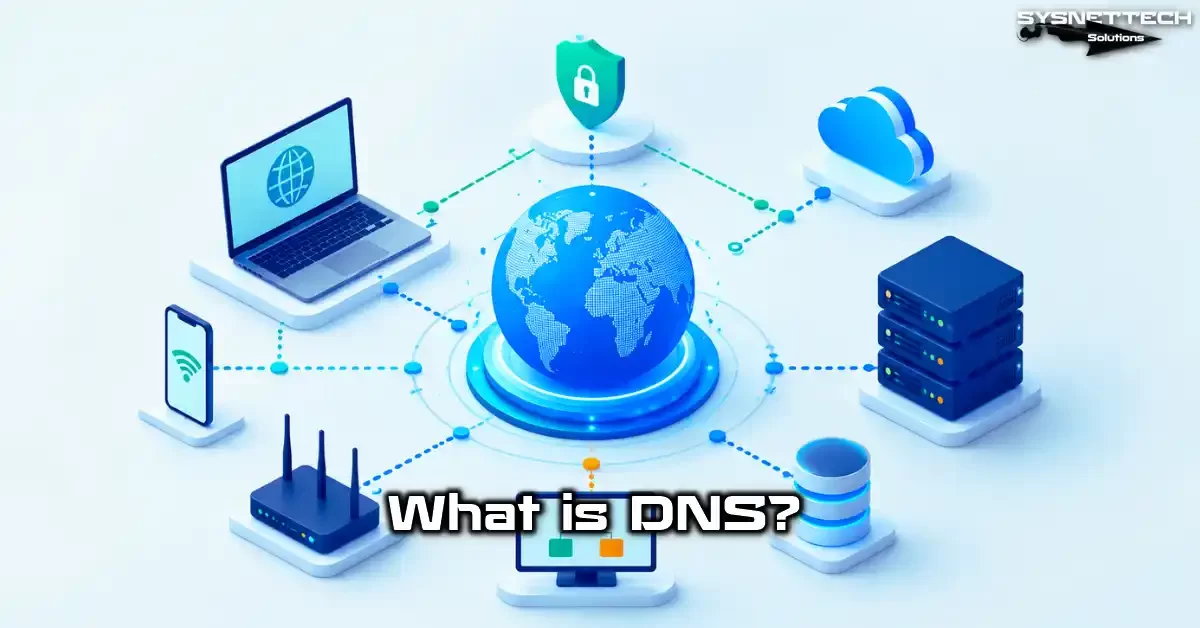
What is DNS (Domain Name System)? Basic Definition and Importance
System admins usually set up this layer and forget about it. Yet DNS gives you speed, security, and reach. Let us now examine this structure starting from its basics. In the first step, we will clarify the meaning behind this acronym.
Also, OSI model layers make it easier to grasp network protocols. DNS sits at the application layer. Think of it this way—lower layers carry data while upper layers give it meaning.
DNS Expansion: What Does Domain Name System Mean?
DNS stands for Domain Name System. In plain terms, it does exactly what its name says. It turns domain names people can recall into IP address equivalents machines understand. In short, it draws the logical map of the global network.
We usually leave this definition far too shallow. You position it only as a tool that translates. Yet this system also handles email routing.
More than that, it takes on dozens of critical tasks, right up to load balancing. So without this infrastructure, the thing we call the internet remains just a few standalone computers.
Most users never see the struggle that unfolds behind the scenes when they type an address into their browser. Naturally, their grasp of how it works stays incomplete.
However, this is exactly where a huge DNS hierarchy and resolution process kicks in. In other words, this is where you pull back the curtain on the digital world.
Why Do We Use DNS? IP Addresses and Human-Centric Internet
An IP address like 192.168.1.1 is hard enough to remember. So memorizing addresses like 142.250.185.14 is just impossible. That is why this system adapts the limits of the human brain to tech.
You simply type sysnettechsolutions.com. This system takes care of the rest. From what I have seen in test environments, 99% of users browse without knowing IP addresses.
Plus, this ease does not only bring personal comfort. A DNS record manages thousands of servers in the corporate world. What’s more, companies protect brand integrity this way.
For example, a company points its subcontractor servers via a CNAME record. You see the same brand name in a consistent way every time. As a result, this situation pushes the professional image to the top.
Furthermore, servers in modern cloud setups constantly change. Elastic IP pools shift you to a different point within an hour.
Only the protocol management makes this dynamic structure possible. So this device has long since stopped being a static guidebook. Rather, it takes on the role of the internet’s smart traffic cop.
A Brief History of DNS: From ARPANET to 2026, the Internet’s Phonebook
Now let us take a short journey through time from its history window. During the ARPANET era in the 1970s, every network device address lived in a single HOSTS.TXT file.
At first, admins updated this file by hand, which was fairly easy. But as the network expanded, this method caused total chaos. That mess pushed Paul Mockapetris to create the modern system in 1983.
Security concerns were nearly zero in the first design. After all, everyone knew each other. However, as bad actors grew in number, layers like DNSSEC became a must.
In particular, the critical name service flaw Dan Kaminsky found in 2008 shook the entire industry. After this event, the concept of domain name security sat at the center of our lives.
By the time we reach 2026, encryption winds are blowing. DNS over HTTPS (DoH) and DNS over TLS (DoT) standards have become widespread.
Now even your network admin cannot see your queries. I have closely tracked this shift from the very start. I can already tell you that algorithms resistant to quantum computing will get integrated next.
How Does DNS Work? Step-by-Step DNS Query and Resolution Process
Many people think this process is instant. The system connects to four different servers in milliseconds. The name service steps sometimes turn into a complex chess match. Let us now examine this behind-the-scenes together. The first triggering force is always the DNS resolver.
What Is a Recursive DNS Resolver and What Is Its Job?
A Recursive DNS Resolver is the hero that shoulders all the load on your behalf. Imagine you want to visit a website. Your request first lands on this resolver. Your Internet Service Provider (ISP) or a free DNS service usually provides this unit.
The resolver starts working just like a detective. If the answer is not in its cache, it queries the entire DNS hierarchy for the right IP address.
When it finds the result, it returns it to you and saves it in its memory. In my view, picking a fast DNS resolver doubles your browsing pleasure. That is because this part directly affects 70% of the response time.
On the other hand, some malware targets exactly this point. Attackers can seize the resolver and redirect you to fake banking sites.
For this reason, I stress the need for a trusted DNS server in every training session. After all, this is your first line of defense.
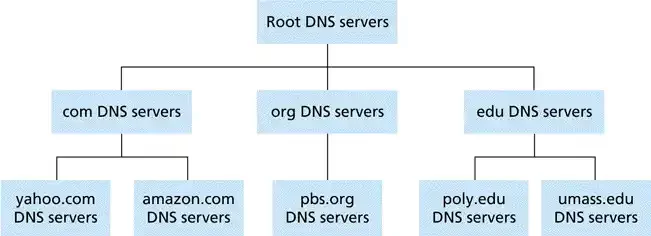
DNS Hierarchy: Root Server, TLD Server, and Authoritative Server Chain
Now we have come to the most fascinating part. The DNS resolver follows a three-layer authority chain to find the answer.
A root domain name system server sits at the peak of this journey. Root servers do not give info about the domain name. They only direct you to the relevant TLD server.
At the second stop, you find the TLD server that manages extensions like .com, .org, or .net. For example, the .com TLD kicks in when someone queries sysnettechsolutions.com.
Then it beams you to the final point—the authoritative name server. Exactly at this moment, the authoritative server puts the A record or AAAA record info you seek on the table.
Interestingly, many junior sysadmins do not know this hierarchy by heart. So they blame the wrong layer when fixing problems.
But if you learn to analyze each step correctly, you will weed out chronic address errors in seconds. I always see mastering this tree structure as the first requirement of expertise.
Differences Between Iterative and Recursive Name Service Queries
Most sources mix up these two concepts. However, let us clarify the difference like this. In a recursive query, the client asks once. The resolver visits all layers on its own. It brings back the result in full and hands it over. In short, this method offers the user great ease.
In an iterative query, the process works differently. The server says “I do not know, but knock on this door” each time. The client must start a new query at every step. In short, the client shoulders the load. Usually, a DNS resolver prefers the iterative method when asking another server for info.
In practice, you feel the biggest performance gap here. Recursive mode offers more perks for caching. Iterative mode, on the other hand, tires the server side less.
Personally, I often use the iterative structure when doing conditional forwarding on my internal network. Because this way, I keep full control over DNS traffic.
DNS Cache and TTL Value: The Key to Performance
Now let us touch on the topic of speed. If this chain had to rebuild for every single query, the internet would grind to a halt. The brilliant fix is the DNS cache.
Your operating system, browser, and resolver server store this data. So you connect instantly to sites you visit often.
This is where the TTL value comes into play. TTL stands for Time To Live. It sets how many seconds a record stays in the cache.
Caching speeds everything up. But it is a real headache when it gets corrupted. You must flush this storage the moment poisoning occurs. I have also prepared detailed DNS cache clearing methods for you.
The higher the TTL value, the less the server gets tired. But a risk of getting stuck on an old address arises during an IP change.
I have searched for the best balance for years. Raising the TTL value to one full day works well for high-traffic static sites.
Meanwhile, 300 seconds is ideal for dynamic servers. I have seen admins ignore this even when their name server buckles under overload. Yet tuning this setting is a real achievement.
What Are DNS Server Types? A Full Classification

Thinking every server does the same job is a rookie mistake. In reality, they split into four main groups.
Each one has a clear role and authority limit. Let us now examine them with a professional eye. The structure at the very top of the authority chain has always thrilled me, especially.
DNS Root Servers: The 13 Cornerstones of the Internet
It may sound a bit like a myth, but the internet spins around 13 main root DNS servers. The system names them from the letter A to the letter M.
Each one hides behind a massive Anycast network. So thinking there are physically only 13 of them is a big error. They have hundreds of copies worldwide.
Root servers are the starting point of every DNS query process. You will not find a record belonging to an end user inside them. They only know where the TLD servers are. No resolution can start without this info. So this device truly is the sacred trust of the internet.
One of the biggest crises I have seen in my career is root server attacks. The DDoS event in 2016 left many regions in the dark.
Luckily, recovery was quick thanks to the spread-out structure. In the ten years since, the security of these servers has grown exponentially. In this sense, they are planet-scale engineering wonders.
TLD (Top Level Domain) Servers and the DNS Zone Structure
After getting the address from the root server, the turn passes to the TLD layer. Top Level Domain servers manage universal extensions like .com, .org, and .net. Also, country-code domains like .us or .de sit here too. The system defines a separate zone for each extension.
The zone structure draws the admin boundary. It sets which server holds authority for which domain name. For example, the .com TLD gives you the authoritative server address of the target site. Then the job falls to the authoritative server. So although it looks simple in theory, it is the most critical joint of the big picture in practice.
An outage at this layer affects very wide audiences. For instance, if the .com TLD hiccups, the heart of commerce stops.
Therefore, running these servers brings enormous responsibility. For this reason, I always advise corporate firms to test their own TLD resilience scenarios.
Authoritative DNS Server and Zone Transfer
The query’s final stop is the authoritative name server. This server stores the final answer for a specific domain name.
It holds all building blocks like A records and MX records. You manage this server. That is why you have full control over the authoritative DNS server.
The system performs zone transfers for backup and sync. The Primary server copies data to the Secondary server. This action usually takes place over TCP port 53.
So, it actually works at the application layer of the TCP/IP protocol stack. Without this layer, network traffic would turn into total chaos. Data transmission moves in a disciplined way thanks to this model. Grasping this structure correctly will make all upcoming topics easier.
On the other hand, the name queries use the connectionless transport protocol UDP. You absolutely must protect the zone transfer with authentication.
One of my scary memories involves a zone transfer left wide open. The attacker mapped the entire network in seconds.
After that incident, I always double-check these settings. Otherwise, the whole DNS infrastructure falls into the attacker’s hands. That spells a nightmare for any company.
DNS Forwarder and DNS Resolver: Forwarding and Conditional Forwarding
Two parts often cause confusion in corporate networks. These are the DNS Forwarder and the Resolver.
The Resolver runs recursive queries and brings back the answer. The Forwarder, on the other hand, passes the query to another server. So one is like a detective and the other like a mail carrier.
Conditional forwarding is a whole different level. It says, “If the query is for an internal site, go to the local server; if not, go to the outside server.” This method is tailor-made for hybrid setups.
It ensures you do not lose your way, especially when working with VPN tunnels. I have seen admins try to fix problems for two days simply because they did not know this logic.
A wrongly set forwarder leads to endless loops. In this case, you get the DNS server not responding error. The unit in question locks up. Based on my experience, always set these up with a logical map.
Domain Name Record Types and Their Purposes
Now we move on to the section where the magic gets written. DNS record types are the alphabet of this system. Each record type brings a different protocol or service to life.
If you do not set the right mix, your site will not work and your emails will not go out. Let us get to know these basic building blocks one by one.
A Record and AAAA Record: IPv4 and IPv6 Address Mapping
The most basic record type is the A record. It ties a hostname to an IPv4 address. For example, if your server IP is 192.168.1.10, you map it to your site name with an A record.
Without this, visitors will never find your site. Frankly, nearly 80% of the internet still relies on this record type.
As the digital world grew, IPv4 addresses ran out. That is why the AAAA record was born. This record points the domain name to IPv6 addresses.
IPv6 uses a much longer and more complex format. But it is a must for modern networks. Mobile carriers, especially, make heavy use of IPv6.
In my current projects, I always build a dual-stack setup. In this structure, you define both the A record and the AAAA record together.
This two-way compatibility guarantees the smoothest connection. Using just one of them is a big shortfall by today’s standards.
CNAME Record: Domain Name Aliases and Use Cases
You use the Canonical Name—that is, CNAME—record to create an alias. You point one domain name to another domain name.
For instance, pointing www.yoursite.com to yoursite.com is common. This method makes management incredibly easy. You update one single point and change all sub-addresses.
But the CNAME record has one golden rule. You can never use it on a bare domain (apex domain).
The reason is that it creates conflicts with other DNS records. CDN services generally work with this record. They give you a custom URL, and you connect to that address via CNAME.
I have seen many people in my career break this rule and struggle for hours. The moment you enter a CNAME on a bare domain, the protocol goes haywire. So you must set up your root domain with an A record. Otherwise, you completely break the DNS setup.
MX Record: Setting Up Email Servers

Mail Exchanger—the MX record—sets the route for emails. This record tells where your messages must get delivered.
The server with the lower priority value takes precedence. That way, you build a redundant mail setup. This record is a must, especially when using Google Workspace or Microsoft 365.
This should be your first check when your emails do not arrive. Wrong priority assignments often cause problems. 0 means the highest priority. The priority drops as the number grows. Personally, I always give the backup server a value of 10 or 20.
Also, an MX record must point to a domain name, not an IP address. Many people skip this part. You must also resolve that domain name with an A record. The moment you set up this chained structure correctly, communication flows without a hitch.
TXT Record and SPF/DKIM/DMARC: Email Security and Verification
The TXT record lets you add text-based notes. However, its most vital role today is in email security. You announce which servers can send mail on your behalf with an SPF record. You digitally sign the mail with DKIM. DMARC, meanwhile, sets the fate of fake emails.
This trio is a must to prevent phishing attacks. Without SPF, an attacker spoofs your address. Without DKIM, the server cannot check the signature.
If the DMARC policy is in reject mode, fake emails go straight to the trash. In my view, running a mail server without this trio in 2026 is a big act of carelessness.
You need to double-check during setup. Even an extra space makes the SPF record invalid. In my experience, this is the most common mistake. You must use online check tools for sure. In short, a wrong DNS setting costs you your reputation.
NS, SRV, PTR, and Other DNS Record Types
Of course, record types are not limited to these. An NS record announces the authoritative servers. An SRV record tells the location of specific services.
For example, you use an SRV record for VoIP or instant messaging. A PTR record, on the other hand, does reverse resolution. That is, it provides the return path from IP address to domain name.
For more special scenarios, the SOA record is the Start of Authority for the zone. It carries vital info for zone transfers. The CAA record restricts which authorities can issue SSL certificates. This list goes on and on. I always argue that learning these lesser-known records lifts a sysadmin higher.
For instance, one of my clients had a login issue. The servers were running, but the service could not be found. After four hours, I spotted that an SRV record on the resolution name server side had been deleted. It became one of the unforgettable lessons of my career. One small record had paralyzed the whole system.
The Fastest DNS Servers of 2026 and a Comparison
After getting past the theory, the time has come for concrete speed. My field tests have taught me how vital milliseconds are when picking a name server.
A slow server quietly undermines even the fastest fiber connection. Let us now compare the market’s most ambitious players.
The Most Popular DNS Providers: Cloudflare, Google, Quad9, OpenDNS, and AdGuard

Cloudflare DNS is famous for 1.1.1.1. It focuses on privacy and promises not to sell data. Meanwhile, we know Google DNS very well through its 8.8.8.8 address. Its global Anycast network almost never goes down. Personally, I have gone back and forth between the two for years.
Quad9 (9.9.9.9) works with a security focus. It auto-filters sites that host malware. OpenDNS (208.67.222.222), on the other hand, has no rival in parental controls.
AdGuard DNS has exploded in the last few years for ad blocking. Each one has a strong character.
Location is the biggest factor when choosing among them. There is no such thing as the best in theory. The server closest to your ISP exit is the fastest.
Because of this infrastructure gap, Google’s address can sometimes beat Cloudflare in New York. In short, you must test at regular intervals.
DNS Benchmark Comparison Table (2026 Updated Results)
| Provider | Primary IP | Secondary IP | Average Response Time (ms) | Key Feature |
|---|---|---|---|---|
| Cloudflare | 1.1.1.1 | 1.0.0.1 | 14 | Lowest Latency |
| 8.8.8.8 | 8.8.4.4 | 18 | Global Reach | |
| Quad9 | 9.9.9.9 | 149.112.112.112 | 22 | Security Filter |
| OpenDNS | 208.67.222.222 | 208.67.220.220 | 25 | Parental Control |
| AdGuard | 94.140.14.14 | 94.140.15.15 | 19 | Ad Blocking |
How to Find the Fastest DNS Server for Your Location
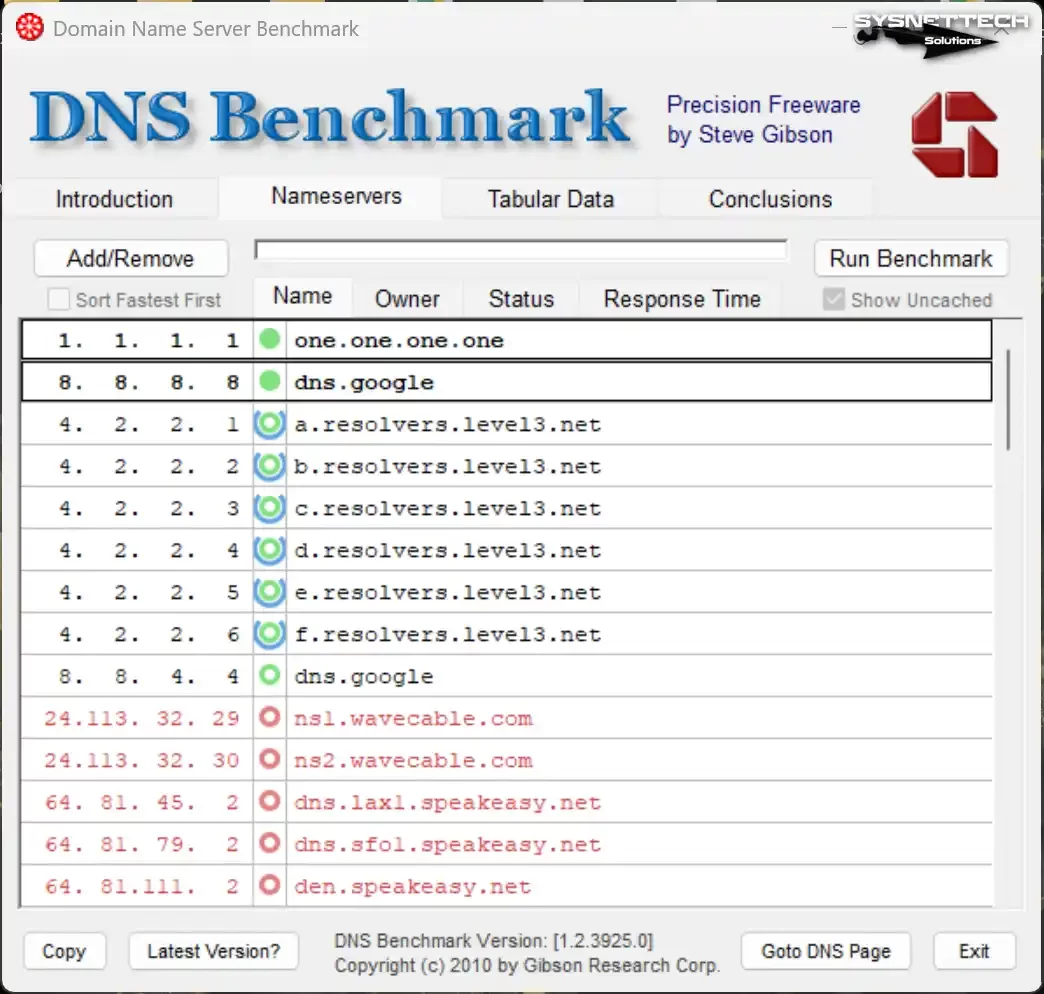
To find the most accurate result, you must benchmark name addresses. First, download GRC’s DNS Benchmark tool to your computer.
This free software tests hundreds of servers at your location. First, run the program and update the list. Start by launching the standard test.
Then read the results with care. Do not just look at the lowest average time. Consistency and error rate also matter. A server that is very fast but has high packet loss is useless. I usually ignore the red bars.
When the test ends, note the top three picks. Then enter these addresses based on your operating system. You should feel the difference in your browser after the change.
If there is no difference, you did something wrong. Also, make a point of choosing a DNS provider with DDoS protection.
DNS Security: Current Threats and Protection Methods (2026)
Many users think security is just about antivirus software. Yet attackers focus on the weakest link—DNS traffic.
You get redirected to a fake site without even noticing. Let us now examine these threats and shields together.
DNS Poisoning (Cache Poisoning) and Spoofing Attacks
We call it DNS poisoning when an attacker injects fake data into the cache. Even when you type the right address, the system cannot resolve the IP address.
Without realizing it, you land on the hacker’s copy of a banking page. This method is quite sneaky and destructive. That is because the URL bar still shows the correct address.
DNS Spoofing, on the other hand, mimics query responses in real time. The attacker sends you a fake reply before the real server does.
DNSSEC carries vital weight against these kinds of attacks. Without encrypted check, spotting the attack is just impossible. For this reason, I never entrust critical systems to plain text protocols.
DNSSEC signatures do not work without the right timestamp. That is why NTP time sync service is a must on servers. To put it plainly, clock drift breaks the security chain. You must never skip setting up the time protocol.
I lived through this kind of event on my own network once. All clients got steered to fake ad pages because of a local router flaw.
Luckily, I spotted the damage fast and isolated the network. Ever since that day, I use trusted the naming service filtering solutions.
What Is DNSSEC (DNS Security Extensions) and How Does It Work?
DNSSEC is an extension that guarantees data integrity. It seals query responses with a digital signature. That way, an attacker cannot send a fake IP address.
Because the system rejects packets not signed with the private key. After all, a chained trust model is in place.
Starting from the root servers, zones verify each other. If the signature chain breaks, the system cuts the connection. This structure adds a light load to performance.
But next to the security it brings, this cost is a drop in the bucket. For years, I have told big financial firms to make this mandatory.
As of 2026, many TLDs are DNSSEC-signed by default. But the job does not end there. You need to activate it on your own domain too.
Plus, you must introduce the DS record to the upstream provider in your DNS settings. If you skip this last step, all the work goes to waste.
DNS over HTTPS (DoH) and DNS over TLS (DoT): Encrypted DNS Protocols
Normally, DNS queries travel over the network as plain text. Your network admin can see which sites you visit in real time.
Two rivals emerged to close this privacy gap. DNS over HTTPS (DoH) hides the query inside an HTTPS stream. DNS over TLS (DoT), on the other hand, opens a private TLS channel.
Users generally prefer DoH tech at the app level. Browsers support it, and it blends into network traffic. It is a perfect fit for bypassing censorship.
DoT, meanwhile, uses a separate port (853) across the whole system. Network admins find DoT easier to manage. Personally, I keep this one a tick ahead in terms of stability.
Both largely eliminate man-in-the-middle attacks. Your ISP can no longer read your queries. Of course, this situation makes some filtering solutions useless. For this reason, a hybrid approach is a must in corporate networks.
DNS Tunneling and Data Leak Risks
Attackers can use the DNS protocol as a data carrier. We call this method DNS tunneling. They hide stolen data, especially inside TXT records or other fields.
Firewalls usually do not block DNS traffic. So you cannot spot the leak. As a result, attackers comfortably smuggle data out from behind the firewall.
Some ransomware talks to its command-and-control center this way. It does not show a simple sign like the the naming server not responding. This misleads admins.
You must detect unusual DNS traffic on your network. For this reason, I suggest you invest in threat hunting tools.
In one case I saw, an intern’s project was leaking data via tunneling. Code he wrote without any awareness had created this flaw. Luckily, the team caught the issue during a pen test. Otherwise, a big scandal could have erupted.
DNS Filtering and DNS Blocking: Threat Hunting and Parental Control
You can use Domain Name System tech both as a threat and as a strong shield. DNS filtering lets you easily cut access to harmful domain names.
This way, you stop your staff from downloading ransomware without knowing. Also, you block adult-content sites at this layer with parental control. As a result, this method adds a simple but solid security layer.
Political or geo-based DNS blocking methods also exist. Some countries cut access to social media this way.
Using a foreign DNS address is the most common way to bypass this censorship. But do not forget this. You hand over all your browsing logs to the provider you use.
I suggest Quad9 or OpenDNS for corporate scenarios. For personal use, Cloudflare DNS is both fast and safe.
In every case, you must make your DNS provider choice with full awareness. When you are stuck between them, I advise you to pick safety over speed.
DNS Propagation Time and TTL Value Optimization
Now let us touch on that famous topic everyone asks about. You updated a record, but the site still shows the old version. This annoying wait is called DNS propagation.
I am writing this section for those who can never make sense of why this process takes 24 hours.
What Is DNS Propagation and Why Does It Take 24–48 Hours?
Technically, this period is not a propagation at all. You are waiting for resolvers worldwide to finish their old TTL countdown.
Even if you update the authoritative server at once, you cannot clear millions of caches. In short, the process has left your hands.
ISPs generally do not fully obey TTL values. Some stretch the cache too far to cut costs. That is why changes can take up to 48 hours.
Sadly, there is not much you can do to speed this up. You can only call your internet provider and ask them to clear the cache. This drives all of us crazy, but the protocol works like this.
During this chaotic transition, one user sees the new site. Another user still sees the old one. This gap in what people see is harmless. It fixes itself with a little patience. If you panic and keep changing the settings, you make things even worse.
6 Effective Methods to Shorten DNS Propagation Time
- Lower the TTL Value Ahead of Time: Drop the TTL value to 300 seconds 24 hours before the move. That way, you quickly wipe old records at the moment of update.
- Update the SOA Serial Number: If you do not increment this number for zone transfer, secondary servers miss the update. Frankly, do not keep making this critical mistake.
- Clear the Local DNS Cache: Use the
ipconfig /flushdnscommand to test. Avoid getting tricked by seeing old data. - Use Different DNS Lookup Tools: Run your queries from global locations. This way, you get the most realistic result.
- Bypass the ISP Cache: Switch temporarily to a server like Google DNS or Cloudflare. You will see the new site right away.
- Do Planned Migrations: Make critical changes at midnight or on the weekend. Sync moves faster during low-traffic hours.
Free DNS Propagation Check Tools and Lookup Sites
Free tools exist to see the global state of your change. First, go to Whatsmydns.net. Pick your domain name and record type. Watch live on the world map which server sees what.
Another strong pick is DNSChecker.org. It runs a detailed lookup from many locations. Also, MXToolbox is great for testing your email records.
I check these three sites as a routine after every deployment. If green checkmarks have not covered every spot, I do not say the job is done.
Make a habit of doing this check by hand. Do not trust automatic messages. Because sometimes it only looks successful on the surface. The DNS system is a complex clock. You must make sure every gear is turning right.
DNS Troubleshooting: Common Errors and Surefire Fixes
We have come to my favorite section. These are the first issues that come to everyone’s mind when networks crash. I will give you not just theory but field-tested DNS error fix methods. Let us now set things right.
“DNS Server Not Responding” Error: Causes and 11 Surefire Fixes
- Unplug the router and modem for 30 seconds and restart them.
- Flush the cache with
ipconfig /flushdnson Windows. - Define a static DNS address from the network adapter settings (e.g., 1.1.1.1).
- Briefly disable the VPN or resolver filtering module of your antivirus software.
- Test the sites on a different browser.
- Check from your cell phone to see if there is an ISP-sourced outage.
- Update the network card driver from Device Manager.
- Type
netsh winsock reseton the command line and restart the computer. - Turn off the DNS Relay feature from the router interface.
- Verify the connection by pinging the Google DNS server directly.
- Run the Windows Network Troubleshooter. In short, the simplest fix sometimes does the job.
DNS_PROBE_FINISHED_NXDOMAIN and ERR_NAME_NOT_RESOLVED Errors
The moment you see these two errors in the browser, you cannot reach the server. DNS_PROBE_FINISHED_NXDOMAIN means the domain name does not exist at all.
You likely made a typo. But if you are sure you typed it right, there is a serious issue on the server side.
ERR_NAME_NOT_RESOLVED is more of a connection problem. The DNS query has timed out. The operating system could not run the resolution.
In this case, your first move is to close VPN software. That is because VPN tunnels often break resolver settings.
Checking the host file is a must for a fix. Malware sometimes adds fake entries to this file. Also, try booting into safe mode and test again.
If the issue continues, change the DNS from the modem interface. These two errors usually do not point to a lasting problem.
Risks of Careless Address Changes and Security Warnings
Some addresses touted online as fast DNS servers are complete traps. Cybersecurity firms often report that these servers analyze traffic.
If you use a DNS server you do not know, all your bank passwords face danger. Because a fake provider steers you to its own banking copy. Despite this, people still take careless resolver change risks just to gain 5 ms.
Also, some free DNS services sell your requests. You hand your browsing habits to marketing firms. You think it is free, but you are actually the product.
In my opinion, you should not be stingy when it comes to DNS security. You must pick well-established and auditable companies.
This situation gets even more critical in corporate networks, especially. An employee carelessly changing the DNS address opens the whole company network to the outside.
It sends an open invite for DNS tunneling attacks. For this reason, you must absolutely lock this setting down with group policies.
Name Server Management and Advanced Setup Techniques
We are now leaving the simple user level and moving to the admin level. As a network engineer, this is the part that gives me the most joy.
DNS zone management and architectural choices decide the fate of a system. We will go a bit deeper in this section.
Zone Management: Zone File Structure and the SOA Record
Every domain name has a zone file. An SOA (Start of Authority) record sits at the top of this file. The SOA record carries the zone admin email and serial number.
The server admin announces the primary server name here. Without this setup, the zone will not work for the name server.
Inside the zone file, you see TTL values, NS servers, and other records. Editing this file by hand is a skilled craft. Even a single space error makes the file invalid. Always run a syntax check when working in this setting.
I generally prefer using a web-based panel. These panels shrink the margin of error to near zero. But if you will manage from the command line, the named-checkzone tool saves lives. Never restart the service without running this command after every change.
Sync and Primary-Secondary Server Architecture
Redundancy is a must. The Primary server is the writable copy. Secondary servers are read-only copies. Address sync protects data integrity. Even if the primary server goes down, the secondaries keep serving.
Zone transfer lies at the base of sync. The primary server notifies the slave with a NOTIFY message. Then the system copies the data in a secure way. I strongly suggest you use TSIG keys to encrypt this traffic.
It is like a ship crossing the digital ocean with a single engine. A smart captain always keeps the backup engine warm.
Likewise, you must define at least two authoritative DNS servers. Otherwise, the smallest DDoS attack buries your site in darkness.
Load Balancing and Anycast Architecture
If you run a global site, load balancing is a must. DNS-based load balancing works with the Round Robin method. You define multiple A records for the same domain name. The system spreads these queries to different servers in turn. This method is simple but powerful.
However, the real revolution is Anycast DNS tech. The system assigns the same IP address to servers at different points around the world.
The system steers the user to the nearest node based on geography. That way, lag drops; as a result, the system spreads the attack surface. In the end, giants like Cloudflare and Google stay up thanks to this infrastructure.
Sadly, many local hosting firms still do not invest in this architecture. Consequently, sites crash the moment a heavy attack hits.
If you run a serious e-commerce project, sign up with a DNS provider that supports Anycast. This is an insurance policy beyond performance.
Advanced Reading Resources for Domain Name System
I have tried to give in-depth info in this article as much as I could. But the journey on the sea of knowledge never ends. I have compiled the sector’s most respected resources for those who want to push the topic even further.
First, you should look at the Internet Engineering Task Force (IETF) standards. The RFC 1035 document is a masterpiece for the original DNS specs. For encryption details, you can examine the RFC 8484 document that defines the DoH standard.
Plus, the official technical docs offered by Cloudflare’s learning center also help you stay current.
The 10 Most Asked Questions About DNS
What Does DNS Server Mean and What Exactly Does It Do?
How Do DNS Settings Affect My Internet Speed and Game Performance?
What Is a DNS Lookup and How Do I Query a Site’s Records?
What Are the Fastest and Most Reliable DNS Addresses?
Why Is the Resolver Address Important for My Internet Security? What Are the Threats?
How Do I Change It on My Phone (Android & iOS) or Modem?
Is Changing DNS Legal, and Does It Carry Any Risk?
What Are the Differences Between DNS Servers Like 1.1.1.1 and 8.8.8.8? Which One Should I Pick?
How Exactly Does the DNS Lookup Process Work Behind the Scenes?
What Is the Difference Between DNS and VPN? Which One Suits Me Better?
Conclusion: The Importance of Setting Up and Managing DNS Right in 2026
We have come to the end of this long chat. As you have seen, this system is a beast far beyond a simple address book. A well-set infrastructure both speeds you up and shields you with an invisible cloak. A poorly managed setup, on the other hand, turns into a total nightmare.
We must keep tracking the standards shaping the internet’s future together. Many new things wait at the door, from quantum threats to AI integrations.
Those who build solid foundations now will not get tossed around by these winds of change. I always say this. The best network is the invisible network, and behind that magic, DNS always sits.
Remember, speed and safety are not a choice but a must. My own experiences remind me of this truth every time. With what you learned here today, you will solve the problems you face tomorrow in an instant.

Be the first to share your comment