

Your phone, car, and coffee maker all have a quietly working brain. Its name is software. In 2026, this field goes beyond writing programs. Moreover, it drives the entire digital transformation.
With over twenty years of industry experience, I want to be clear. Those who see this concept as merely a pile of code miss the big picture. The real point is to rebuild the physical world with programming languages.
Also, I won’t bore you with ordinary definitions in this guide. I’ll talk using data I’ve gathered from live projects, system crashes, and real coding practices. We’ll blend 2026 Bureau of Labor Statistics (BLS) reports and the TIOBE index as we go.
So whether you’re a complete beginner or want a career change, this article offers a concrete roadmap for learning software. Let’s explore the backbone of the digital world together.

What Is Software?
I can define software in its simplest form like this. It is a collection of organized command sequences that tell hardware components what to do. A processor needs an instruction set to follow. Machines operate thanks to this command chain.
For example, even when you press a key on your keyboard and a letter appears on the screen, this process requires tremendous orchestration. During this process, the operating system, driver, and application layers communicate within milliseconds. The general name for this layered structure is software technology.
Moreover, in 2026, this definition is no longer limited to computers. Internet of Things devices and autonomous vehicles work on the same principle. In other words, software is the invisible nervous system of the modern world.
The Fundamental Definition and Working Principle of Software: Compiler, Interpreter, and Machine Code
Computer hardware understands only 0s and 1s. This binary code is the lowest-level machine language. However, coding in this format is nearly impossible for humans. That’s why smart translators step in.
The first of these translators is the compiler. It takes the source code you write and translates it all at once into machine language. C or C++ programming languages work this way. As a result, you get extremely fast object code.
The second translator is the interpreter. It runs your code line by line, in real time. There is no compilation step. Languages like JavaScript (JS) or Python use this method. This way, the development process moves much faster.
Additionally, hybrid approaches became widespread in 2026. The strategy of first compiling to bytecode and then running on a virtual machine, as Java does, became the industry standard. Java’s two-stage architecture made platform independence possible.
The Vital Difference Between Hardware and Software: The Brain and Mind Metaphor
The best way to understand this duo is the brain-mind metaphor. Hardware is the physical organ inside your skull. It consists of neurons, synapses, and electrochemical signals. You can touch it, even remove it with surgery.
Software, on the other hand, is the mind that the brain produces. Your thoughts, memories, and dreams are entirely abstract. You can’t touch them, yet their existence governs your life. This dual relationship forms the foundation of computer science.
There’s also another critical difference. Hardware parts physically wear out over time. Code, however, doesn’t suffer physical wear. Nevertheless, we encounter a different phenomenon called software rot. We’ll dive into the details shortly.
Now you have the basic knowledge about the physical world of hardware components. Let’s continue focusing on coding and programming.
Software-Defined Everything (SDx) and the Biological Software Analogy
There’s a concept that has revolutionized the industry in the last five years. We call it SDx, or software-defined everything. This approach turns tasks we used to do with specialized hardware into entirely code-based operations.
For example, you can use software-defined networking. This way, you manage data center traffic without swapping cables. With software-defined storage, you merge disk arrays into virtual pools. This provides incredible flexibility and cost advantages.
Now, let’s look at the biological software analogy. Our DNA is actually the oldest and most complex code nature has ever written. This instruction set, composed of four base pairs, determines how trillions of cells operate. CRISPR and similar gene-editing tools function precisely thanks to bioinformatics software.
Furthermore, in 2026, these two worlds are closer than ever. In synthetic biology labs, we design DNA sequences just like writing code in an IDE. In the future, we’ll model everything as a code structure.
A Short History of Software: From Ada Lovelace to AI Engineering
Let’s go back to 1843. Before computers even existed, Ada Lovelace wrote the first algorithm for the Analytical Engine. Yes, the world’s first programmer was a woman. She even coded without a working machine.
Then Alan Turing appeared on the scene in the 1940s. With the Turing machine concept, he laid the foundation of modern computing theory. Without his work, today’s programming languages couldn’t exist.
The 1950s and 60s ushered in a new era. During this period, assembly language and the first high-level languages like FORTRAN were born.
Back then, software was a free add-on alongside hardware. Nobody predicted it would become a trillion-dollar industry.
From the First Algorithm to Modern Compilers: Milestones
- 1843 – Ada Lovelace: The first algorithm to compute Bernoulli numbers. Frankly, this is the birthday of the coding concept.
- 1936 – Turing machine: The mathematical model of computing theory. All modern computers are based on this abstract machine.
- 1957 – FORTRAN: The first high-level programming language. Scientists no longer struggled with machine language.
- 1972 – C language: Created by Dennis Ritchie, this language shaped the UNIX operating system and modern software development practices.
- 1991 – Linux and Python: Linus Torvalds’ open-source operating system and Guido van Rossum’s simple language were born in the same year.
- 2008 – GitHub: A turning point for version control and the open-source ecosystem. Developers could now collaborate on a global scale.
- 2022 – ChatGPT: AI-assisted code generation became mainstream. Large language models (LLMs) now analyze millions of lines of code in seconds.
Each milestone represents humanity’s effort to democratize computing power. Today, the phones in our pockets are millions of times more powerful than the computer on Apollo 11.
How Web 2.0, the Mobile Era, and Cloud Computing Transformed Software Development
In the early 2000s, the internet consisted only of static pages. Then the Web 2.0 revolution broke out. Users were no longer just consuming content; they were also creating it. This transformation exploded web application development.
Along with this, everyone gravitated toward web-based systems instead of desktop applications. Ajax technology made it possible to exchange data without refreshing the page. The concept of user experience gained importance for the first time.
Behind these web-based systems, server-side languages like PHP usually run. Dynamic content started being generated in real time thanks to these languages. What many overlook is that PHP still holds the largest share of the web.
With the launch of the iPhone in 2007, the mobile era began. Mobile software development became a giant sector. The App Store and Google Play became the distribution platforms for millions of mobile apps.
Finally, cloud computing entered the stage. Thanks to AWS, Azure, and Google Cloud, setting up servers became history. With the software-as-a-service model, you can rent any tool. This paved the way for modern practices like DevOps and continuous delivery.
Software Types and Categories: A Comprehensive Classification
To understand this ecosystem, a solid classification is essential. I’ll give you a practical grouping I’ve used in the field for years. Basically, we divide it into four main categories: system, application, embedded, and malicious.
However, keep in mind that these boundaries are not always sharp. For example, a web browser can function as both an application and a platform.
Google Chrome now works almost like an operating system on its own. Examining Chrome’s hybrid structure reveals the layered nature of modern software.
Additionally, in 2026, the cloud-based software category has become a class of its own. Software as a Service (SaaS), Platform as a Service (PaaS), and Infrastructure as a Service (IaaS) models are now the standard infrastructure of the business world.
System Software: What Operating Systems, Drivers, and Compilers Do
System software is the bridge between hardware and applications. The most fundamental example is the operating system. The basic tasks of an operating system include memory management, process scheduling, and file system control.
Drivers act as translators between the operating system and hardware. Also, the structure we call the kernel is the most critical part of an operating system. Understanding how the kernel manages system resources is essential for advanced development.
Compilers and interpreters also fall into this category. Tools like GCC, LLVM, and the Python interpreter are a developer’s most loyal companions. In 2026, AI-powered compilers have also entered our lives.
Application Software: Web, Mobile, Desktop, Enterprise, and E-Commerce Solutions
All programs that users interact with directly fall into this group. Let’s quickly look at the main types:
- Web Applications: Run through a browser and require no installation. Gmail, Trello, and Notion are great examples.
- Mobile Applications: Developers design these for iOS and Android. WhatsApp, Spotify, and mobile banking are in this group.
- Desktop Applications: Run directly on the operating system. Adobe Photoshop and Visual Studio Code are among the best-known.
- Enterprise Software: Manages business processes for large companies. SAP and Oracle ERP are the giants of this field.
- E-Commerce Software: Platforms like Shopify and WooCommerce. Global e-commerce volume exceeded $8 trillion in 2026.
- Game Engine: Platforms like Unity and Unreal Engine. Designers use these engines not only for games but also for architectural visualization.
What’s more, most applications now target multiple platforms. Cross-platform frameworks like Flutter and React Native allow you to deploy everywhere with a single codebase.
Embedded Software, Firmware, and the Internet of Things (IoT)
There’s another critical category you don’t see but that makes your life easier. Embedded software is special-purpose code running on microcontrollers. It’s the system that adjusts your dishwasher’s water temperature.
Firmware, on the other hand, comes embedded in the hardware’s ROM. Your motherboard’s BIOS or a router’s operating system is an example. If you don’t update carefully, you can render the device completely unusable.
The IoT field truly exploded in 2026. Developers write billions of lines of code for smart home devices and industrial sensors. With edge computing, the level of automation in this area has reached incredible dimensions.
Software License Types: Open Source, Closed Source, and the Legal Framework

Knowing how to license your code is just as important as writing it. A wrong license choice can ruin your commercial project. It can also land you in legal trouble.
There are basically two main poles: open source and closed source. However, dozens of different licensing strategies exist between these two extremes. With MIT, GPL, Apache, and others, it can get confusing.
Moreover, with the rise of the SaaS model in 2026, matters have become even more complicated. You no longer distribute the code; you only offer it as a service. This pushes the limits of traditional license types.
The Open Source and Free Software Philosophy: GPL, MIT, Apache Licenses
The open source philosophy advocates that code should be open to everyone. Richard Stallman’s free software movement is the foundation of today’s entire technology infrastructure. You should have the freedom to use, study, distribute, and improve the code.
The GPL license is the strictest. If you use code under this license, you must also release your project under GPL. The Linux kernel is licensed under GPL, a choice that turned it into a massive ecosystem.
On the other hand, the MIT license is extremely flexible. You can take the code, modify it, and even turn it into a commercial product and sell it. Popular frameworks like React, Vue.js, and Node.js are distributed under MIT. The Apache license provides more protection regarding patent rights.
Closed Source, Commercial, and SaaS Software: When Should You Choose Them?
In the closed-source model, the source code is the company’s private property. Microsoft Windows and Adobe Photoshop fall into this group. The user only buys the right to run it. This model is the strongest method for protecting intellectual property.
However, in 2026, the pure closed-source model is gradually declining. Companies are following hybrid strategies. Microsoft made .NET and Visual Studio Code open source while keeping Windows closed.
In the SaaS model, ownership remains entirely with the company. You access the application running on their servers with a monthly subscription. Salesforce and Slack are pioneers of this model. The advantages are continuous revenue and automatic updates.
The Software Development Process (SDLC): Steps from Idea to Going Live

Turning an idea into a working product requires a systematic process. We call this SDLC, the software development lifecycle. Each phase has its own specific outputs and pitfalls.
I’ve worked on dozens of projects over the years. Let me be clear: if you can’t manage the process correctly, even the best team will collapse. A single day’s mistake in the planning phase turns into a month of lost work during coding.
In 2026, Agile methodology is the undisputed standard. Scrum and Kanban frameworks enable progress in two-week sprints. Thanks to continuous integration/continuous delivery (CI/CD) pipelines, you can take code live within minutes.
Planning, Analysis, and Design: The Foundations of a Solid Architecture
Everything starts with requirements analysis. You sit down with the client and try to understand the real problem. Most of the time, the client doesn’t know exactly what they want. Your job is to find the root cause by asking the right questions.
Then the design phase kicks in. You sketch the overall software architecture. Which database will you use? How will you structure the APIs? Monolithic architecture or microservices architecture? All these questions are clarified at this stage.
Finally, the project management team gets involved. They create a timeline and conduct a risk analysis. It’s essential to proceed at this stage without rushing, getting approval from all stakeholders.
Coding, Testing, and Going Live: The Modern CI/CD Pipeline
Planning is done. Now comes the most exciting part: coding. Developers sit down at their keyboards. But in the modern world, they are no longer alone. AI assistants and pair programming tools constantly look over our shoulders.
Right after writing the code, the testing phases begin. You check each function individually with unit tests.
Integration tests verify that the modules work together. Performance tests measure how the system behaves under load. You get client approval with acceptance tests.
Thanks to continuous integration, you automatically test every code push. With continuous deployment, you push approved code live instantly.
Container technology and Docker killed the “it worked on my computer” excuse. In short, we now orchestrate everything with Kubernetes.
Maintenance, Updates, and Retirement: The Lifespan of Software and the Reality of Rot
You went live. Congratulations. But the work doesn’t end there. Every piece of software is destined to age over time. We call this software rot. If you don’t update your dependencies, security vulnerabilities accumulate and code smell increases.
The concept of technical debt comes into play right here. The shortcuts you took for fast delivery will come back with interest later. You must manage this debt through refactoring.
Update types are also important. A patch closes an urgent security hole. A stable release brings new features. Plus, a beta release delivers innovations in the testing phase. The final stage is retirement. In summary, every piece of software has a lifespan.
Programming Languages: Which Language to Learn in 2026 and Why?
Now let’s get to the most frequently asked question. Which programming language should I learn? The answer is clear: it depends on your goal. Learn JavaScript for web development, Python for data science, and Rust for systems programming.
However, in 2026, some languages clearly stand out. According to TIOBE and Stack Overflow data, Python, JavaScript, and TypeScript share the top spots. Rust, on the other hand, is preparing to take the flag from C++ in terms of security and performance.
My personal advice is this: Start with Python as your first language. Its syntax is very close to human language. Then dive into the web world with JavaScript. This pair will open all doors for you.
What Is a Programming Language? The Difference Between Compiled and Interpreted Languages
A programming language is the communication protocol between human and machine. Each language has its own syntax and philosophy. Just like spoken languages, some programming languages are written like poetry and others with military discipline.
You first fully translate compiled languages, then run them. C, C++, Rust, and Go belong to this group. Developers prefer these languages for game engines. They also use them in operating system kernels.
Interpreted languages, on the other hand, run line by line in real time. Python, JavaScript, and Ruby are the best-known examples. Development speed is incredible. However, runtime performance is lower compared to compiled languages. In 2026, this gap is gradually closing thanks to just-in-time (JIT) compilers.
2026’s Most Popular and Best-Paying Programming Languages (Comparison Table)
| Programming Language | Use Area | Average Salary (US – Monthly) | Learning Difficulty | 2026 Demand |
|---|---|---|---|---|
| Python | Data science, AI, Backend | $4,000 – $7,500 | Low | Very High |
| JavaScript / TypeScript | Frontend, Backend, Mobile | $3,500 – $7,000 | Medium | Very High |
| Java | Enterprise, Android, Fintech | $3,750 – $6,250 | Medium | High |
| C# / .NET | Enterprise, Game, Desktop | $3,500 – $5,950 | Medium | High |
| Rust | Systems, Blockchain, WebAssembly | $5,000 – $8,750 | High | Rapidly Growing |
| Go | Cloud, Microservices, DevOps | $4,375 – $8,125 | Low-Medium | High |
| Kotlin | Android, Backend | $3,500 – $5,950 | Medium | Stable |
| Swift | iOS, macOS | $3,750 – $6,875 | Medium | Stable |
This table represents the average of 2026 BLS and industry salary surveys. The figures are gross and vary by experience. For freelancers, hourly rates range between $15 and $80.
Malicious Software Types and Ways to Protect Yourself: Digital World Threats
There’s also a dark side to this business. As the digital world grows, threats are increasing exponentially. Experts detect over 450,000 new malicious code samples every day. This number was around 350,000 in 2020.
Moreover, attacks don’t just target computers anymore; even your smart refrigerator is a potential target. IoT botnets and ransomware gangs are constantly developing new methods. Being on the defense side is truly a challenging job.
Additionally, social engineering has become the biggest threat. You can bypass the strongest firewall with just a phone call. You have to manage the human factor as much as technical measures.
The Malware Family: Virus, Worm, Trojan, and Ransomware
The malware family is quite crowded. Let’s meet its most dangerous members:
- Virus: Spreads by infecting other files and cannot replicate without user interaction.
- Worm: Spreads on its own over a network. WannaCry in 2017 hit over 200,000 systems in 150 countries.
- Trojan: Appears as a useful program but opens a backdoor. It is the most deceptive type.
- Ransomware: Encrypts your files and demands a ransom. Its global cost surpassed $40 billion in 2026.
In addition, fileless malware has become widespread. It runs in RAM and can disappear without leaving any trace.
Spyware, Adware, and Social Engineering Threats
Spyware operates silently in the background. It records your keystrokes and sends all the data to a remote server. Commercial spyware like Pegasus can access everything on a phone with zero clicks.
Adware is relatively harmless but annoying. It constantly shows pop-up ads and slows down your system. It usually comes bundled with free applications.
Social engineering, on the other hand, is on a completely different level. The attacker manipulates you into giving up your password with your own hands. CEO fraud and phishing emails fall into this category.
A Guide to Protecting Yourself from Malware: Antivirus, Firewall, and Secure Coding
The first step is basic hygiene. An up-to-date antivirus program is essential. Understanding how antivirus software works helps you choose the right tool. Also, a firewall monitors incoming and outgoing traffic.
The second step is secure coding practices. You should know the OWASP Top 10 by heart. Classic vulnerabilities like SQL injection and cross-site scripting (XSS) are still the most common attack vectors. Penetration testing is no longer a luxury; it’s a necessity.
The third and most critical step is the human factor. Provide regular security awareness training to your team, because even the most advanced security system can be brought down by a moment of carelessness.
Popular Software Programs and Tools: The Applications You Use Every Day
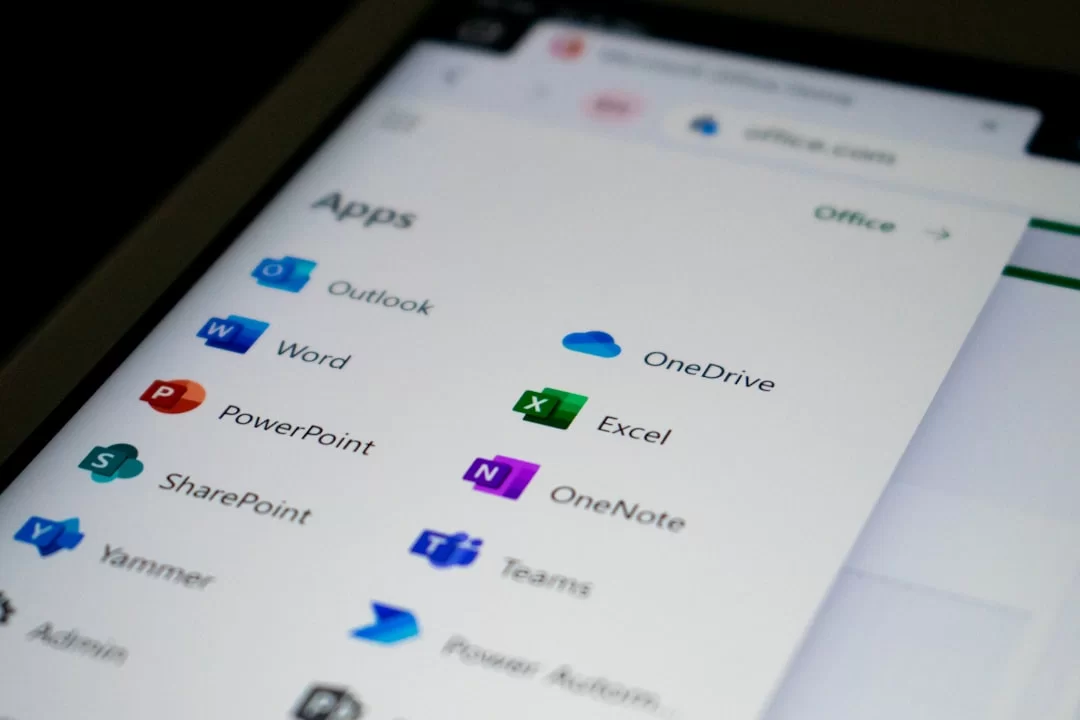
Even if you don’t realize it, you interact with dozens of applications every day. You message on Slack in the morning, edit documents in Google Docs, and hold meetings on Zoom. They are all software products.
In 2026, cloud-based solutions have fully integrated into our lives. Installing a program on your desktop now feels almost nostalgic. Everything runs in the browser, on a subscription model.
Additionally, open-source alternatives have never been stronger. It’s possible to use Penpot instead of Figma, and AppFlowy instead of Notion.
Office Tools, Communication, and Cloud Services
I can list the indispensable tools of daily life like this:
- Microsoft 365: Word, Excel, PowerPoint, and Teams. Still the leader in the corporate world.
- Google Workspace: Docs, Sheets, Slides, and Gmail. Unmatched in real-time collaboration.
- Slack and Discord: The new standards for team communication.
- Zoom and Google Meet: The unsung heroes of the remote work revolution.
- Dropbox and Google Drive: Cloud storage is now everyone’s second brain.
- Notion: Note-taking, wiki, and project management in one platform.
The common point of these tools is that they operate on the SaaS model. You can access them from anywhere as long as you have an internet connection.
Must-Have IDEs, Editors, and Database Tools for Software Developers
Let’s talk about the Swiss Army knives of the developer world. The right IDE choice multiplies your productivity:
- Visual Studio Code: Microsoft’s open-source editor. With its extension ecosystem, it can transform into anything. Its market share exceeded 75% in 2026.
- JetBrains Family: IntelliJ IDEA, PyCharm, and WebStorm. The choice of professionals for deep code analysis and refactoring support.
- Cursor and GitHub Copilot: AI-powered editors. They write half of your code for you.
- Docker Desktop: An indispensable tool for container technology.
- Postman: The industry standard for API testing and documentation.
- DBeaver and TablePlus: Modern clients that make database management enjoyable.
In addition to these, Git and GitHub are must-haves for version control. Additionally, learning to use the terminal moves you up a league.
Learning Software: The 2026 Roadmap from Zero to Expertise

Now we’ve reached the most critical part. How do you go from zero to a job-ready level? As someone who has mentored for years, I’ll draw you a clear roadmap. If you follow these steps, you’ll reach a hireable level in 12 months.
First, let’s bust a myth. A four-year computer engineering degree isn’t mandatory. Half of the best developers I know graduated from other fields. What matters is continuous learning discipline and a passion for problem-solving.
Additionally, learning resources have never been richer than they are in 2026. Free YouTube tutorials, interactive platforms, and AI-powered assistants are at your fingertips.
Where to Start with Software? A 5-Stage Modern Learning Strategy
- Basic Computer Literacy: First, get to know your operating system well. Especially learn the file system, command line, and basic networking concepts.
- Algorithm and Problem Solving: Learn to think before you code. The skill of building algorithms is the foundation of everything. Start by drawing flowcharts.
- First Programming Language (Python): With its clean syntax, Python is ideal. After grasping variables, loops, and functions, build small projects.
- Web Fundamentals (HTML, CSS, JavaScript): Learn the three musketeers of the internet. Build the structure with HTML, style it with CSS, and bring it to life with JavaScript.
- Framework and Database: Choose a frontend framework and a backend framework. Reinforce database concepts with PostgreSQL or MongoDB.
The most common mistake on this journey is trying to learn everything at once. Be patient, and progress by digesting each topic. Definitely create a GitHub profile and showcase your projects.
Building Apps Without Coding: Low-Code, No-Code Platforms
We are in an era where not everyone has to write code. Low-code and no-code development platforms allow even non-technical people to build applications. This is a massive democratization movement.
With tools like Bubble, Webflow, and FlutterFlow, you can create fully functional web applications using drag-and-drop. With Airtable and Zapier, you can set up backend automations without writing any code.
However, don’t forget this fact: these tools can carry you only so far. When scalability or performance optimization is needed, you’ll have to return to traditional coding. See them as a starting point.
Are English and Math Required for Programming? Skill Myths
This is one of the questions I hear most often. Let me give a clear answer: You cannot get anywhere in this industry without knowing English. All documentation and error messages are in English. Therefore, being able to read at a B1 level is essential.
People, on the other hand, greatly exaggerate the math part. In daily web development, you rarely use more than basic arithmetic. However, if you’re going into data science or machine learning, linear algebra and statistics are a must.
The truly critical skill is patience and research ability. Being able to Google an error you encounter and find a solution is a developer’s superpower. Consequently, code literacy develops over time; it’s not something you’re born with.
Software Architecture, Security, and Modern Development Practices

Writing code is one thing; designing a system is another. Software architecture is the skeleton of the project. A wrong architectural decision leads to irreversible technical debt later on.
In 2026, three main architectural approaches are competing. Each has its own advantages and blind spots. You must choose correctly based on the project size and team structure.
Additionally, security is no longer a layer added at the end. With the shift-left approach, we pull security to the very beginning of the process. In fact, we catch most vulnerabilities before going live.
Architecture Types: Monolithic, Microservices, and Event-Driven Approaches
| Architecture Type | Advantages | Disadvantages | When to Choose It |
|---|---|---|---|
| Monolithic Architecture | Simple development, easy deployment, low initial cost | Hard to scale, a single bug can crash the entire system | Ideal for MVPs and small teams |
| Microservices Architecture | Independent deployment, flexible scaling, technology diversity | Complex orchestration, network latency, high operational cost | Suitable for large teams and high traffic |
| Event-Driven Architecture | Loosely coupled systems, real-time data flow | Difficult debugging, consistency issues | Perfect for IoT, finance, and instant notification systems |
Think twice when choosing microservices. A distributed system brings distributed problems with it. If your team is smaller than five people, start with a monolithic architecture and split later if necessary.
Software Security: Penetration Testing, OWASP, Secure Coding, and KVKK Compliance
When it comes to security, our guide is the OWASP Top 10 list. This list ranks the most critical web application security vulnerabilities. Authentication failures and injection flaws are still at the top.
Penetration testing is a health check you should have done at regular intervals. An outside eye trying to attack your system reveals blind spots. Add automatic checks to your CI/CD pipeline with vulnerability scanning tools.
For the US market, data privacy regulations like GDPR and CCPA are critical. You must document how you store user data. Data privacy breaches can result in serious fines. Build your encryption and authorization mechanisms solidly from the start.
Sustainable and Green Software: Energy-Efficient Coding and Ethics
This is one of the hottest topics recently. Data centers are responsible for about 2% of the world’s electricity consumption. This figure equals the carbon footprint of the aviation industry. Sustainable software is now an ethical responsibility.
With energy-efficient coding, you can reduce unnecessary loops. You can also optimize memory usage. With serverless architecture, you can prevent resource waste. Even a simple UI choice like dark mode can save up to 30% energy on OLED screens.
Software ethics is a broader framework. Algorithmic bias means AI systems unintentionally discriminate. You must diversify your training data and adhere to ethical AI principles.
The US Software Ecosystem, Career, and Salaries (2026 Updated Data)
The US has made an incredible leap in this field in the last five years. According to BLS data, the IT sector employs over 4 million people. This number was only around 3 million in 2020.
The number of tech hubs has surpassed 100, and software exports have reached the $5 billion mark. Thanks to R&D center incentives, many global companies have opened development offices in the US. The domestic software ecosystem spans a wide range from defense to finance.
As the digital economy grows, the qualified talent gap is also increasing. Currently, there are about 500,000 open positions in the sector. This represents a huge opportunity window for new graduates.
What Does a Software Developer Do? Current Roles and Career Paths
When you hear “developer,” don’t just think of someone who writes code. Modern teams have dozens of different roles:
- Frontend Developer: Codes the user interface and user experience side. Uses React, Vue, or Angular.
- Backend Developer: Writes the server side, API, and database logic. Uses Java, Go, Python, or C#.
- Full Stack Developer: A Swiss Army knife that can handle both sides. A favorite for startups.
- DevOps Engineer: Manages CI/CD, container orchestration, and cloud infrastructure. Kubernetes knowledge is essential.
- Data Scientist: Analyzes big data and trains machine learning models.
- Cybersecurity Expert: Protects systems, performs vulnerability scans, and responds to incidents.
- Mobile Developer: Uses Swift for iOS, Kotlin for Android, or Flutter for cross-platform development.
Each of these roles offers a different career path. Starting as a generalist and specializing over time is the healthiest strategy.
2026 Developer Salaries, Tech Hubs, and Government Incentives
| Position | Entry Level (Annual Gross) | Mid Level (3-5 Years) | Senior (7+ Years) | Remote Global |
|---|---|---|---|---|
| Frontend Developer | $70,000 – $95,000 | $110,000 – $170,000 | $190,000 – $280,000 | $4,000 – $8,000/mo |
| Backend Developer | $75,000 – $105,000 | $125,000 – $190,000 | $210,000 – $300,000 | $5,000 – $9,000/mo |
| DevOps Engineer | $85,000 – $115,000 | $140,000 – $210,000 | $230,000 – $340,000 | $6,000 – $10,000/mo |
| Data Scientist | $85,000 – $125,000 | $150,000 – $230,000 | $250,000 – $380,000 | $6,000 – $12,000/mo |
| Cybersecurity | $75,000 – $105,000 | $130,000 – $210,000 | $230,000 – $340,000 | $5,000 – $10,000/mo |
These figures are 2026 current market averages. Thanks to tech hub advantages and software incentives, additional benefits can come on top of the gross salary. For those working remotely for overseas companies, dollar-based income is highly competitive.
The Future of Software: A New World with Artificial Intelligence, Quantum, and Web3
The next 10 years will bring more change than the last 50. Artificial intelligence is no longer just an assistant; it’s taking the lead role in some areas. You can now rent quantum computers via the cloud.
Web3 and blockchain technologies are creating new paradigms in finance and digital sovereignty. All these developments are fundamentally transforming the software development profession.
I can comfortably tell you this: In the upcoming period, the most valuable skill will be learning how to learn. The framework that is popular today might be obsolete tomorrow. Those who grasp the fundamentals will always stay afloat.
AI-Powered Software Development: Copilot, LLMs, and Autonomous Coding
Tools like GitHub Copilot and Cursor have increased developer productivity by at least 55%. Large language models can now write complete functions from scratch. They even automatically generate test scenarios.
However, this doesn’t mean we’ll be unemployed. While AI assistants handle routine tasks, we focus on more strategic problems. Developers now pair-program directly with an LLM instead of a human.
The only risk with AI-assisted code generation is that the developer gets lazy. If you copy-paste code without understanding it, you’ll be helpless at the first error. Use the tool, but definitely understand what you’re doing.
What Would Happen If Quantum Mechanics, Web3, and Software Never Existed?
Quantum software is still in its infancy, but its potential is mind-boggling. With libraries like Qiskit and Cirq, you can write quantum algorithms today. It will revolutionize encryption and drug discovery.
Web3 promises decentralized applications. Smart contracts and decentralized finance (DeFi) are reshaping the financial world. However, this area is still grappling with regulatory uncertainty and scaling problems.
So what would happen if this digital layer never existed? Hospitals wouldn’t function, planes couldn’t take off, banks couldn’t process transactions. Modern civilization would completely collapse. This dystopian scenario reminds us how dependent we truly are.
Glossary of Concepts: Basic Terms and Their Meanings
I’ve compiled basic terms for those just stepping into this ecosystem. After reading this mini-glossary, you can comfortably join industry conversations.
Basic Software Terms from A to Z and Their Explanations
Part 1
| Term | Explanation |
|---|---|
| API | An interface that allows two applications to communicate with each other. REST and GraphQL are the most popular API standards. |
| Backend | The server side that the user doesn’t see. The database, business logic, and authentication run here. |
| Cloud Computing | Renting resources like servers and storage over the internet. AWS, Azure, and Google Cloud are the three major cloud providers. |
| Framework | A collection of ready-made libraries for rapid development in a specific language. Examples include Django, Spring Boot, and Express.js. |
| Deployment | The process of taking your code to the live environment. Modern teams automate deployment with CI/CD. |
| Docker | A platform that runs applications in isolated containers. It solves the “it worked on my machine” problem. |
| Frontend | The interface layer that the user sees and interacts with. HTML, CSS, and JavaScript are its cornerstones. |
| Git | A distributed version control system. It tracks code changes and enables teamwork. |
Part 2
| Term | Explanation |
|---|---|
| Operating System | The fundamental system software that manages hardware resources. Windows, Linux, and macOS are the most common examples. |
| Source Code | The human-readable command set written by the programmer. It becomes executable through compilation or interpretation. |
| Container | A lightweight virtualization unit that packages an application and its dependencies. You manage it with Docker and orchestrate with Kubernetes. |
| Server | A computer that processes requests from clients. Types include web servers and database servers. |
| Database | A system where you store data in a structured manner. It’s divided into two main categories: SQL and NoSQL. |
| Data Structure | The way you organize data in memory. Arrays, lists, trees, and hash tables are the most fundamental data structures. |
| Artificial Intelligence | Systems that mimic human-like thinking ability. Machine learning and deep learning are its sub-branches. |
These terms are sufficient for a start. As you progress, you’ll encounter more advanced concepts like distributed systems and serverless architecture. Your learning journey will never end.
Advanced Reading Resources for Software Technologies
If you want to dive deeper into what I’ve explained in this guide, I recommend reviewing the following authoritative sources:
- IEEE Software Engineering Body of Knowledge (SWEBOK): This comprehensive document published by IEEE standardizes all disciplines of software engineering.
- OWASP Foundation: The world’s most respected authority on web application security.
- NIST (National Institute of Standards and Technology): The most competent institution in the US for software and cybersecurity.
Everything You Wonder About Software and Coding: FAQ
What is the short definition of software?
What are the types of software?
Where should you start with software?
Is English required for software?
Is the software on a phone and a computer the same?
Is a website software?
Is artificial intelligence a type of software?
What is software rot?
Software developer salaries in 2026, US?
How to build an app without writing code?
What is the difference between open source and closed source software?
What are the types of malicious software?
What happens if software updates aren’t done?
What is SaaS (Software as a Service)?
What is the impact of software on the economy?
Conclusion: Understanding Software Is Shaping the Future
We’ve come to the end of this long journey. I hope I’ve been able to convey the backbone of the digital world to you in all its clarity. As you’ve seen, this field is much more than just writing computer programs.
Whether you want to change your career or are just curious, understanding this ecosystem opens every door for you because the future is written in code, and you can be a part of this story.
Now it’s time to take action. Pick a programming language, decide on a small project, and start right away. Remember, the best way to learn is by doing. Good luck on your journey!

Be the first to share your comment