

As we step into 2026, AI and smart machines sit at the center of our lives. Actually, everyone talks about the madness of these smart systems. But I’ve spent years in the field. So hear this: a very simple truth lies behind them. That truth is solid algorithm knowledge.
To tell the truth, most people think algorithm is only a programmer’s job. However, that is a big mistake. Systematic thinking gives you an edge in all parts of life. In fact, from waking to sleeping, you run many sets of steps. You do this without even knowing.
I will not drown you in just technical terms. Instead, I will guide you to reshape your mind. Also, I will share key points from my own hands-on work. Moreover, I will use the newest 2026 data.
Whether you are new to this field or a seasoned engineer, the skill you gain here will open your eyes. It is computational thinking. Because I trust field-tested facts, not rote learning. So let’s explore the most basic building block of computer science together.
What Is an Algorithm? Its Definition and Origins
The Meaning of the Word Algorithm and Al-Khwarizmi
The word algorithm sounds modern. Yet its roots reach back to the 9th century. It comes from the name of Al-Khwarizmi, a math and astronomy genius.
The Western world translated his works into Latin. They turned his name into Algorismus. That is the exact source of today’s term algorithm.
Al-Khwarizmi was a trailblazer, above all in algebra. He made a systematic way to solve problems with set rules. At first, we used such methods only for math tasks. But over time, this idea became the base of all computing.
Indeed, Hindu-Arabic numerals gave us step-by-step ways to solve problems. Al-Khwarizmi laid out a set of rules that were crystal clear.
Everyone got the same result by following the same steps. In short, the logic of today’s computer algorithm began back then.
Today, algorithm means much more. It covers not just math, but every kind of step-by-step process in life.
For example, even an assembly guide gives a finite set of steps. That’s why algorithm now spans many fields.
Algorithm Definition in Computer Science

In computer science, an algorithm is a set of commands that does a task. The key point: it has a finite number of steps.
You must state each step clearly. Otherwise, the computer cannot run the steps and gives an error.
Every computer algorithm must have a start and an end. Programmers define data handling steps inside it. They use tools like variables and loops. So a solid software backbone forms.
Notice, there is no magic here. Everything rests on simple, logical steps. The computer follows each command you give it exactly. So even a tiny logic flaw can change the outcome completely.
Many people mix up programming with this idea. But coding is just the last step. The core skill is the power to build a logical flow.
In the end, knowing top programming languages means nothing. Without a logical plan, you get nowhere.
The 5 Basic Features of an Algorithm
Now, let me share the must-have rules of this structure. Most sites list them in a dull way. But I will show them through my own project mistakes. Because theory alone is useless.
- Finiteness: It must not run forever. It has to reach an end point. Last year I wrote a money algorithm with a loop that never stopped. The server ran out in five minutes and crashed.
- Certainty: You must define each step clearly. You cannot accept any vague instruction. Say “Add 5 grams of salt” not “Add some salt.”
- Input and Output: It can take zero or more inputs. But it must always produce at least one meaningful output. A process with no output wastes effort.
- Effectiveness: Each step should be so simple you can do it by hand. Complex subprogram calls must break down into basic steps.
- Determinism: With the same inputs, you always get the same result. If it gives random outputs, the structure is broken.
How Do Algorithms Work? Step-by-Step Operation
Input, Process & Output Cycle
Every algorithm looks like a magic black box. Yet it works in three main steps. First, you feed it input. Then the system processes that data. Finally, the output you care about shows up. Systems run this loop trillions of times in the digital age.
Suppose you use a nav app. Your location and the target address are inputs. The system scans map data behind the scenes. It also measures distances. As a result, the app gives you the shortest route.
At this point, the most critical thing is the accuracy of the processing part. Even if you have the latest phone, if the code is wrong, you go to the wrong place.
This once cost me a lot. A wrong condition made me 45 minutes late for a meeting.
Also, the scale of the work matters. A washer uses a simple loop. Yet a social media algorithm handles millions of data points each second. Still, the core rule stays the same: Input-Process-Output.
Control Structures: Sequence, Decision & Loop
Now, let’s look at the backbone structures. Developers build each solution with three simple controls. We call them sequence, decision, and repetition. Skillful use makes complexity vanish.
The sequence structure is the simplest. The system runs code from top to bottom. It’s like following a user manual step by step. You never skip or stray.
But life does not run in a straight line. That’s when decision structures, or branches, step in. For instance, traffic lights are a true decision maker. If the light is red, you stop; if green, you go.
Loops repeat the same task until a condition is met. For example, an elevator moves until it reaches the called floor.
A poorly optimized loop quickly consumes system resources. Therefore, you must always be careful about efficiency.
Visualizing Algorithms with Flowcharts

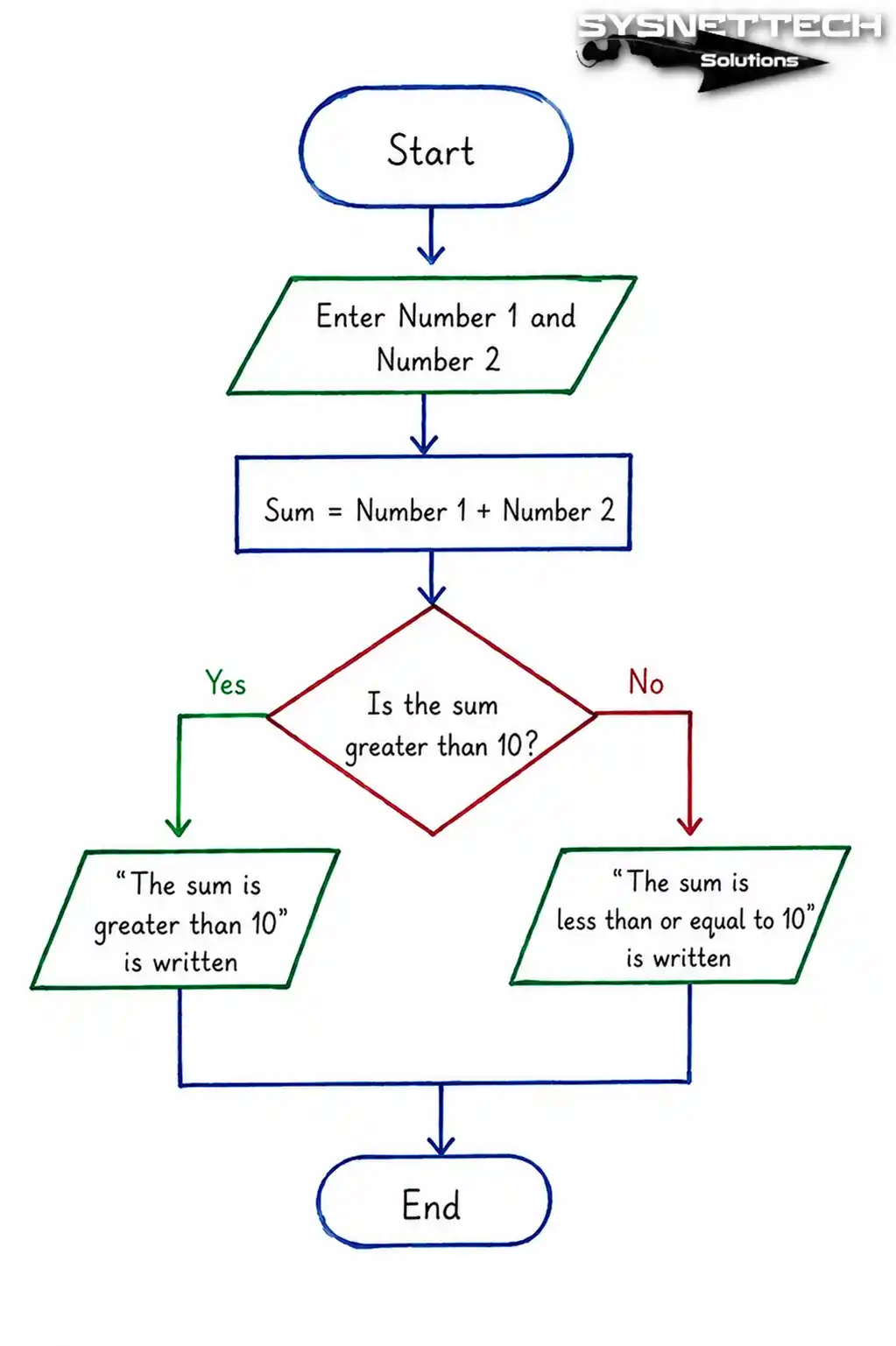
In my experience, a flowchart can explain even the most complex setup. Words can confuse. But visuals make the logic click much faster. Let me show you the steps.
- Step 1: Start with the Start Symbol. Use an oval or a rounded rectangle. Write “Start” inside. This is your entry point.
- Step 2: Place the Input Step. A parallelogram stands for data input. Add the variables you will get from the user here. For example: “Enter Your Name”.
- Step 3: Define the Process Boxes. Write the action you will do in a rectangle box. It could be an assignment. Code bits like Total = Number1 + Number2 go here.
- Step 4: Add Decision Points. A diamond shape marks a decision moment. Yes and No arrows come out from it. Say you are checking if the password is correct.
- Step 5: Show Output and End. Print results on screen, again using a parallelogram. Finally, put an oval “End” symbol. That’s all!
Some people jump straight to coding. I see this mistake a lot. First, grab paper and pencil. Then sketch out pseudocode or a diagram. Otherwise, you’ll get lost in the code.
Algorithm Examples in Daily Life
The Recipe Algorithm
Let me start with my favorite. In the kitchen, everyone follows a set of steps without thinking. A recipe is a perfect example. First, gather items (input). Then mix in order (process). Finally, you get a meal (output).
Now, compare this to 2026 trends. You load a recipe into a smart kitchen bot. The device follows steps exactly. But here’s the catch: missing a step can burn the soup.
Let’s compare a classic recipe with a new-style code structure. You will see the logic is the same. The only difference is the language.
| Feature | Recipe | Computer Algorithm |
|---|---|---|
| Start | Prepare Ingredients | Define Variables |
| Process | Mix and Cook | Process & Calculate Data |
| Decision | Wait Until Golden | Run Loop Until Counter |
| End | Serve Hot | Print Result |
Directions and Navigation Algorithms

Another clear example is navigation apps. They run on a search algorithm. The system scans millions of points. Then it finds the shortest path for you.
It also checks time and traffic jams. Honestly, these apps are great for beginners.
It shows a dynamic update logic. If traffic hits, the app changes its mind. So it plots a new route for you.
First-generation navigation devices used only static maps. But as a software developer, I always value real-time data.
That’s where real optimization starts. In building algorithms, instant feedback is your best tool.
Algorithms in Robot Vacuums and Home Appliances

Daily life is full of devices that run on algorithms. Our homes are now small tech wonders. Here are the most common ones.
- Washing Machine: A sensor constantly checks water temperature. A condition structure turns the heater on when needed.
- Dishwasher: It works with a timer loop. Wash, rinse, and dry steps follow a sequence.
- Smart Thermostat: It continuously measures room temperature. If it’s below the set value, it triggers the furnace.
- Robot Vacuum: LiDAR sensors map the room. An optimization process plans its cleaning route.
These devices all stick to the finiteness rule. They don’t stop until the job is done. If they hit an error, they warn you with a clear set of rules.
What I Learned from an Algorithm Mistake (Experience)
How a Wrong Condition Operator Caused an Infinite Loop
Let me share a bitter lesson. It involved stock updates in an e-commerce setup.
I wrote a code piece to bump stock when orders got canceled. But I made a deadly error in the loop condition.
- Step (Mistake): In the
whileloop, I should have writtenx > 0but wrotex >= 0. Soxnever went below zero and the loop kept repeating itself. - Step (Spread): Thousands of update requests per second hit the database. The server memory swelled in minutes.
- Step (Crash): The system first slowed down, then completely locked up. Customers could not place orders. This caused a full twenty-minute outage.
- Step (Fix): I turned on the resource monitor and instantly stopped the code. Then I cleared the related subprogram pool and rebooted the server.
That taught me every millisecond counts in software. In cloud systems, cost can explode. What works in tests can fail badly in real life.
3 Golden Rules This Experience Taught Me
Here are three rules I never break.
- Always Test Boundary Values. Never skip edge cases like zero, negatives, or empty data. Your tests may pass with ideal data. But real users never behave ideally.
- Put an Escape in Every Loop. Define a backup counter against infinite loops. If the loop exceeds a limit, it should break on its own.
- Don’t Take Code Review Personally. Always show your code to a fresh pair of eyes. Overlooked steps are often the simplest mistakes.
Algorithm Types and Application Areas
Search Algorithms: Linear & Binary Search
We build search algorithms to navigate data. The basic ones are linear and binary search. Yet they differ hugely in speed. Let’s see a table.
| Criterion | Linear Search | Binary Search |
|---|---|---|
| Working Method | Checks one by one | Splits the list in half to search |
| Prerequisite | List does not need sorting | List must be sorted |
| Time Complexity | O(n) – Slow | O(log n) – Fast |
| User Experience | Ideal for small lists | Revolutionary for big data |
Linear search is fine for simple cases. But with millions of records, it’s a dead end. That’s why we use binary search for speed.
But a key warning: It’s easy to mess up the start and end indexes in binary search. If you don’t split the array right, it loses its edge. Then the system loops forever.
Sorting Algorithms: Bubble and Quick Sort
We often sort data before using it. Bubble sort and quick sort are the top two methods.
To be clear, bubble sort is just for learning. In real work, pros pick quick sort.
Bubble sort compares side-by-side items. It’s easy but painfully slow. For large data, it’s a sure way to crash your machine.
Quick sort uses divide and conquer. It picks a pivot and splits the set. I use these types in my own security tools. Every millisecond counts there.
Machine Learning and Artificial Intelligence Algorithms

2026 is the golden age for these. AI algorithms now do more than crunch data. They also learn and decide. That has pushed recommendation engines to new heights.
The lists on Netflix or Spotify come from a recommendation system. It studies your habits closely. Then it shows you what similar users like. In the end, you stay glued for hours.
Finance takes this much further. Experts predict stock moves in real time with ML algorithms.
The system learns from past data to guess the future. Even encryption algorithms rest on such math.
But a word of caution: A search algorithm is only as good as its input. Garbage in, garbage out.
So solving a problem often hinges on data quality, not code. That’s the biggest lesson for my analytical mind.
How to Write an Algorithm
Designing an Algorithm with Pseudocode
Now for the core part. Jumping to code often leads to errors. Write pseudocode first. It frees your thinking from language limits.
- Step 1: Define the Problem in Plain Language. You can’t write code without knowing what the client wants. Summarize the issue in one sentence. Like “Allow game access based on user age.”
- Step 2: Identify Inputs and Outputs. Before thinking where the algorithm will be used, define the interface. What will the user enter? What will they see on screen?
- Step 3: Create structures like IF, THEN, and PRINT. Don’t be afraid to use technical English terms. You can use logic like
IF age < 18, THEN print "Entry prohibited". - Step 4: Number the Steps. Numbering saves you in complex tasks. If you manage a function and a loop at the same time, tracking becomes easy.
Here, computational thinking kicks in. Think like a person, not a machine. The system just needs clear, logical steps. I’ve used this method to design complex code in five minutes.
Simple Algorithm Example with Variables and Operators (Apply in Code Editor)
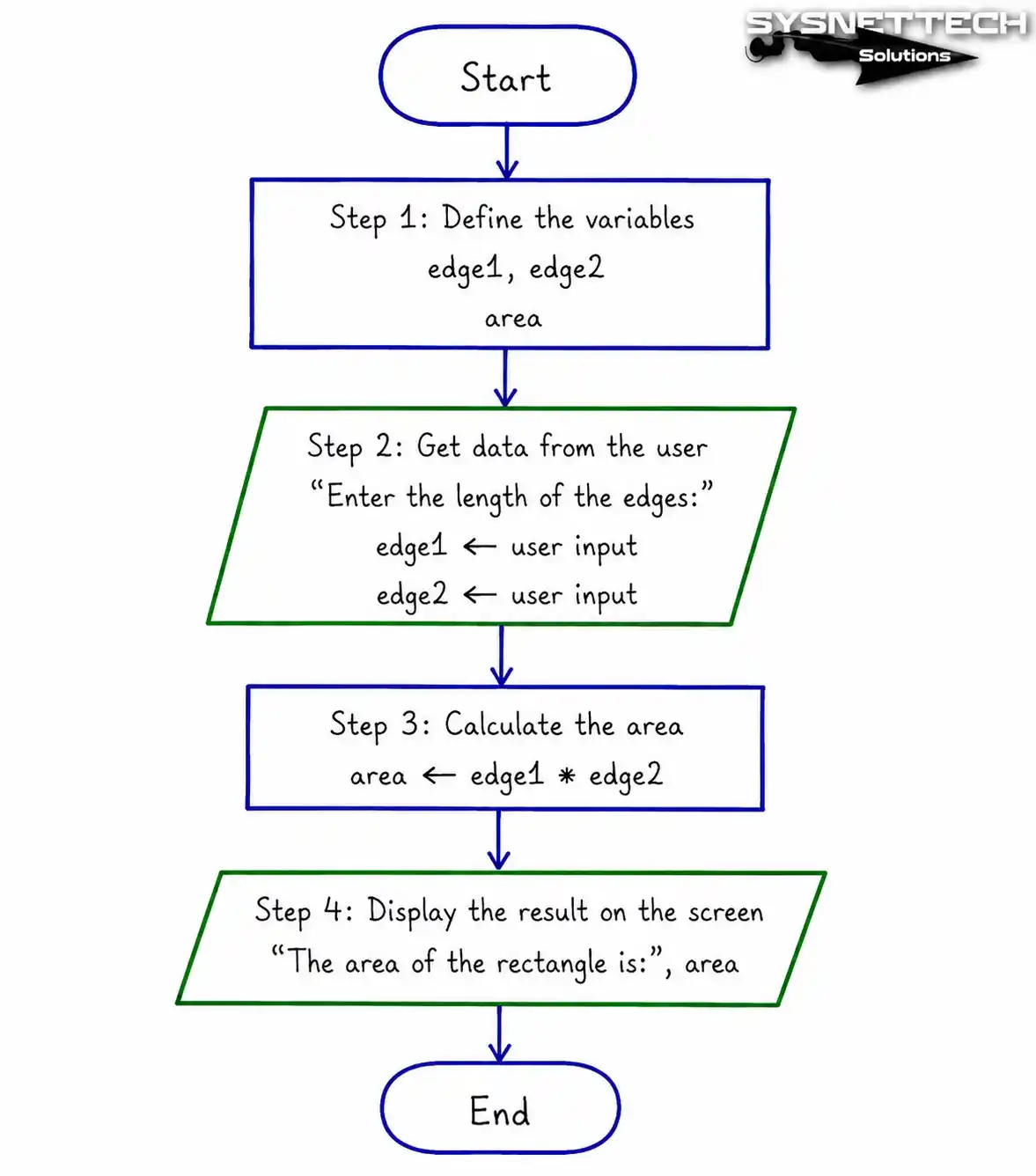
Let’s get practical now. I’ll build a simple tool to find a rectangle’s area. This is a great guide for beginners.
- Step 1: Define Variables. Create two containers named
edge1andedge2. These are your raw materials for the calculation. - Step 2: Get Data from the User. Show the message “Enter side length” to the user. Assign the value you receive to the variables you defined earlier.
- Step 3: Perform the Calculation. Execute the operation
area = edge1 * edge2. Here, you use the multiplication operator. - Step 4: Print the Result to the Screen. Show the computed value to the user. That’s the simplest process from start to finish.
Even this simple code builds your problem-solving skills. You used a systematic approach. Next, we’ll turn this logic into a Java or Python app.
Converting the Algorithm to a Programming Language
Once your pseudocode is done, you can start coding. Variable types and syntax matter now. Yet the core logic stays the same. You just translate it into computer language.
Suppose you are writing in Python. You use the input() function for input, and print() for output. For decision structure, if-else blocks do the job. That’s all there is to it.
I think coding newbies should start with a strict language like Java. It teaches type safety. Scripting languages skip these, leaving weak basics.
Remember, coding is a craft. You can’t just memorize steps. Each new script rewires your brain. That’s the fun part of building algorithms.
Efficiency and Optimization in Algorithms
What is Time Complexity (Big O Notation)?
Now we step into the pro league. Code must not just work. It must run fast and lean.
That’s where Big O notation helps. It shows, with math, how code slows as data grows.
For example, O(n) means linear growth. So 10 items take 10 seconds, 100 take 100. But optimal code can run at O(log n). That’s crucial in big data and AI.
This idea can halve your server bills. Time complexity affects CPU and memory use directly.
Memory Usage and Resource Optimization
Memory use matters as much as speed. Many new coders focus only on speed. But memory control is just as key. In embedded or robotic work, RAM is tight.
I learned a big lesson working with IoT gear. I ran a Python script on a 512 MB device. It kept crashing from memory overload. I reworked the logic with fewer variables and fixed it.
This is vital in finance. In real-time trading, nanosecond delays can lose millions. So efficiency is not just theory. It’s key to happy clients.
Algorithm & Programming Relationship
The Difference Between Algorithm and Program
People often mix them up. But the difference is clear. An algorithm is a plan on paper. A program is that plan in code. Think strategy vs. tactic.
Think of building a house. First, you draft the blueprint (algorithm). Then workers lay the bricks (program). So blueprint is algorithm, building is program.
It’s the same when making software. You plan the solution, then code. So interviews test logic first, not code. If you don’t get algorithm basics, you can’t be a top coder.
| Criterion | Algorithm | Program |
|---|---|---|
| Structure | Abstract, theoretical | Concrete, you code steps directly |
| Language | Plain language, flowchart | C++, Java, Python |
| Debugging | By logical reasoning | With debugger tools |
Problem-Solving Skill with Algorithm Logic
Apply this skill to life, and everything shifts. You see the big picture, not just bits. You break complex issues into small parts. That’s computational thinking.
Say you’re fixing a workflow in a company. You hunt for the paper jam in tracking. Like debugging, you scan step by step. You find useless approvals and speed things up.
Today, tech literacy shouldn’t just mean office apps. The real goal is grasping this mindset.
Because learning to build algorithms is like learning to plan your life. An orderly mind always wins.
Advanced Reading Resources on Algorithms
Here are three top resources for deeper learning. They’ll help you build a rock-solid base.
- Stanford University Algorithms Specialization: Stanford’s constantly updated program covers divide and conquer, randomized algorithms, and dynamic programming. These courses are fully online and free. You can enroll via the Algorithms Specialization page.
- MIT OpenCourseWare – Advanced Algorithms: MIT’s legendary course 6.854J covers Fibonacci heaps, splay trees, and network flows. Find the schedule and materials at MIT OCW Advanced Algorithms.
- Princeton University Algorithms (Robert Sedgewick & Kevin Wayne): Robert Sedgewick, a student of Donald Knuth, represents a tradition in algorithm education. This course co-authored with Kevin Wayne teaches graph, string, and optimization algorithms with Java examples. It is one of the most recommended advanced online programs in 2026. Access the full course at Coursera Algorithms, Part II.
Remember, learning from top sources lifts you above average. Stick to this discipline even for basics. You’ll build solid engineering roots.
Everything You Wondered About Algorithms
What is an algorithm and why is it important?
What is the purpose of an algorithm?
Who invented the algorithm?
What is a simple algorithm example?
What are the types of algorithms?
How is an algorithm created and what tools are used?
What is the difference between an algorithm and a programming language?
How is algorithm analysis done?
What is the role of algorithms in AI and machine learning?
What is the difference between an algorithm and a flowchart?
Conclusion: Add the Art of Algorithmic Thinking to Your Life
Ways to Develop Algorithmic Thinking
We have reached the end of this journey, but your learning adventure is just beginning. Now I will tell you how to embed this skill into your daily routine. If you don’t apply this info, you just waste time.
- Break One Problem Apart Every Day. Even grocery shopping is an optimization problem. How can you do the most correct shopping in the shortest time?
- Practice Code Reading. Read code others have written. Try to solve the logical flow behind those codes.
- Don’t Neglect Drawing Flowcharts. Turn even a meeting note into a diagram. This way, you can express your thoughts much more clearly.
- Be Patient and Make Lots of Mistakes. Remember, the best debugging method is to make mistakes. Just don’t make the same mistake twice.
Frankly, these things won’t happen in a day. But once your mind switches to this mode, you can never think the old way again. This set of instructions will put you one step ahead in the sector.
The Future of Algorithms and Career Opportunities
Looking at 2026 and beyond, I see this field is exciting. No longer just software houses, even law firms are seeking automation. The medical world uses these devices with robotic surgery. Nearly every sector needs people who master problem-solving steps.
Whether you design a web page or write an API. The same core logic lies beneath. Because computer science is fundamentally a thinking discipline. Therefore, the sooner you gain this discipline, the faster you rise.
Today, software engineering salaries have hit the ceiling. But let me tell you this: Companies are not looking for someone who just writes code; they are looking for a partner who solves problems.
To make this difference, grab a pen right now and draw your first flowchart. Trust me, your future self will thank you for it.

Be the first to share your comment