

In this article, I will define why Windows 95 was significant in history. We will also examine what it is and its key features. I will also discuss what it requires to run and how it has impacted computers.
First of all, I will also talk about the time from when Windows 95 came out until now. Then, I will show how it helped make operating systems better. If you’re interested in technology and vintage computer systems, I’m glad you’re here!
What is the Classic Microsoft Windows 95 Operating System (OS)?
Before Windows 95, Microsoft mainly focused on Windows 3.1. They were successful with this system, but it did not offer ease of use & functionality.
On the other hand, Apple’s Macintosh system was becoming a strong competitor. At the same time, people using computers needed more things. Due to these problems, they sought a system that was both easier and more robust to use.
Microsoft announced the Windows 95 operating system on August 24, 1995. Of course, I can say this system was a significant change for our home computers back then.
Because this system is the first picture-based system made by Microsoft, compared to older ones. The reason they made this was, of course, to help users. Better-looking pictures, easier to use, and nice designs!
They also chose a brand-new design for the desktop’s appearance. So, we can quickly see the Start Menu and Taskbar tools right away.
Thanks to these tools, Microsoft gave us an easy-to-use system. So, we started using our computers in a more straightforward and natural way.
Moreover, they did not just make it easier for regular users. They also took a big step to help new types of operating systems grow later.
Importance of Windows 95 OS in PC History
As personal computers became more common, I can say that Windows 95 was a significant step forward for us. Because of that, it made people like PCs more by making them easier to use.
It is easier for us to move around, especially with the picture-based user interface. So, it is also easier for people with little PC knowledge. Also, file names can now be longer than eight letters. We also have extended name support in this system compared to the previous ones.
At this point, managing files is now easier and more transparent. Moreover, Windows 95 now supports Plug and Play.
Thus, it can easily find devices like printers or scanners. Moreover, there is no need to add the driver by hand. Of course, these new things have made using it much more comfortable.
The Microsoft Windows 95 system also has better multitasking features. That is, it means we can use many programs at the same time. So we can work more efficiently and accomplish more.
Also, Microsoft greatly changed how people used their computers. They helped launch Win95 with a big marketing plan.
In particular, they mainly used music and images in TV ads. With their good promotion, they made people very excited about this system. At that time, they sold over 7 million copies in just five weeks.
Because they did well, they made W95 stronger in the market. In fact, this system helped Microsoft become a top name in creating software. This change also affected the tech world and shaped the future of systems for a long time.
Background: Before Windows 95
In the early 1990s, home computers were strong but hard to use. Especially the systems they used back then were not easy to understand.
Before it, Microsoft started with a system called MS-DOS. After that, they kept working on it with the Windows 3.x version.
Knowing the history is very important. Because of that, this helps us better understand how W95 made a big change.
MS-DOS & Windows 3.x

In the 1980s, MS-DOS was the basis of computer systems. But of course, it wasn’t easy to use because we used it with a command line interface.
In fact, it was simple for expert users. But normal people still had to type in commands by hand.
Also, even though MS-DOS was strong, I can say it was not easy to use. So, it was a big problem for people who did not know much about computers.
As picture-based screens became more critical, Microsoft released Windows 3.0 in 1990. Then, in 1992, it gave us Windows 3.1.
These versions no longer had text-based structures. We now started to see windows, icons, and menus.
But Windows 3.x worked as a layer on top of MS-DOS. This meant it was still connected to the old system. But it gave new features like multitasking, better graphics, and easier use.
The Need for an Operating System That Is Easy to Use
In the early 1990s, the need for easy systems grew fast. Because more people were using computers. So, users wanted simpler and more picture-based ways to use them.
The command line was hard for many people. So, the need for easier ways to use computers grew. At the same time, market research also showed this trend.
Also, businesses and people at home wanted to avoid complicated PC stuff. So, more people than ever wanted systems that were easy to use.
Also, they made many new programs for new users at that time. This trend changed the software market, too. Because of all this, Microsoft made a big move.
Because MS-DOS and old Windows versions were not good enough! At this point, they needed to make a system that was new and easy to use. To meet these needs, they got ready to create Win95.
The picture-based system wanted to make things easier. Of course, it was not only about being easy to use. In fact, the real goal was to rebuild the link between the user and the PC.
In short, Microsoft Windows 95 was a strong answer that fit the needs back then. So, it became a key moment in the history of personal computers.
Steps When Microsoft Made the Windows 95 System
One of the most popular news stories of the 90s is, of course, Win95. Now, let’s look at how it changed during the making process!
1. Early Planning (1990-1992)
Microsoft embarked on a serious project in 1990. At that time, they were looking for a new system to replace Windows 3.1.
For this purpose, they defined the name of the project they started as “Chicago.” They also aimed to combine Windows features with the basics of MS-DOS.

2. General Preview (1994)
In 1994, Microsoft gave the beta version of W95 to users. Clearly, this made it easier to try new features.
In fact, this helped test new features. However, the graphical user interface got a lot of attention.
Because this interface showed the new system that would come to the market! So, users felt very excited and were waiting for it.
3. Release of Chicago (1995)
On August 24, 1995, Microsoft officially launched the W95 platform. They also supported it with a massive campaign during the launch process.
The Rolling Stones’ song “Start Me Up” caught a lot of attention. The TV ad had a strong effect on people watching. This intro made many people excited about the 95 system. Because of this, Microsoft sold over one million copies in just four days.
4. Plug and Play Integration (1995)
Microsoft Windows 95 made hardware setup much easier with Plug & Play. Because now we can connect devices without hard settings.
Also, it made using the system much better. In short, this way sets a new rule for future systems.
5. Worldwide Success (Post Launch)
After the launch, we can see that Microsoft Windows 95 quickly became very popular. So, it sold more than 40 million copies in its first year alone.
Also, it gave a big help with its picture-based features. It made using computers easier for everyone with its simple design. Because of this, PC use grew fast in homes and offices.
What are the Features of Windows 95?
W95 has made using computers much better. It has also made using devices easier.
It also made handling files and networks much easier. So, it helped computers get better.
Now, let’s take a look at what the features of this groundbreaking Microsoft Windows 95 operating system are!
1. Start Menu & Taskbar
One of the most striking aspects of the classic W95 is its Start Menu. Frankly, this menu made our navigation much easier.
We can also provide quick access to applications & settings. We can access files and programs at a glance.
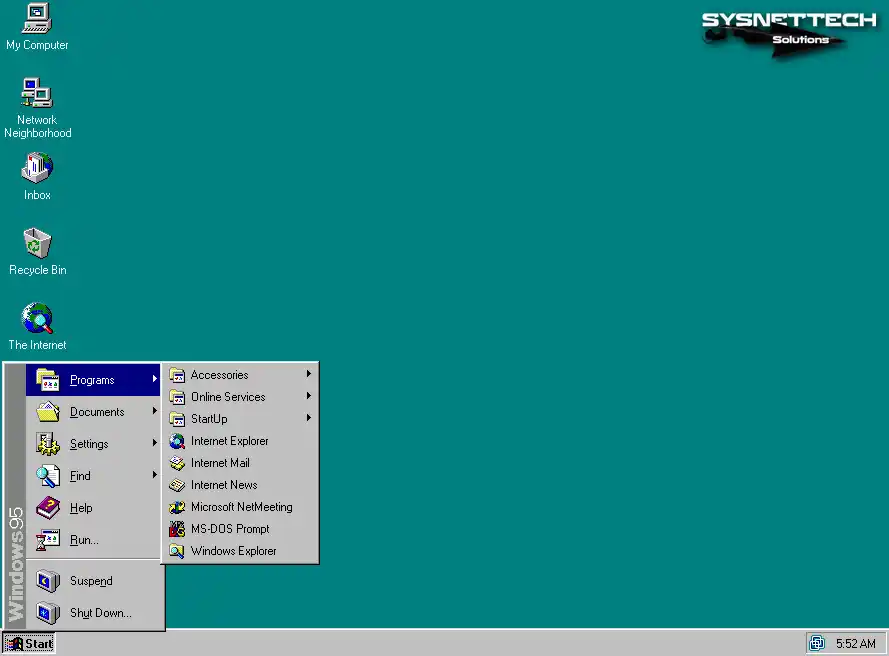
On the other hand, the Taskbar at the bottom of the screen was also a great innovation for us. It became easier for us to view open applications through this bar.
Also, we can quickly change between apps. So I can say that doing many things at once is now more helpful.
2. Desktop Environment & Icons
W95 desktop looks nicer and is easier to use. So, file and app icons helped us use the system better.
Also, toolbar shortcuts became easier for us to use. Because of this, we can change our desktop with our settings.
3. Plug & Play Hardware Support
Another innovation we see in W95 OS is the Plug and Play (PnP) support. We can easily add our hardware without the need for manual configuration.
Actually, when we connect our new devices to our computer, it quickly finds them for us. This is easy because we do not need complex setups.
So, it fixed tech problems by putting in the correct drivers by itself. It also made things better for us by making the setup faster.
4. Hardware & PnP
Plug and Play helped make hardware easier to create. So, makers started building parts that worked with Microsoft Windows 95.
So, they began making devices that could use Plug and Play features. This new step, of course, made hardware grow faster with new ideas.
5. New File Explorer & Old Ways
Microsoft introduced a new tool called File Explorer with the 95 system. This tool made it easier to navigate through files and folders.
Also, MS removed the cumbersome command line method in previous systems. So we can move files easily with drag & drop.
This picture-based way made handling files easier. Its most significant effect was that more people could use the 95 OS easily.
Also, it works with ISO-9660 CD-ROM (CDFS) and Joliet.
6. Use of Long File Names
Successor systems to Microsoft 95 had short file names. This made it challenging to create descriptive titles.
But with this system, Microsoft allowed long file names up to 255 characters. We could start giving longer names to our files.
This feature helps us organize files better because it makes files easy to find.
There are also some improvements in later OEM Service Releases. For example, they added FAT32 support for larger disks.
7. Internal TCP/IP Stack
Win95 made network features better with its own built-in TCP/IP part. We started having a smoother time with internet connections.
This helped us reach online stuff fast and easily. This was a big tech step that made the Internet popular on home PCs. As an extra, Internet Explorer 1.0 was only in the additional “Plus!” package.
Furthermore, OSR1 had IE 2.0 and basic networking. OSR2 had TCP/IP and IE 3.0.
Also, we can easily use SMB/NetBIOS shares on LAN folders.
NOTE: The first Microsoft 95 version did not come with its own TCP/IP part. However, we could still use network connections with Microsoft’s dial-up (PPP) program.
8. Integration with Local Area Networks (LAN)
MS Parallel worked well with local area networks (LANs). We could easily link many computers at once in our home or office.
Also, sharing files and stuff on the network is easier now. Sharing printers or papers works better. In fact, it helped us work well together.
9. Core Architecture
Win95 didn’t actually make any changes to the 32-bit protected-mode kernel at all. They merged it with a 16-bit/real-mode DOS layer.
Obviously, the 95 OS is still booted from DOS. It used HIMEM.SYS for extended memory. On the other hand, the 32-bit parts (KRNL386.EXE, KERNEL32.DLL, etc.) handled modern functions.
In summary, Win95 was a hybrid 16/32-bit operating system. MS-DOS served as a compatibility layer. Plus, it used Windows drivers for most hardware.
At this point, we must ask a key question. Windows 95 relied on a hybrid kernel, whereas Windows NT used a totally different architecture.
Microsoft Windows 95 System Requirements
Even though it was long ago, each new system still needed certain things. This info is vital for how well it works and what it can do.
So, let’s take a look at what the Windows 95 system requirements are!
1. Processor
We need at least a 386 DX processor speed to run Microsoft Windows 95. However, I recommend a 486 DX or Pentium to get full performance.
The 32-bit system lets us run more tasks at once. Also, a faster processor makes using the computer better because it handles things better than older versions.

2. RAM
Microsoft has set the minimum RAM requirement for W95 at 4 MB. This amount is sufficient for our basic uses, but I recommend 8 MB or more.
Because using many programs at once makes things run much better! Thus, we need enough RAM because new programs use more memory. So, having enough is more important for things to work well.
Additionally, the maximum amount of physical RAM that Windows 95 supports in a PC is 480 MB.
NOTE: W95 may fail on very new machines. MS has pointed out that CPUs above 2.1 GHz or 480 MB RAM are required. If you do not make adjustments to these values, it may “not boot.”
3. Storage Features
We need at least 50 or 55 MB of free space to install Windows 95. However, if you are going to install additional applications, more space would be good.
To upgrade your current system to 95, you need approximately 35–40 MB of space. Of course, this size may vary depending on the components you install.
On the other hand, our system should also support the FAT16 file system. In this way, we will increase compatibility with old hardware.
4. Floppy & CD Drive
You should also have a 3.5-inch HD floppy disk drive in your system. Thus, you will be able to install it with this driver card.
Of course, that was the beginning of the transition to CDs. But you should still have a CD-ROM drive if you have one.

5. Graphics Card
Finally, I think a VGA or better display is a must. If you plan on improving the visual quality, I recommend SVGA and 256 color support.
Because you can display better 800 x 600 pixels with SVGA on your Microsoft 95 OS.
What are Windows 95 All Versions?
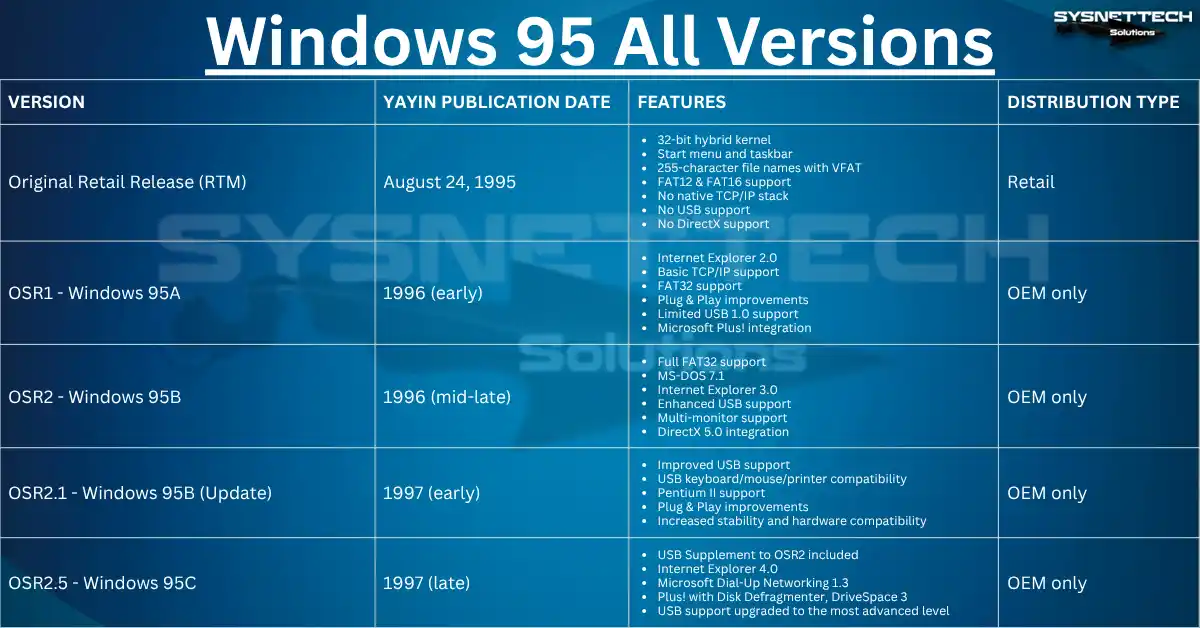
Let’s see what all Windows 95 versions are from the release date to the 2001 discontinuation date!
1. Original Retail Release (August 24, 1995)
Microsoft’s Retail Release of ’95 is what we know as the RTM or “Production Release.” This is the first version that MS made available to the general public.
As I said, it came with a new and significant change in look. But it also lets us run many 32-bit tasks at the same time.
To begin with, the Start Menu and Plug/Play features are in this version. So, they have made tremendous progress in user satisfaction.
Let’s take a closer look at the key features of the original Windows 95 version:
- It is a 32-bit hybrid kernel that they developed on top of a 16-bit DOS compatibility layer.
- It has a Start menu & Taskbar that make our work easier.
- With VFAT long file names, we can now name folders up to 255 characters.
- It can find new hardware with basic Plug & Play. But sometimes there are problems that make it not work well with some hardware.
- It includes built-in support for FAT12 and FAT16 file systems.
- There is no native TCP/IP stack, but you need a different version or the Plus! Package. As an extra, you can connect to the Internet with a manual installation.
- Sadly, the first version does not support USB.
- It is not very capable of multimedia. On the other hand, they did not include the first versions of DirectX.
2. Windows 95 OEM Service Release 1 (OSR1) – Windows 95A
Microsoft released version OSR1 in the early 1996s. They distributed it through OEM manufacturers, who bundled it with new PCs.
The main innovations of OSR1 are:
- They integrated a web browser into W95 for the first time. This was Internet Explorer version 2.0.
- They added simple TCP/IP network support so that we could connect to the Internet at home.
- They included FAT32 support for larger hard drives (over 2GB).
- They made finding devices better with Plug & Play support.
- They added USB 1.0 support, but it works in a small or test way.
- They made standard things better, like themes and extra tools. They did this using Microsoft Plus!
However, they did not offer OSR1 as a retail upgrade. It is exclusive to OEMs. However, they did fix a lot of the bugs in the other version. They also fixed a lot of the stability issues with this version.
3. Windows 95 OEM Service Release 2 (OSR2) – Windows 95B
MS released OSR2 in mid to late 1996. This version was exclusive to OEMs with significant upgrades.
The main innovations of OSR2 are:
- OSR2 has full FAT32 file system support. That means you can use your hard drives larger than 2 GB on your device.
- They changed the MS-DOS part to version 7.1. This made old programs work better, and the system ran faster.
- They added Internet Explorer 3.0 with better ways to browse the web.
- They made devices work better and improved USB support, too.
- They said to help with using more than one monitor.
- They made their multimedia drivers better and added DirectX 5.0 support.
- They made the system work better and more stable.
In short, OSR2 made the classic OS stronger for Internet and media use. Also, they only gave this version with the new computer packages. So, it was not sold in stores and had no upgrade choice.
4. Windows 95 OEM Service Release 2.1 (OSR2.1) – Windows 95B
MS released OSR2.1 in early 1997. They released it as an update to OEMs only in this package.
With OSR2.1, we also have:
- They made the system better by giving better USB support.
- They added help for many USB devices like keyboards, mice, and printers. This made more devices work well with the system.
- They fixed numerous bugs and improved OS performance.
- They added support for new hardware like the Pentium II.
- They improved Plug & Play to work with digital media.
So, OSR2.1 is the last OEM update for this OS. Therefore, this means it only came with new computers and was not sold in stores.
5. Windows 95 OEM Service Release 2.5 (OSR2.5) – Windows 95C
Windows 95C, also known as OSR2.5. MS released it in late 1997. Plus, it is the last version of the 2.x series. They distributed this version with an OEM license.
In short, they prepared it as pre-installed on new computers. Also, they did not offer it for retail sale. Of course, it is the most advanced and final version of Win95.
The OSR2.5 release also includes:
- They first added USB support with OSR2.1. However, they improved it even further with OSR2.5.
- They included the “USB Supplement to OSR2” package in this release.
- They brought out Internet Explorer 4.0 with better browsing features.
- It comes with Microsoft Dial-Up Networking 1.3.
- They put in tools like Disk Defragmenter and DriveSpace 3 in the “Microsoft Plus!” package.
The Table that Compares All Windows 95 Versions
| Version | Release Date | Features | Distribution Type |
|---|---|---|---|
| Retail Release Original (RTM) | August 24, 1995 | 32-bit hybrid kernel Start menu and Taskbar 255-character file names with VFAT FAT12 & FAT16 support No native TCP/IP stack No USB support No DirectX support | Retail |
| OSR1 – Windows 95A | Early 1996 | Internet Explorer 2.0 Basic TCP/IP support FAT32 support Plug & Play improvements Limited USB 1.0 support Microsoft Plus! Integration | OEM only |
| OSR2 – Windows 95B | 1996 (mid-late) | Full FAT32 support MS-DOS 7.1 Internet Explorer 3.0 Improved USB support Multi-monitor support DirectX 5.0 integration | OEM only |
| OSR2.1 – Windows 95B (Update) | Early 1997 | Improved USB support USB keyboard/mouse/printer compatibility Pentium II support Plug & Play improvements Increased stability and hardware compatibility | OEM only |
| OSR2.5 – Windows 95C | 1997 (late) | USB Supplement to OSR2 included Internet Explorer 4.0 Microsoft Dial-Up Networking 1.3 Plus! with Disk Defragmenter, DriveSpace 3 USB support upgraded to the highest level | OEM only |
Can I Play Games on a Windows 95 System?
Microsoft 95 system hit a critical moment in 1995. This was because we saw big new ideas, from its look on the screen to how it worked with hardware.
This system became the usual one for later versions. But retro gamers often ask one question. “Can we still play games on Windows 95?” Yes, we can, but it depends on whether the game works well, old memories, and tech stuff.
Microsoft Windows 95 Games
It also hosted commercials and shared games. We saw many iconic games on this platform.
- Doom
It is one of the first shooting games that helped start the whole FPS style. Also, playing it on W95 showed how strong the system was. Because we saw its detailed pictures and sound work with no trouble.
- Myst
Myst did something new with stories and graphics in games. It also used the computer’s power well and sold really well. It made playing games a lot better.
- Command & Conquer
This game is a very new and different kind of strategy game. But it got a lot of attention because they made it for W95.
In addition to these, there are SimCity 2000, Warcraft II, and The Incredible Machine. Games like these are unforgettable because they represent the classics of the 90s. However, we have to make some adjustments to be able to run these games.
How to Run Windows 95 Games on Modern Systems
If you want to play Microsoft 95 games today, let me explain a few methods to you:
- Virtual Machines
The most reliable way to re-experience Win95 is to use a virtual machine. For example, you can try software such as VMware or VirtualBox.
This will allow you to install a copy of W95 in your VM. You can also run old games in their original form. I’m sure this method will give you the best nostalgia experience.
- DOSBox
Most DOS-based games & old games run fine in DOSBox. Because DOSBox is a tool they designed specifically for old DOS applications.
However, some games can run on W95. In this case, you can make a combination of DOSBox and special configs.
- Compatibility Mode
If you have old systems like Windows XP or Windows 7, you can play some old games. You can run these games in compatibility mode.
First, right-click on the game file and select “Properties.” Next, click the “Compatibility” tab and turn on the settings. Eventually, this will allow you to run Windows 95 games on older systems.
- Community Repositories
Websites and forums with old games also give a lot of help. This is because new computers often have trouble running them.
These places give patches and emulators. They also share helpful tips for fixing problems. So players can play old games more easily and smoothly.
General Problems and Solutions
Like every system, we had some problems with the 95 operating system. We saw errors or issues with working together.
- Driver & Hardware Issues
One big problem was not having the correct device drivers. Users said their printers, modems, and graphics cards did not work well.
Also, the system could not find extra devices like printers or scanners. This was a big problem, especially for people with old hardware. That’s why many makers had not updated their drivers when it launched.
- Software Incompatibility
Many programs made for MS-DOS and old versions of Windows did not work with the 95 OS.
This caused many crashes and slow work. Also, limits on features made it harder to use. Because of this, many users felt frustrated and worked less well.
- System Instability
People said their computers crashed, stopped working, or showed error messages. They also often had problems with the system not running well.
Moving to the new system was hard for many users. It made using the computer harder because the old hardware had problems.
- Installation Difficulties
The setup was easy to use, but we had some problems. This was because the hardware did not match well or the system was not strong enough.
This caused trouble for some people while they were installing it. The result was that the system didn’t install correctly or was missing parts.
If you still want to try it out, you can satisfy your retro curiosity with our guide on how to install Windows XP.
Windows 95 Community
People and Microsoft both reacted to the problems with Win95 when it came out. At first, online groups and help pages jumped in quickly. People talked about their problems and found ways to fix them.
They also gave advice and short-term ways to help. By working together, they quickly fixed common problems.
BBS systems and online forums became key places. Thus, users could share what they went through easily. On the other hand, Microsoft also listened to what users said.
The company said clearly that there were problems. Then, they made a special website to help. This site had common questions and how-to guides. They also shared info about the issues people had.
This stuff was beneficial for everyday users. Microsoft teamed up with the people who make hardware. Their main aim was to make things work better together and stop problems.
With this collaboration, they updated and improved the drivers. Thus, the devices started to work more smoothly with the W95 system.
Patches and Updates
To fix the many problems users had, Microsoft shared many patches and updates:
- Service Packages
Microsoft began updates in 1996 with the release of Service Pack 1. They then developed several more service packs. In short, they designed these packs to fix many bugs in the system.
It also had changes that made the system faster and more stable. So, they took the user experience to the next level. Of course, these updates helped Microsoft earn trust.
- Driver and Compatibility Updates
Besides huge updates, Microsoft gave driver and fix updates. These updates fixed problems users had talked about.
They wanted to make hardware and systems work better together. So, they fixed many problems from the first launch.
- Windows Update Feature
Microsoft made a tool called Windows Update. This tool lets users get patches right from the website.
It also made the update process much easier. So, they kept the system working well in a more straightforward way.
- Documents and Help for Users
Besides patches, Microsoft gave help documents in the Windows 95 Resource Kit. This guide gave deep details on fixing problems, not setting things up.
Also, it gave tips on making the system work better. So users could fix problems by themselves. At the same time, they learned more about the operating system.
Windows 95 & Today’s Impact
Microsoft’s new system, Windows 95, made a massive impact on technology. Plus, this made people excited and brought new ideas to business.
1. Initial Public Response & Sales
When MS launched Windows 95 on August 24, 1995, people were very excited. This was because it had an easy-to-use picture-based interface for the first time.
The Start Menu, Taskbar, and Minimize buttons were great. So, I think it’s a pretty impressive leap forward from previous versions.
The marketing plan was also really amazing. Microsoft used about 300 million dollars for this plan. They also had a big launch at midnight. Because of this, the media and users got more excited than ever.
Indeed, sales figures confirmed this interest. They sold more than 1 million copies in the first week. By the end of the year, they had exceeded 7 million.
So, it became the fastest-selling software of its time. Moreover, it was not only people who liked it. At the same time, businesses began to change quickly, too. In these conditions, it increased MS’s sales even more.
2. Impact on Future Operating Systems
Windows 95 set a new standard for computer system design. This impact was felt not only in Microsoft’s products but also in those of its competitors.
The computer screen design (GUI) focused on being easy to use and simple to move around. So, it created a basic model for desktop layouts.
It also made a big difference with features like Plug & Play. This also includes long file names and advanced multitasking. So, these innovations also led to versions like Windows 98 FE and SE and Windows eXPerience (XP).
Also, MS sped up changes in software with this success. Developers began to make apps just for Windows.
They started to turn more to Windows because it provided a wide range of software options. Thus, Windows became prominent in both personal and business use.
Because of this, Microsoft built a strong software system. Thanks to this, it kept bringing in developers and users.
3. Legacy of Modern Computers
The first version of the W95 did not limit its impact. Instead, its influence extends to today’s computers.
Simple and easy interfaces are still used on devices today. For example, we’ve seen systems like Windows 10, Windows 11, and macOS move forward with this approach.
The Start Menu, although changed, is still the same. I can say that this situation is proof of permanence in user experience.
Microsoft’s version 95 gave the same setup for all users. This also helped the Internet grow. Later versions started to come with Internet Explorer already installed.
Because of this, the system helped everyone use PCs. This lets more people learn about technology. At that time, the gap between tech users and others started to get smaller.
As time passed, computers started showing up in many homes and jobs. They changed daily life, from schools to how businesses work.
Windows 95: Retro System FAQ
How do I run Windows 95 in a virtual machine today?
What were the minimum system requirements?
Did USB support exist, or did it come later?
What are the differences between Windows 95 OSR2 and the first release?
How do you fix the ‘Setup.exe does not run’ error during setup?
Does Windows 95 play old DOS games without problems?
What are the main differences from Windows 98?
How do you set up an internet connection in Windows 95?
How do you switch to the FAT32 file system?
What are the known security vulnerabilities in Windows 95, and is it still risky today?
Conclusion
Windows 95 still matters in today’s computer world. Also, its effect is not just about how it looks. The new ideas it added to the screen style made a significant change.
For example, the Taskbar, icons, and start menu made a new rule for others. These parts gave ideas to today’s computer systems. They also changed how developers create software.
Moreover, Win95 made technology easier to access. It helped people use the Internet in their daily lives. So, people found new ways to talk and share.
In addition, the way we work and play has changed. Many people have accessed the Internet for the first time with this system. As a result, I can say that we have gained a new dimension in our access to information. Plus, it has provided an essential foundation for networked systems.
Microsoft made new versions over time. However, the effect of W95 has not thoroughly worn off because its latest ideas and easy use have made a significant impact.
This system clearly showed how technology can change things. It even changed how people act in daily life. Of course, it still gives ideas to developers and users.
To sum up, Win95 was more than just a computer program. In simple words, it became a big part of the culture. Its easy-to-use style made it special. It mixed strong tools and smart ads. Because of that, people still remember it after many years.

Be the first to share your comment