

Link Layer Discovery Protocol (LLDP) is a tool to find switches and other network devices. On the other hand, it works on Layer 2 of the OSI model and shows nearby ones. It also helps draw maps of devices and check the topology.
The IEEE 802.1AB paper shows an extra choice for CDP. This protocol helps share and control messages between devices.
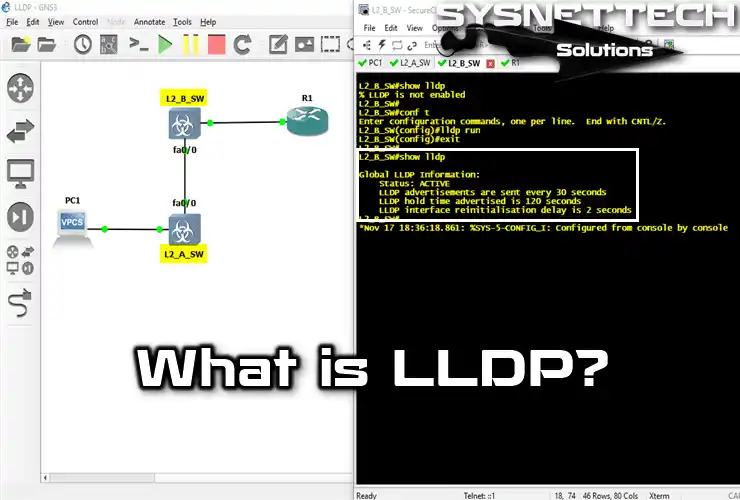
What is the LLDP Protocol in Networking?
Devices close by talk by sending and receiving a MAC frame to share data. This means they can only talk inside the same network part.
The LLDPDU packet has Chassis ID, Port ID, and TTL data. TLV (Type-Length-Value) parts show the info by type, length, and value. So, these parts help collect data in certain areas.
The data from the protocol stays private and works easily with SNMP. Also, SNMP gets and keeps this data in an MIB on local or remote LANs.
LLDPMED is a better version that shares information beyond the same network. The full name is Link Layer Discovery Protocol – Media Endpoint Discovery. It helps find devices and track their location. Also, it makes the topology easier to see. So, it lets us get data about devices in other LANs.
The LLDPMED shares LAN rules, device place, power use, and more. As a result, devices in different networks can share information.
Every device on the network has an LLDP helper that controls its link to other layers. This helper deals with getting, sending, and handling packages.
The Link Discovery protocol is key to finding VoIP systems. Also, it helps check if devices work with Voice over IP. So, this standard is vital for choosing VoIP systems.
Also, it helps check if devices work with Voice over IP. CDP is useful when Cisco devices are primarily in the network. And, it helps to find devices and run the network more simply.
When the network has Cisco and other devices, LLDP is helpful. Also, LLDP works well with devices from many makers.
How Does LLDP Work?
A device that uses the protocol sends notes to its neighbors. These notes name the device and share facts about the network.
SNMP keeps information in the MIB so that it can be seen. So, data in this place can be easily obtained using SNMP.
The database has the system name, port info, IP address, and more. So, it keeps crucial network and device info fully. Reading the database with SNMP shows the complete topology design. So, managers can see the network’s structure and links.
LLDPMED Working Logic
The new version shares VoIP info, making VoIP setup easier. So, it makes adding Voice over IP systems simple. This protocol does the following steps in order;
- The Switch sends port power and VLANs for audio systems. Also, it shares DiffServ Code Point and location info.
- IP phones share power needs, VLANs for sound, and service codes. They also send out helpful facts about their setup.
- The LAN system asks for full details from the Switch. As a result, it can make maps of the voice and data grid.
Comparison
| CDP | LLDP | |
|---|---|---|
| Standard | Cisco Proprietary | IEEE 802.1AB |
| Operation Level | Data Link Layer | Data Link Layer |
| Benefit | Lighter | Highly Adjustable |
| Configuration | Active by Default | Active by Default |
How to Enable and Configure LLDP on a Cisco Router or Cisco Switch
Appliances like CDP do not turn on the Link-finding tool by themselves. So, you must set it up by hand to help the tool.
Run the “lldp run” command in config mode to turn on the Link Discovery protocol. So, it starts the protocol on the Router and Switch.
To turn off the service, use the “no lldp run” command in config mode. Thus, it deactivates the Link Discovery protocol on the device.
Now, we will look at the orders!
show lldp (Not Enabled)
L2_B_SW#
% LLDP is not enabled
lldp run
L2_B_SW#conf t
L2_B_SW(config)#lldp run
L2_B_SW(config)#exit
show lldp (Enabled)
Global Information:
    Status: ACTIVE
    LLDP advertisements are sent every 30 seconds
    LLDP hold time advertised is 120 seconds
    LLDP interface reinitialisation delay is 2 seconds
L2_B_SW#
show lldp neighbors
Capability codes:
    (R) Router, (B) Bridge, (T) Telephone, (C) DOCSIS Cable Device
    (W) WLAN Access Point, (P) Repeater, (S) Station, (O) Other

Device ID           Local Intf     Hold-time  Capability      Port ID
L2_A_SW             Gi0/0          120        R               Gi0/0

Total entries displayed: 1

L2_B_SW#
no lldp transmit
L2_B_SW(config)#interface gigabitEthernet 0/0
L2_B_SW(config-if)#lldp ?
  med-tlv-select  Selection of LLDPMED TLVs to send
  receive         Enable LLDP reception on interface
  tlv-select      Selection of LLDP TLVs to send
  transmit        Enable LLDP transmission on interface

L2_B_SW(config-if)#no lldp transmit
To continue sending data, use the “lldp send” command on the GigabitEthernet0/0 interface of the L2_B_SW. Therefore, running the show lldp neighbors command on the L2_A_SW does not produce any results.
The L2_A_SW command output will be as follows;
Capability codes:
    (R) Router, (B) Bridge, (T) Telephone, (C) DOCSIS Cable Device
    (W) WLAN Access Point, (P) Repeater, (S) Station, (O) Other

Device ID           Local Intf     Hold-time  Capability      Port ID

Total entries displayed: 0
show lldp neighbors detail (L2_B_SW)
Local Intf: Gi0/0
Chassis id: 0ce6.486e.b400
Port id: Gi0/0
Port Description: GigabitEthernet0/0
System Name: L2_A_SW

System Description:
Cisco IOS Software, vios_l2 Software (vios_l2-ADVENTERPRISEK9-M), Version 15.0(4
Technical Support: http://www.cisco.com/techsupport
Copyright (c) 1986-2014 by Cisco Syst

Time remaining: 87 seconds
System Capabilities: B,R
Enabled Capabilities: R
Management Addresses - not advertised
Auto Negotiation - not supported
Physical media capabilities - not advertised
Media Attachment Unit type - not advertised
Vlan ID: - not advertised


Total entries displayed: 1

L2_B_SW#
show lldp traffic
Traffic statistics:
    Total frames out: 34
    Total entries aged: 0
    Total frames in: 12
    Total frames received in error: 0
    Total frames discarded: 0
    Total TLVs discarded: 0
    Total TLVs unrecognized: 0
L2_B_SW#
Frequently Asked Questions (FAQ)
- What is LLDP?
- How does LLDP work?
- What are the key advantages of using LLDP?
- Network Map Finding: LLDP helps you see the thinking and real shape of a network. Network managers, most of all, can picture device links. This makes it a lot simpler to know the whole network setup.
- Device Facts: This lets tools share their details by themselves. For one, we can find out things like type, maker, and system number.
- Advanced Fixing: Makes networking fixing simpler. We give correct facts about nearby tools first. So, it lets us and network managers find issues fast.
Conclusion
So, the LLDP protocol helps us see the network better. It also makes handling devices in many places easy and fast. This makes sure the LAN always works well and is safe.
The skill to gather and share essential details in many network parts is key. This means managers can quickly make full maps of their system.
It can also make things work better and save time. Also, this helps fix problems more quickly.
The LLDP protocol has a simple setup that works with Cisco and other devices. It also gives a strong solution that fits today’s network needs. So, it is a valuable and strong choice for managers.
Also, the changes from LLDPMED give big help, especially for VoIP. They also make it easy for different systems to work together. In short, we see these features helping the protocol be used more.
As networks get more complex, using tools like LLDP becomes more critical.
This is because these protocols give a fast and straightforward way to work. In short, we can easily keep networks safe and working well.

Be the first to share your comment