

Six out of ten developers use the same tool each day. This comes from Stack Overflow’s 2024 survey. What’s more, the GitHub Octoverse report confirms it. This tool ranks first in contributions. It is JavaScript, the backbone of the web.
I have used this language for over ten years. At first, we only did simple form checks. Now you can train AI models with the same language. I have lived this shift firsthand. So I can say this with ease: learning JavaScript has never been more worthwhile.
What awaits you in this guide? We will start with the basic definition. Then we will look under the engine’s hood. Next, we will explore security flaws and performance tips. Plus, we will cover a vast set of career paths. I packed every line with project-tested insight.
By the end, you will have zero doubts about the JS world. This guide works for both new coders and skilled pros. In short, it will open new doors for you. Let’s jump in!
What is JavaScript? A Basic Definition
JavaScript was born as a language that brings web pages to life. Today it runs on servers and mobile devices too. Knowing it gives you the key to modern software.
We can group this as an interpreted scripting language. That means it reads your code line by line. It runs it right away. You do not need a compile step. Just open your browser and start coding.
JavaScript also has a multi-paradigm structure. It supports object-oriented, functional, and event-driven styles. This flexibility lets each developer find their own approach. It gives you limitless freedom in your work.
The Meaning of JavaScript and Its Origin Story: From LiveScript to ECMAScript
In May 1995, Brendan Eich built a new language for Netscape. He wrote it in just ten days. He first called it LiveScript. But a marketing plan soon changed the name.
Java was hugely popular back then. Netscape wanted to ride that wave. So they renamed the language JavaScript.
Do not let this confuse you: Java and JavaScript have no technical link. They are two fully separate languages with different ideas.
In 1996, Netscape handed the language to ECMA International for standards work. That is how ECMAScript came to life. Even now, the official name for JS is ECMAScript. In the field, we just call it ES.
The standards process sped up the growth of the language. Microsoft launched its own version called JScript. Then the browser wars began.
Luckily, all key players adopted the same standard in the end. This agreement gave JavaScript the power it holds today.
Programming Language vs. Scripting Language: Where Does JavaScript Stand?
A classic programming language compiles first, then runs. C++ and Java are good examples. Meanwhile, an interpreter reads a scripting language on the fly. JS fits squarely in this second group.
But this grouping has become quite blurry now. Modern JS engines use JIT compilation. They turn your code into bytecode first. Then they optimize it into machine code. This helps it reach speeds that rival compiled languages.
JavaScript also stands out for its light structure. You can define variables and write functions with ease. You only need a browser and a text editor to start. There is no need for complex dev setups.
In my view, JS is no longer a pure scripting language. Node.js lets it run on the server side. React Native lets it run on mobile. This makes it a hybrid powerhouse. Focus on its skills, not on labels.
Your First JavaScript Code: console.log(‘Hello World’)
Let us put theory aside and write some code. Press F12 in any browser. In the panel that opens, click the Console tab. Now type the line below and press Enter:
console.log('Hello World');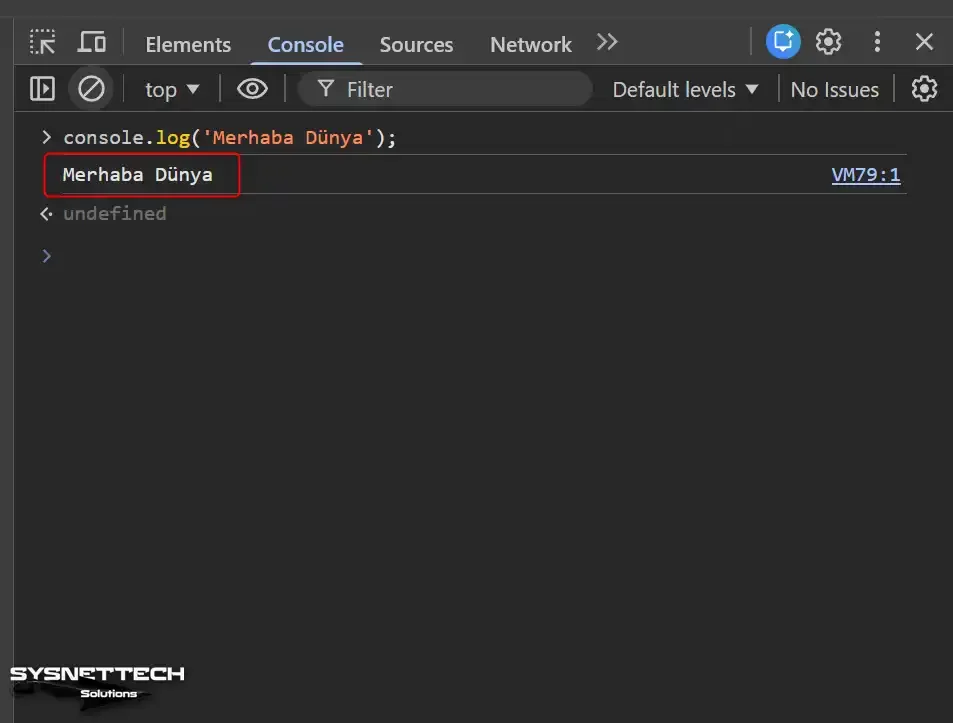
You saw “Hello World” appear on the screen right away. Great job—you just ran your first JavaScript code! That is how simple the start is. No setup was needed, right?
Now let us add a small variable. Type these two lines in the same console:
let name = 'Alex';
console.log('Welcome, ' + name);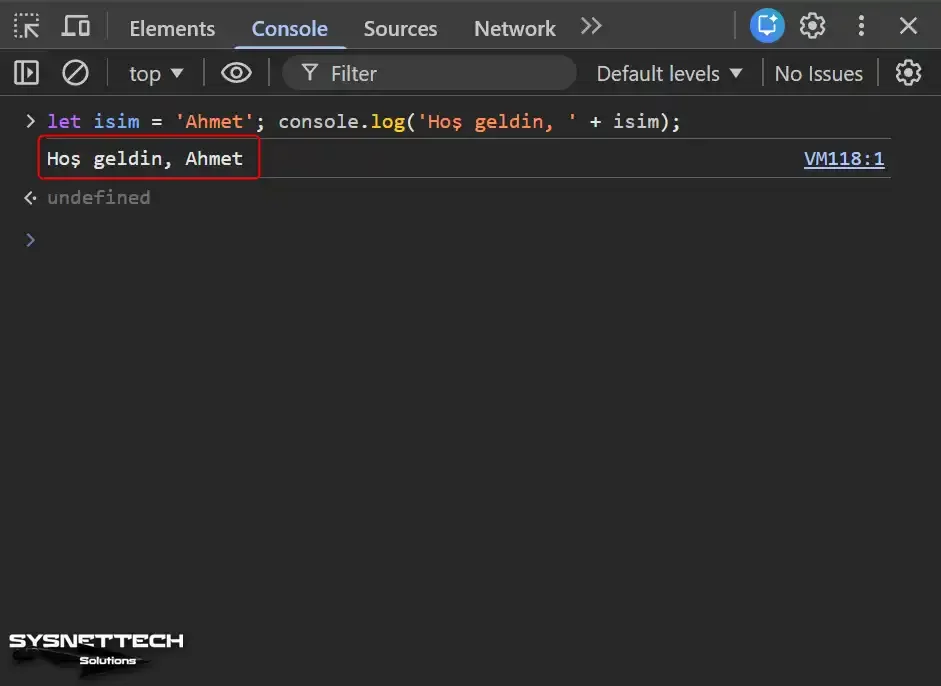
You define JavaScript variables with the let keyword. Then we printed that variable to the screen. You can see how natural the language feels. No complex rules—you start building right away.
This quick test gave you a solid feel for what JavaScript means. The language is right at your fingertips, waiting for you. Now let us move into deeper topics.
What Does JavaScript Do and Where Is It Used?
JavaScript’s use cases have grown at a stunning pace in recent years. It used to be just a small helper inside the browser. Now it forms the core building block of full-stack apps. Let us explore this vast world together.
Also, you can no longer sum up what JavaScript does in one sentence. Interactive web pages, mobile apps, desktop tools, and even IoT devices fall under its skill set. We have lived through a truly striking shift.
Ask what you can build with JS today. I can give you a long list. Game creation, AI, blockchain, and data charts all sit within its reach. This range keeps boosting demand for the language each day.
Client-Side JavaScript: Living Pages with the DOM
Client-side JS runs inside your browser. It kicks in after the page loads. It responds right away to every click and scroll. This is the basis of the dynamic web page idea.
DOM manipulation is the most vital skill here. The DOM is a tree structure of every element on your page. JavaScript can read, change, or delete this tree. So you update page content without a full reload.
Form checks also happen at this layer. Users get instant feedback while filling out a form. You see the “invalid email” alert before the data hits the server. This creates a huge edge in user experience.
Event handling lets your page breathe. You catch mouse clicks, key presses, and window resizes. You define a unique response for each one. That is how interactive content comes to life.
document.querySelector and addEventListener cover most of your needs.Plus, animation skills show the strength of the client side. You pair JS with CSS for smooth shifts and visual effects. You hold full power to build moments that captivate users.
Server-Side JavaScript: The Node.js Revolution

Node.js launched in 2009 and changed everything. JavaScript could now run on the server side too. This gave the language a whole new layer. The concept of full-stack development was born.
Node.js builds on Google’s V8 JS engine. This engine runs JavaScript code at blazing speed. Its async and event-driven design handles thousands of links at once. It became a serious rival to old-school server languages.
The top plus of server-side JavaScript is consistency. You write the same language on the front end and the back end. It works with JSON in a natural way. So data exchange becomes incredibly easy.
Today, giants like Netflix, PayPal, and LinkedIn use Node.js. I use Express.js to build REST APIs for my own work. I set it up in minutes. Its performance goes far past what you might expect.
It is a great choice for building Web APIs. It handles file system tasks, database links, and auth checks. JavaScript is no longer just a browser toy. It is a full-blown server powerhouse.
Mobile, Desktop, and Game Development with JavaScript: Cross-Platform Power
The cross-platform skill of JavaScript is truly stunning. You can ship to many platforms from one code base. Here are the main areas that show this strength:
- Mobile App Development: Frameworks like React Native, Ionic, and NativeScript let you write native mobile apps with JavaScript. The same code runs on both iOS and Android.
- Desktop Apps: Electron.js brings JS to macOS, Windows, and Linux desktops. Developers built VS Code, Slack, and Discord with Electron.
- Game Development: Libraries like Phaser, Babylon.js, and Three.js help you create 2D and 3D games. WebGL lets you render striking graphics inside the browser.
- AR and Virtual Reality: The WebXR API lets you build browser-based AR/VR moments. Users join the session with no extra app install.
This list shows just how rich the game and mobile dev world is. JavaScript gives you the power to be on every platform. Your learning pays you back many times over.
The HTML, CSS, and JavaScript Link: The Web’s Big Three
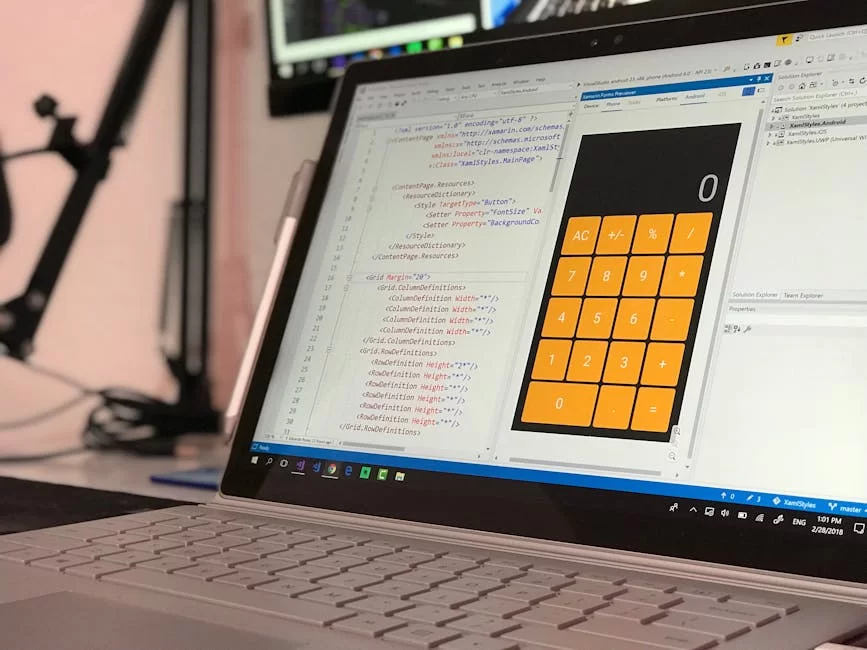
Web development rests on three core pillars. They are HTML, CSS, and JavaScript. Each one has a role with clear lines. But the real magic happens when they work as a team.
The HTML, CSS, and JavaScript link is like a well-tuned crew. HTML builds the frame, CSS adds the look, and JS brings the brains. You cannot do modern web work without knowing all three. Let me dive in deep right now.
To grasp this topic better, learning the basics of HTML gives you a big edge. Now let us move to our famous story.
The HTML (Skeleton), CSS (Skin and Muscle), JavaScript (Brain) Story
Think of HTML as the concrete frame of a building. It defines your page’s headings, paragraphs, and images. It builds the structure, but it stays dull and still. A site made with only HTML will not excite you much.
CSS steps in right at this point. It wraps the frame with muscles, skin, and clothes. Colors, fonts, spacing, and layouts fall under CSS’s job. The site now looks good but still feels lifeless.
JavaScript gives this body a brain and quick reflexes. Buttons react when you click them, forms get checked, and animations start. The page now breathes, thinks, and responds to you. That is how real interaction comes alive.
You must keep these three layers apart from each other. Avoid stuffing CSS and JS code into your HTML file. Manage each layer in its own file. This boosts your project’s long-term health. Ten years of work have shown me how vital this is.
A Teamwork Example: A Dynamic To-Do List
Let us put theory into practice. We will build a simple app that shows how HTML, CSS, and JavaScript work as a team. We will make a to-do list. First, let us set up our HTML frame:
<!-- index.html -->
<div id="app">
  <h1>To-Do List</h1>
  <input type="text" id="task" placeholder="New task...">
  <button id="add">Add</button>
  <ul id="list"></ul>
</div>
Now let us make it look good with CSS. We will craft a clean and modern design. Shadows and soft corners will go in. So user experience always stays our top goal.
Time for our main hero. JavaScript will breathe life into our list. Click the button to add a new task. Click a finished task to cross it out. Here is our script.js file:
// script.js
document.getElementById('add').addEventListener('click', function() {
  const input = document.getElementById('task');
  const newTask = input.value.trim();
  if (newTask !== '') {
    const li = document.createElement('li');
    li.textContent = newTask;
    li.addEventListener('click', function() {
      this.classList.toggle('completed');
    });
    document.getElementById('list').appendChild(li);
    input.value = '';
  }
});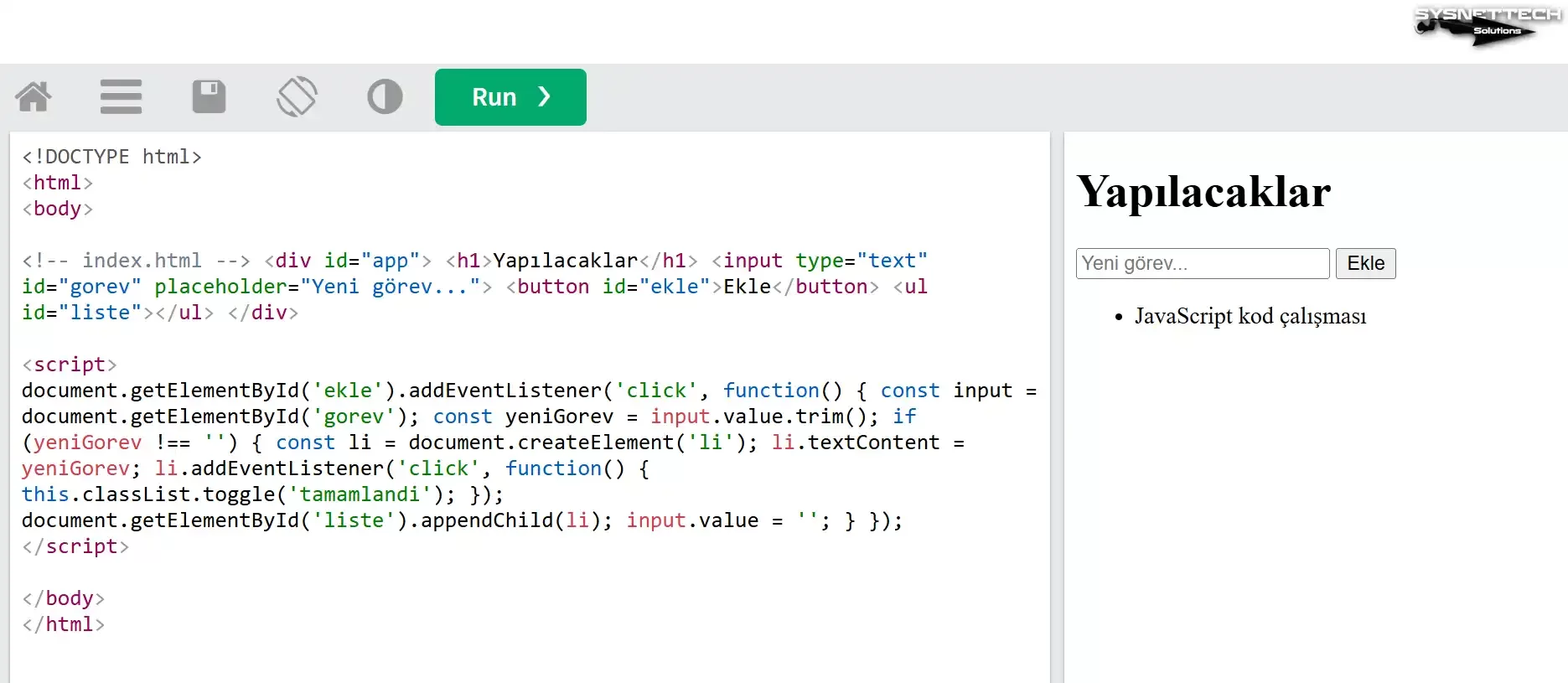
This small app sums up DOM manipulation and event handling concepts perfectly. Here, JavaScript acted as your brain. HTML was your frame. CSS was your look. All three together gave a full, clean fix.
How Does JavaScript Work? Under the Engine’s Hood
Do not let the simple look of JavaScript fool you. A wildly smart and complex system runs beneath it. Knowing this system is the top trait that sets you apart from an average coder. Let us pop the hood open together.
The question “how does JavaScript work” often comes up in job talks. Interviewers expect you to know the event loop and call stack. This section focuses exactly on those key points.
Every modern browser holds a JS engine inside. Chrome uses V8. Firefox runs on SpiderMonkey. These engines take your code, process it, and spit out results. Frankly, the core ideas are mostly the same.
The Call Stack, Task Queue, and Event Loop
The call stack is the to-do list of JS. It adds your code from top to bottom. Each function call sits on top of the stack. Once its work ends, it pops off.
JavaScript runs as a single thread. That means it can do only one job at a time. So do long tasks freeze the page? No—this is where the event loop steps in.
The browser offers Web APIs outside the JS engine. It hands off async tasks like setTimeout and fetch to these APIs. The main thread keeps running without a lock. When the APIs finish, they drop the result into the task queue.
The event loop checks the call stack all the time. When the stack is empty, it grabs the first task from the queue. It then pushes that task onto the stack. This loop runs nonstop. That is how we get concurrency.
This setup forms the base for async programming. The user interface always stays quick to respond. Even as you read these lines, the event loop spins in the back. It is a true feat of engineering work.
JIT Compilation and the Optimization Secrets of the V8 Engine
We said JavaScript is an interpreted language. But modern engines do far more. They use JIT compilation to optimize code while it runs. The result is speed close to compiled languages.
The V8 engine first sends code through a parser. It builds an Abstract Syntax Tree. Then an interpreter turns that tree into bytecode. This is where the magic starts.
The engine spots functions that get called a lot. It marks them as “hot code.” An optimizing compiler turns this code straight into machine code. Now those functions run at near C++ speed.
But the dynamic style of JS makes this optimization tough. If a function gets different input types, the engine drops the optimization. We call this “deoptimization.” You must keep types steady for top speed.
Memory management is another key engine task. JavaScript uses a garbage collector on its own. It finds unused objects and clears the memory. You just write code without stress about this.
Let Us Compare Code Performance: let vs var Loop Test
Let us make the theory real with a speed test. We will measure the gap between let and var. You can run this test in Chrome DevTools with ease. The results might shock you.
// var loop test
console.time('var');
for (var i = 0; i < 1000000; i++) {
  var x = i * 2;
}
console.timeEnd('var');

// let loop test
console.time('let');
for (let j = 0; j < 1000000; j++) {
  let y = j * 2;
}
console.timeEnd('let');
On my own machine, let usually ran a bit faster. But the gap is often just a few ticks. What truly counts is that let gives you block scope. This is a big plus for memory management.
When you work on code optimization, do not chase micro gaps. Readability and safety must always come first. I strongly urge you to use let and const over var. Modern JavaScript standards point the same way.
JavaScript Language Pros and Cons
Like all tech, JavaScript has both strong and weak sides. Knowing these lets you pick the right tool for each project. Let us take a fair look with no emotional ties.
This list of pros and cons also shapes your career moves. You will learn when to lean on this language and when to seek other paths. Let us be real: no single language solves every problem.
Speed, Ease, and a Huge World: Why Is It a Must-Have?
Here are the main pros that make JavaScript stand out:
- Blazing Speed: Engines like V8 and SpiderMonkey make JavaScript fly. Node.js has no match for I/O-heavy tasks. Plus, its async design uses resources well.
- Easy to Learn: The syntax is clean and kind. New coders become productive fast. Its light structure means no setup pain.
- A Huge World of Tools: npm is the largest package hub on earth. You find a ready library or framework for every need.
- Full-Stack Creation: One language covers the front end and the back end. This lifts team output in a huge way.
- Community Help: Millions of coders stay active on Stack Overflow and GitHub. You find a fix for your bug in no time.
- Constant Growth: ECMAScript versions bring new traits each year. The language keeps getting fresh and strong.
These points explain why JavaScript became so widely loved. It opens unique paths for those who aim for a software career.
Security Flaws, Browser Gaps, and Weak Type Safety: The Hard Parts
Now let us check the other side of the coin. Ignoring the downsides of JavaScript is not a pro move. Here are the real-world hurdles you will face.
XSS risk is a big threat on the client side. Bad actors can inject harmful code into your page.
You will land in deep trouble if you skip cleaning form inputs. We will dig into this in a later part.
Browser quirks can still be a pain. Not all browsers adopt new traits at the same speed. Old tools like Internet Explorer are a real headache. Still, tools like Babel fix this to a large extent.
Weak type safety causes bugs in big code bases. Dynamic typing boosts speed in small projects. But as the code grows, errors slip through.
That is where TypeScript saves the day. It brings type safety right into the JavaScript world.
One more hurdle is the single-thread build. CPU-heavy work can lock the main thread. Web Workers give a partial fix for this. Still, JavaScript may not be the best pick for heavy math tasks.
JS Security Flaws and How to Stay Safe
Security is a topic that JS developers must never brush aside. Each year, thousands of sites get hacked through simple gaps. In this part, I will show you both the threats and the fixes.
When you hear “JavaScript security flaws,” XSS comes to mind first. But CSRF, prototype pollution, and dependency risks exist too. You must grasp each one and take steps. Your users’ data sits under your care.
By the way, knowing the basics of API security will also make your job easier. Modern JS apps talk to APIs all the time. You are only as strong as your weakest link.
What Is XSS? Harmful vs. Safe Code Side by Side

XSS is an attack where a bad actor injects harmful JavaScript into your page. They can steal user session data or change page content. So the fallout can be truly harsh.
Here is a risky case. We print user input straight into the HTML:
// DANGEROUS CODE - NEVER USE THIS!
const userComment = "<img src=x onerror=alert('Attack!')>";
document.getElementById('commentArea').innerHTML = userComment;
This code runs random JavaScript in the user’s browser. An attacker can grab all session cookies. Now let us do the same task in a safe way:
// SAFE CODE - USE THIS INSTEAD
const userComment = "<img src=x onerror=alert('Attack!')>";
const commentArea = document.getElementById('commentArea');
commentArea.textContent = userComment;
Using textContent instead of innerHTML blocks HTML injection. You can also use libraries that escape the content. DOMPurify is the tool I trust most for this job.
Ten Golden Rules for Safe JavaScript Coding
Here are ten core rules you must adopt for safe JS work:
- Always Escape Content: Clean user input before you print it on screen.
- Use CSP Headers: Limit which sources can run code with Content Security Policy.
- Use HTTPS: Encrypt all traffic, and stop man-in-the-middle attacks.
- Update Dependencies Often: Scan for gaps with the npm audit command.
- Avoid eval(): This function is a total security disaster.
- Set Safe Cookie Flags: Turn on HttpOnly, Secure, and SameSite flags.
- Never Skip Input Checks: Validate inputs on both the client and the server.
- Apply Rate Limiting: Shield your APIs from brute-force attacks.
- Do Not Leak Error Details: Avoid showing deep error data in production.
- Run Regular Pen Tests: Attack your own system to find the gaps first.
These rules will shield you from a wide range of attacks. Security is not a layer you add at the end. It is a culture of how you build. Keep this in mind each time you write JavaScript.
JavaScript Performance Tuning Tricks
A fast-loading site is the base of user happiness. Google research shows that 53% of users leave a site that takes over three seconds to load. That is why knowing JS performance tricks is so key.
Speed is not just about raw pace. Less CPU use means longer battery life. This is vital for mobile users. Simply put, you must account for each tick.
Cutting DOM Work, Lazy Loading, and Code Splitting
DOM manipulation is a costly move. Each touch forces the browser to recalc the page.
Reflow and repaint steps eat into your speed. So keep these steps to a bare least:
First, batch your DOM updates. Instead of adding one by one, group your changes in memory. Use DocumentFragment to add items in bulk. This cuts page recalc work by a wide mark.
Second, use lazy loading. Do not load content that sits off-screen right away. Fetch it as the user scrolls down.
The Intersection Observer API is the perfect tool for this. So images and heavy parts gain a lot from this plan.
Last, adopt code splitting. Break large JavaScript bundles into small chunks.
Load only the code the user needs at that moment. Webpack and Vite are great at this task. Your first load time drops in a clear way.
requestAnimationFrame method to tune your animations. This tool syncs with the browser’s refresh rate and stops extra frame math.Before and After: Cutting Page Load from 3 Seconds to 1 Second
Let me share a real-world case. Last year, I tuned up an e-commerce site’s speed. The page load time sat at a full three seconds. The Lighthouse score was stuck at 45. Here are the steps I took.
First, I opened the Chrome DevTools Performance panel. I saw our JavaScript bundle was 800 KB. That size was just not okay.
I ran a Webpack check and found the dead weight. Instead of all of Lodash, I imported only the functions we used.
Then I put code splitting in place. All code not needed on the home page went into lazy loading. I added Intersection Observer to the images.
The result: the JS bundle shrank to 200 KB. Page load time fell below one second. The Lighthouse score jumped to 92.
Code tuning is a never-ending loop. Run Lighthouse on a set plan. Keep an eye on bundle size. Never break your speed budget when you add new traits. Your users will thank you with a fast site.
JavaScript Debugging Guide: The Art of Bug-Free Code
Debugging is a core piece of software creation. No matter your skill level, you will make bugs. The key is to find and fix them fast. JS gives you strong tools for this.
Your JavaScript debugging skill sets you apart from other coders. You do not guess in the dark. Instead, you chase the root cause step by step. In this part, I will share pro tricks.
Using Chrome DevTools Like a Pro
Chrome DevTools is the best friend of a JavaScript developer. Open it with F12—it is a full Swiss Army knife. Sources, network calls, speed charts, and more sit right at your fingertips.
First, open the Sources panel. Find your JavaScript file on the left. Click a line you think holds a bug to set a breakpoint. Now refresh the page or trigger the task. The code stops right at that spot.
When the code pauses, check your variable states. The call stack panel shows the function chain. The Scope section lists all local and global vars. You can step through line by line and trace the flow. The bug source will pop out right away.
Also, try console.table instead of console.log. It shows arrays and objects in table form. Use console.group to split logs into groups. These small moves save you hours of work.
Ten Common JavaScript Bugs and Their Fixes

Here are the bugs I have hit most through the years, plus quick fixes:
- Undefined or Null Error: Use optional chaining:
variable?.propertyinstead ofif (variable !== undefined && variable !== null). - Reference Error: Define the variable before you use it.
letandconstdiffer fromvarin hoisting. - Type Error: Check types with the
typeofoperator. Using TypeScript solves these bugs at the root. - Async Code Not Awaited: Do not forget the
async/awaitor.then()chain. - Wrong Array Method Use: Learn the gaps between
map,filter, andforEach. - Closure Mix-Ups: Do not use
varinside loops;letgives you block scope. - Lost this Context: Arrow functions keep the
thiscontext bound. - Equality Operator Mix-Up: Always use
===;==does type conversion. - Memory Leaks: Do not forget to remove event listeners.
- Infinite Loops: Double-check your loop conditions.
Knowing this list in advance gives you a big edge. I have run into each one many times in my work. Take it from me—you cannot dodge these traps. The key is to spot and fix them fast.
JavaScript ECMAScript Versions: The Growth of the Language
ECMAScript is the official standard name for JavaScript. Developers update this standard each year and add new traits. Knowing the history of ECMAScript versions helps you see how far the language has come.
Until 2015, ECMAScript updates came very slowly. ES5 stayed the standard for a full ten years.
But ES6 changed the whole game. Now a new version ships each year. This pace keeps JavaScript fresh and in the fight.
Game-Changing Traits That Came with ES6 (ECMAScript 2015)
ES6 marks the biggest leap in JavaScript history. This version brought so many new things that a new language was born. Let us explore these ground-shaking traits as a group.
Arrow functions gave us a short and clean syntax. We started writing () => {} in place of function() {}. The this context became clear to predict. The whole coding feel shifted from the ground up.
let and const brought block scope into the language at last. Now variables live only inside the block where you define them. The scope mess that var caused came to an end. This fixed one of the worst pains in JavaScript.
Template literals ended the pain of string joins. You can write multi-line text with the backtick mark. You can embed variables straight into text with ${variable}. So code became far more clear to read.
The module system also gained a standard through ES6. import and export keywords let us split code into modules. We said goodbye to the global variable mess. Large projects became things we could manage.
Class syntax made object-oriented programming much smoother. Inheritance, constructors, and method definitions became clear. The language grew more stable and easier to guess. This made its multi-paradigm identity even stronger.
From ES2020 to ES2024: Optional Chaining, Nullish Coalescing, and Top-Level Await
New traits kept coming fast even after ES6. ES2020 brought big features, even during the pandemic year. The optional chaining operator (?.) is one of my top picks. It gives safe access deep inside nested objects.
// ES2020 Optional Chaining
const city = user?.address?.city ?? 'Unknown';
The nullish coalescing operator (??) is a true life-saver. Unlike ||, it only catches null and undefined cases. It treats empty strings and zero as valid. This small gap stops a large set of bugs.
ES2022 brought top-level await. You no longer need an async function to use await. You can write await straight at the module level. Your code becomes cleaner and easier to read.
ES2024 comes with the Temporal API and the pipeline operator. JavaScript grows more mature with each passing year. Keeping up with this growth gives you a strong edge in the field.
JavaScript Framework Comparison: React, Angular, and Vue.js
Picking a framework is a key choice in modern JavaScript work. React, Angular, and Vue.js stand out as the big three.
Each has its own style, strong points, and weak spots. The right pick here shapes the fate of your project.
You must weigh many things when you compare frameworks. Speed, the learning slope, group support, and job market needs all sit near the top. Let us check all sides of these three giants.
React, Angular, Vue: Build Gaps and Speed Check
| Feature | React | Angular | Vue.js |
|---|---|---|---|
| Creator | Meta (Facebook) | Evan You (Community) | |
| Build Type | Library (UI-focused) | Full Framework | Progressive Framework |
| Learning Slope | Medium | Steep | Gentle |
| Speed | Virtual DOM, very fast | Real DOM, tuned | Virtual DOM, light |
| State Handling | Redux, Context API | RxJS, Services | Vuex, Pinia |
| TypeScript Help | Optional | Required | Optional |
| Job Post Volume | Highest | High | Medium |
This chart guides you as you pick a library or framework. React is, in strict terms, a library. Angular is a full framework.
Vue.js sits in a flex spot between the two. Knowing each one deep will give you a strong edge in the field.
For my own side work, I lean toward React. Its world is vast, and the job market calls for it the most.
But Vue.js wins on ease, and Angular’s strong build earns respect. Choose based on what you need.
A Simple App with Each Framework: Same Task, Different Styles
Let us build the same counter in all three frameworks. This check shows the build gaps in a real way. The React version:
// React Counter Component
function Counter() {
  const [count, setCount] = useState(0);
  return (
    <div>
      <p>{count}</p>
      <button onClick={() => setCount(count + 1)}>Increase</button>
    </div>
  );
}
React uses JSX and hooks for state work. Vue.js takes a more clear-cut route. Angular sets up a firm build with TypeScript and dependency injection. Each one lands at the same goal through a unique path.
JS Career Paths, Learning Tools, and Current Job Listings
JavaScript is a golden ticket for those who aim for a software career. The job market stays open to all skill tiers. Firms keep hunting for junior, mid, and senior roles. This part will guide you like a map on your path.
JavaScript career paths go far past just web work. They reach mobile, desktop, games, DevOps, and even data science. Your worth grows each time you add a new skill to your set.
Which JavaScript Framework Should You Learn in 2026? Pay and Market Share Data
As we near 2026, React holds its spot at the top. The Stack Overflow 2024 survey shows 42% of developers use React.
Its world grew even more with Next.js. Full-stack React devs face more demand than ever. Angular still thrives inside large firms. The banking and finance world leans hard on Angular.
There are fewer job posts, but the pay runs higher as a rule. Vue.js fits startups and small crews best. To be frank, it holds strong ground in Europe and Asia.
In the US, a junior JavaScript developer earns about $45,000–$70,000 per year. Mid-level roles bring in $90,000–$130,000.
Senior devs can pull $150,000 and up. Plus, remote work from abroad can double those sums in some markets.
You are in luck when it comes to learning sources too. The web brims with free, top-grade content. You just need focus and time. Let me list the tools that will guide your learning trip.
Free JavaScript Learning Sources from Zero to Pro
Here are the free tools I have picked with care:
- MDN Web Docs: This is the official docs hub from Mozilla. It is the most trusted and broad reference source. Developers at all tiers must bookmark this site.
- freeCodeCamp: It gives you live tasks and real-world builds. The certs are fully free of charge. Millions of people launched their jobs from here.
- JavaScript.info: A great tool for modern JS training. It goes from the base to pro topics in rich depth.
- Codecademy (Free Tier): You learn through live lessons. It is a great place to start.
- YouTube Channels: Traversy Media, The Net Ninja, and Web Dev Simplified rank as the best.
- Eloquent JavaScript (Online Book): This is a deep, fully free book. What’s more, it packs a wealth of code samples.
With these tools, you can start at zero and get job-talk ready. Firms post JS jobs on LinkedIn, Indeed, and Glassdoor all the time. Also, do not skip showing off your work on GitHub.
Common JavaScript Mistakes and What to Dodge
I have seen more bugs than I can count in over ten years of work. Some are so widespread that almost every new coder falls into the same traps. In this part, I will share the worst ones and their fixes. My goal is to save you time.
Do not fear mistakes—they are a core piece of how you learn. But you must draw a lesson from each one to avoid repeats. The path to learning JavaScript runs through hands-on work and growth from flaws.
Global Variable Mess and Scope Mix-Ups
Global variables rank as one of the worst habits in the JS world. When anyone can touch a var from anywhere, your code turns wild and hard to guess.
Name clashes and strange side effects are bound to strike. In large projects, this turns into a full nightmare.
The fix is simple: define your vars in the tightest scope you can. Use let and const in place of var. Lean on the module system. In short, each variable must live only where it is truly needed.
Scope mix-ups are a bug I see all the time. Using var inside a loop leads to shocks you will not expect. var has function scope, not block scope. Devs who miss this small gap spend hours on debug work.
I always stick to this rule: when you define a var, think of its life span right then. Use const if you can, and let if the value must shift. Forget var for good. This one clean rule stops a flood of bugs before they start.
Callback Hell in Async Code and the Promise Savior
Async programming is one of the most strong but most mixed-up traits in JavaScript.
New coders often land in the callback hell trap. Nested callback chains turn code into a mess no one can read. Here is a case you will know:
// CALLBACK HELL - DO NOT DO THIS
getUser(userId, function(user) {
  getPosts(user.id, function(posts) {
    getComments(posts[0].id, function(comments) {
      getLikes(comments[0].id, function(likes) {
        console.log(likes);
      });
    });
  });
});
Developers call this shape “callback hell.” Plus, it is hard to read, debug, and test. So Promise and async/await fix this from the root. Let us write the same code with modern JavaScript.
// CLEAN CODE WITH PROMISE AND ASYNC/AWAIT
async function getLikesForFirstComment() {
  try {
    const user = await getUser(userId);
    const posts = await getPosts(user.id);
    const comments = await getComments(posts[0].id);
    const likes = await getLikes(comments[0].id);
    console.log(likes);
  } catch (error) {
    console.error('An error occurred:', error);
  }
}
This code is both clear and strong at handling faults. Async tasks flow as if they were sync. I now use async/await in all my work. The code grade goes up in a clear, sharp way.
Promise.all. It is the best way to run many stand-alone async tasks at the same time. This gives your speed a real, strong lift.Further Reading and Trusted Sources
This guide gave you a firm start in the world of JavaScript. But the learning path does not stop here. Here are the top-rated sources to push you to the next tier.
- The official page for the ECMAScript spec is the most trusted source on the language. You can reach each detail of the standard at the ECMAScript Language Specification. This doc is the go-to guide for engine builders.
- Mozilla’s JS guide has no match for real-world use. The MDN Guide gives broad docs that fit all skill tiers. This MDN guide holds code samples and browser support charts.
- If the inner work of the V8 engine calls to you, the Official V8 Blog is your spot. You will find deep papers on JIT, garbage collection, and tuning tricks here. For those who want to master speed work, this source is a must.
Keeping up with these sources puts you one step ahead in the field. Bookmark these three sites to stay fresh with the facts. The JavaScript world moves fast—you must stay on top of it.
All Your Questions About This Programming Language
What Is the Gap Between JavaScript and Java?
A Quick History of JavaScript: Who, When, and Why?
What Are the Core Gaps Between JavaScript, HTML, and CSS?
What Are the Downsides Next to the Upsides of JavaScript?
Is JS Hard to Learn? How Long Does It Take?
Can You Build a Site Without JavaScript?
How Can I Turn JavaScript On or Off in My Browser? (Chrome, Firefox, etc.)
What Is ECMAScript? Is It the Same as JavaScript?
Which Are the Top JavaScript Libraries and Frameworks? (React vs Angular vs Vue)
How Do You Use JavaScript on the Server Side (with Node.js)?
Conclusion: The Best Time to Start Learning JavaScript
We have reached the end of this long trip. We talked through the birth of JavaScript, modern frameworks, security, and speed. Now the ball is in your court—time to turn what you learned into real work.
There is no such thing as the best time to learn JavaScript. The best time is always right now.
Start today, and in six months you will be set for job talks. This language opens doors abroad, gives you remote work, and brings cash freedom.
I know from my own path: JS gave me more than I dreamed. I hope it opens the same doors for you. May your code flow free and your bugs stay few. See you in the console!

Be the first to share your comment