

Understanding NAT is very important in the networking world. So, Dynamic NAT plays a vital role in this field. In this article, I will explain how this type works.
I will also take a look at its configuration and compare it with other mapping types. If you are a student or new to the networking field, you will quickly understand the concept of Dynamic NAT. So, let’s unleash its potential in network address translation!

Understanding Dynamic NAT
Static NAT and PAT work in a similar way. Both change private IP addresses into public IP addresses.
But the main difference is that private IP addresses are mapped from a group automatically. Static NAT, however, needs us to set up the routes by hand.
In a changing setup, IP addresses from the provider are put together. We do it by using an access list. So, we can link our own network to this access list and make it work.
Because of this, public and private addresses have a direct link. This means we connect the IP addresses we pick for changing to the public IP address we can use.
How Does Dynamic NAT Work?
The general operating logic of the network translation system is as follows.

In the image above, address 192.168.1.10 accesses the internet. Network Translation then takes effect. As a result, the IP address from the ISP goes to the Source portion of the IP packet.
Meanwhile, the private IP uses a blank IP address. This blank IP address is located in the block between 200.1.1.1 and 200.1.1.10. To better understand this dynamic system, you can create the topology described in Packet Tracer.
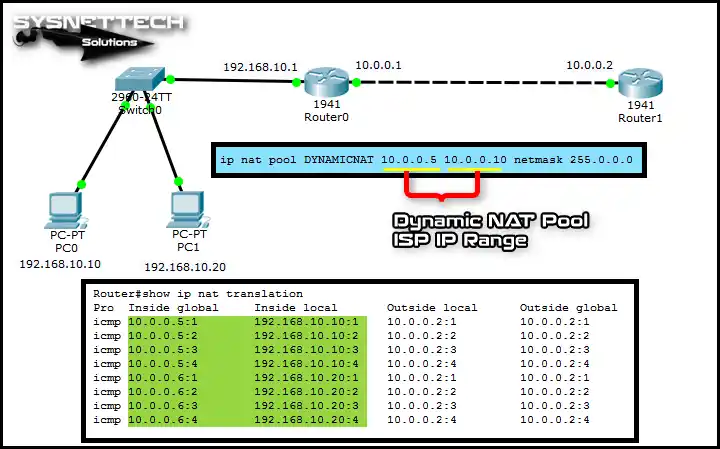
In the image above, two computers are pinging 10.0.0.2. The IP addresses are 192.168.10.10 and 192.168.10.20. The router’s addressing system is crucial here.
Computers on the LAN use addresses between 10.0.0.5 and 10.0.0.10. The ISP allocates these addresses. The first transaction comes from 192.168.10.10.
Therefore, the router maps this to the available address 10.0.0.5. The address output then shows 192.168.10.20, which becomes 10.0.0.6. Consequently, you need to create a pool of dynamic numbers.
Configuration ⇒ Video
Watch this video to learn about dynamic peering. It shows two Routers using Packet Tracer.
This guide will help you learn how to make a connection. It also shows how to keep dynamic connections working. If you like our video, please subscribe to our YouTube channel!
Conclusion
In short, Dynamic NAT provides valuable insight into network address translation. However, since cost and scalability are essential, purchasing multiple IPs from the ISP can be expensive. This makes the Dynamic Network Address Translator system less economical.
In fact, I recommend using PAT instead due to its cost-effectiveness and flexibility. As a result, PAT is often the preferred option. Thank you for exploring the world of LAN address translation with us!

Be the first to share your comment