
The UNIX computer system appeared in the late 1960s. From that time, it has been the base of the computing world. This system, made at Bell Labs, was a considerable change. It brought multitasking and sharing resources. This lets many people work at the same time.
In truth, we know it more for being steady, movable, and safe. Therefore, I believe it has successfully stood the test of time. Moreover, it has had a significant effect on systems like Linux and macOS.
However, its modular design and text commands are powerful. It is made for new users and experts, giving special freedom and power. In this article, I will talk about the story of UNIX, including its main parts, design, and different types.

What is the UNIX Operating System?
They developed the UNIX OS at Bell Labs in the late 1960s. This is a powerful system that lets many people do many jobs at once. It is also famous for being stable and portable.
But it has robust security features. As a result, it has formed the basis for many modern operating systems.
It’s a simple, building-block design that lets users control it with typed commands. This clear design helps new and expert users alike. In the end, it gives flexibility and power to all.
UNIX still holds an essential place in today’s computing world. What’s more, its core concepts have greatly affected current systems such as Linux and macOS. And, due to its trustworthiness and size, it is very common on servers.
Also, people use it a lot in schools and data centers for safety. In short, the UNIX system is helping build future tech and making key systems stronger.
What is the History of the UNIX Operating System?
In 1969, Ken Thompson, Dennis Ritchie, and their team at Bell Labs developed the UNIX system. In fact, their first goal was to make a fast system for many users.
They quickly developed the first version, running it on the DEC PDP-7. They then promptly rewrote the system with improvements in the C programming language.
In the mid-1970s, the UNIX system became well-known for being simple and easy to use. These features made it a top choice for many colleges.
Around the same time, research places everywhere started using it. Then, in the 1980s and 1990s, commercial and open-source versions emerged. So, it made sure it would always be important in computer history.
Ken Thompson, Brian Kernighan, and Dennis Ritchie were all critical in making UNIX. Douglas McIlroy and the Bell Labs team were also involved.
But the significant change was when they rewrote it in C. This led to Version 7, which became the base for modern UNIX.
They later made strong versions like BSD and System V. They then established the POSIX standards. Clearly, it has left a lasting impact on Linux and macOS.
Basic UNIX Features
It’s a working system known for doing many jobs and helping its users. This structure lets many users use it at the same time. Also, each person can run their own tasks separately.
These features make the system ideal for places that need to share resources. Servers and school labs, especially, gain a lot from this.
The UNIX OS stands out for its portability because developers wrote it in C. This way, we can easily adapt it to different hardware platforms.
Moreover, it has safety tools like user logins and file controls. Also, separating tasks guards the system, keeping data safe. So, it gives you a setup that is both adaptable and secure.
It has a hierarchical structure that divides files into folders, all from a single start. This method makes handling files easier and finding them faster.
It also allows users to store their data in an organized manner and control access. Thus, the UNIX OS file system is both organized and practical.
Kernel, Shell & File System Architecture
The UNIX architecture consists of three main components: the kernel, the shell, and the file system. The kernel is the system’s heart and capably handles the computer’s parts.

It also handles running programs and memory use. Plus, it keeps the system working steadily.
The shell is a link between the user and the core, running commands. Meanwhile, the file system sorts data hierarchically. As a result, this lets it store, find, and handle files well.
These parts fit together perfectly to give a smooth user experience. For example, when a user enters a command into the shell, the shell passes it on to the kernel as an instruction.
Then, the kernel gets the files or gives out system power to do the task. Finally, it sends the results back to the shell to display them to the user. This sharing of jobs is flexible, safe, and effective for the UNIX operating system.
Well-Known UNIX System Types & Versions
There are many known types and versions, each made for different uses. But, I can list a few of the most important ones here:
- AIX: IBM’s UNIX system, often used on business servers.
- HP-UX: The type made by Hewlett-Packard for HP servers and workstations.
- Solaris: A system first made by Sun Microsystems. This makes it more commonly used in big systems. It is also a popular pick for vital business jobs.
- BSD (Berkeley Software Distribution): FreeBSD is a powerful open-source system. Moreover, it also has well-known versions like OpenBSD & NetBSD. As a result, this has led to the creation of many other versions.
- macOS: Apple built its computer system on UNIX. Therefore, it has an easy interface and strong safety tools.
All these operating systems follow the same core ideas. For instance, they can do parallel task execution or help many users.
However, they differ in terms of licensing. Hardware support can vary, and its intended users are very varied.
For instance, AIX and HP-UX are owned systems. Therefore, they made specific hardware. In contrast, BSD is open source and highly portable.
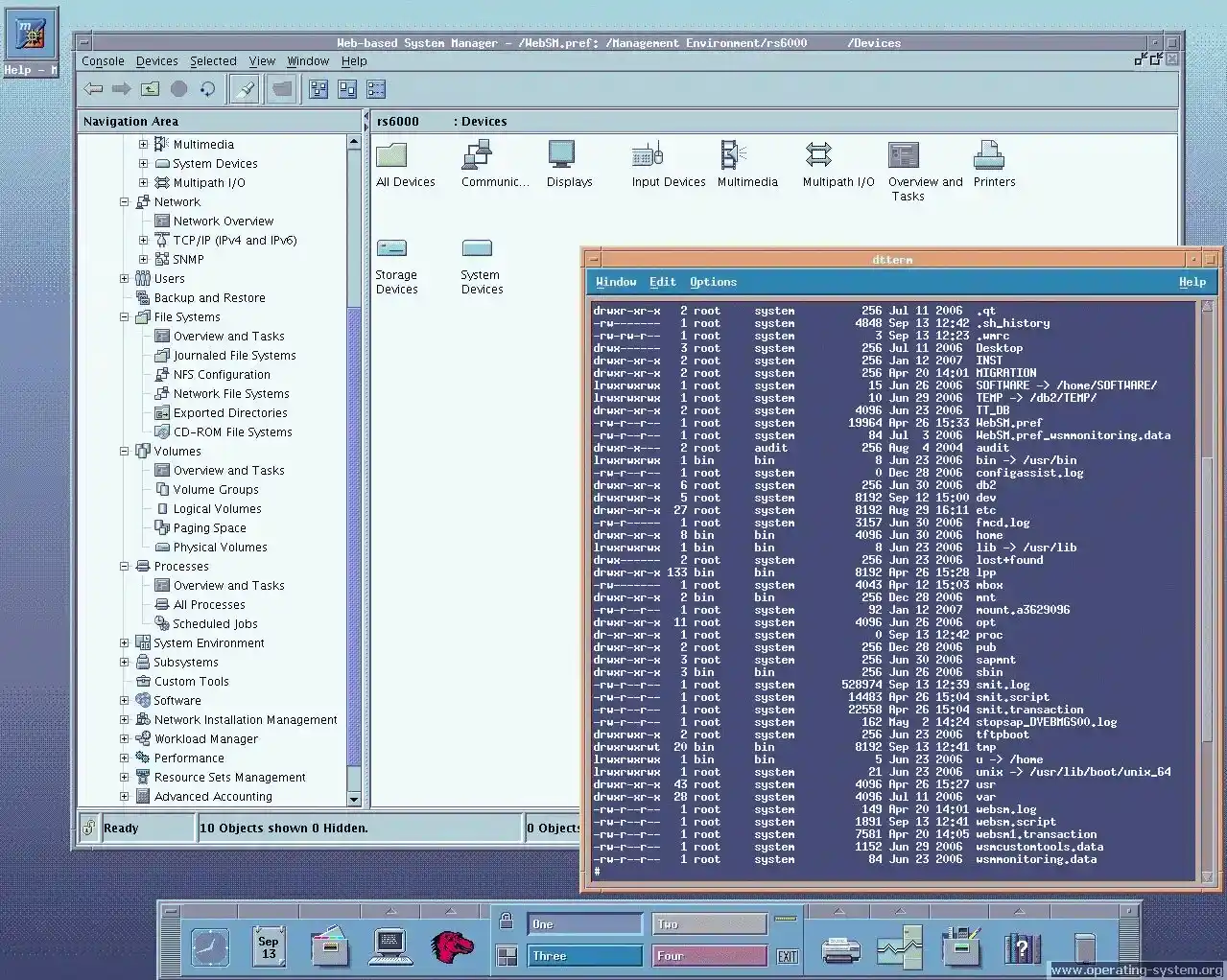
Also, it is a critical choice in the Solaris system. In particular, we know it for its strong growth. Plus, it also has top file tools like ZFS.
On the other hand, macOS stands out with its modern design. It works perfectly with Apple hardware. Despite these differences, it can also work with any system.
By following shared UNIX standards, we can move between systems with ease.
Standard UNIX Tools and Commands
Some of the most commonly used UNIX command line tools are as follows:
- ls: Lists the files and directories in the current directory.
- cd: It moves you to a different folder.
- cp: It copies a file or a folder.
- mv: Moves or renames files and directories.
- rm: It deletes a file or a folder.
- pwd: It shows which folder you are in.
- man: Displays the manual page for other commands.
- grep: Searches for patterns within files.
- cat: Combines and displays the contents of a file.
- chmod: Changes file permissions.
These tools are the base for our primary use of the UNIX operating system. First and foremost, they enable us to manage files efficiently. They also help us navigate the file system with ease. In short, they are essential for performing basic tasks.
Shell functions as the line-based interface between the user and this system. It reads your commands, runs programs, and handles information.
There are several options among popular it shells. For example, the Bourne shell (sh) and C shell (csh) include these.
Also, Korn shell (ksh) and Bourne Again shell (bash) are ordinary. They use scripts, so users can make jobs run on their own. Furthermore, users can also set up their own PC environments.
Benefits of the UNIX Operating System
We know this OS for its excellent stability. For this reason, it makes it a very reliable system. Thanks to its robust design, systems can run for extended periods.
In the end, the system seldom needs crashes or restarts. In short, this system is ideal for servers. I especially suggest it for jobs that must not stop running.
UNIX OS has special features. In particular, it gives us flexible and adaptable answers. Thanks to its modular architecture, we can customize the system.
For example, they are excellent for small workstation PCs. They handle growing work well because they run big company servers. So, we can scale seamlessly as enterprise requirements grow.
Many UNIX versions are open source. For example, the BSD system and its derivatives fall into this group. Open source gives users freedom, letting them study and change the software.
Honestly, they can share it for free, which helps new ideas grow. At the same time, it also builds a community that works together. The work is done in the open, making things clear and safe.
UNIX and Other Systems
It is different from other central systems in a few key ways:
- Linux
People usually see Linux as a UNIX-like system. But it does not come from the original UNIX code.
Despite this, both have similar design ideas. For instance, they offer multitasking jobs. They also both let many people use them. Lastly, they both use a terminal screen.

Linux is fully open source, and you can change it a lot. On the other hand, classic systems are not the same.
For instance, they can be owned or free. But many commands and tools are almost the same. Therefore, switching between them is pretty easy for users.
- Windows
Windows is very different from UNIX in how it’s built and used. It is mainly made for a visual experience and for a broad general audience.

Windows is not like UNIX. First, it cannot handle many users on a command line. Furthermore, it does not have the same level of file permission controls.
Windows is a closed-source system. We often use it at home and in office PCs. UNIX, however, is more common on servers. It is also a frequent choice for special-purpose systems.
- macOS
Apple built macOS on a UNIX base, specifically the BSD type. So, it mixes its strong safety and multi-job skills with an easy visual screen.

macOS users have access to many UNIX tools. They can also use the command line shell. So, macOS is easy to use and built on this OS. Because of this, it occupies a special place among mainstream PC systems.
How Is the Security of UNIX Next to Other PC Systems?
UNIX is a computer system with robust safety features. Therefore, it is a common pick for places that need high environments. A key part is its user-based entry control, which gives a special name to each person.
This makes it possible to assign permissions on three levels: user, group, and others. This means fine control lowers the chance of someone getting in without permission. It also makes it easier to handle than Windows. So, it has a complex login system that can mix up who is allowed to do what.
On the other hand, it has built-in auditing features. These features provide detailed logs of user actions.
These kinds of records are essential for watching for suspicious actions. They also ensure compliance with security policies. Other OSes may not have this level of detailed logging.
But UNIX is safer from some kinds of malware. Its design keeps user programs apart from the system’s core. This makes it hard for harmful software to get high-level power. In contrast, Windows is used by so many that it is often the main goal for attacks.
Thanks to UNIX’s open design, changes are made by its users. But, unlike paid systems, it does not leave security holes open for a long time.
Even though no system is entirely safe from harm, this OS’s safety tools are excellent. Companies and teams that really care about safe computers like these tools a lot.
Real-World Applications
It is known for its strength, offering excellent safety and flexibility. This is why developers often use it in real jobs. For instance, it is a common pick in the banking world.
Just as important, it is vital in telecommunications systems. Plus, it serves an essential function in the healthcare sector. In other words, it supports many corporate servers. Therefore, it is also common in web hosting platforms.
Schools use it because it works better for science tasks. They also use it for data analysis work.
Also, it is the base for many network devices. In the same way, it is common in workstations. Its effect has spread to new systems. For instance, macOS and Linux are part of this.
Because it is so reliable, it works well in places that require continuous operation. Moreover, it is also dependable in systems that need top speed.
Frequently Asked Questions (FAQ) About UNIX
- What is the simple definition of a UNIX system?
- Who uses UNIX?
- How is it different from Linux?
- Is UNIX still relevant today?
Conclusion
UNIX has played a key role in shaping the computer world. Its innovative design principles have set the standard for modern systems.
For example, being reliable and secure is most important. Doing many jobs and having parts are also key traits. The effect of it is easy to see in schools.
Likewise, it is also common in business settings, even making up the base of the Internet.
UNIX’s long history is clear because people still use it. It also continues in the growth of Linux and BSD. Lastly, it has a key role in the design of macOS.
Since the future looks quite promising, we should understand the basic concepts. As it continues to shape new technologies, I recommend staying up to date.
But the use of proprietary UNIX versions could go down. Still, open-source systems will continue to exist. Furthermore, platforms based on it are still growing.
Specifically, we are seeing growth in cloud computing. In the same way, data centers are also expanding. As safe programs increase, their trustworthiness remains useful.
Its strong architecture is always essential for us to. In the end, it will keep its role in key systems. Plus, it will keep being very useful in modern computer systems.

TolgaBagci
Hi, I'm Tolga, a computer expert with 20 years of experience. I help fix computer issues with things like hardware, systems, networks, virtualization, servers, and operating systems. Check out my website for helpful info, and feel free to ask me anything. Keep yourself in the loop about the newest technologies!