

In this article, I will explain what GNU/Linux is, its history, parts, good points, and uses. Furthermore, I will also talk about how engineers make these systems and how they work.
Computers need an OS to run apps. They also help parts of the computer work together. Among the systems, I can say that GNU/Linux is notable for being open and strong.
The Linux operating system, made from free software, is liked by many people. Clearly, it works for normal users and also big companies.
What is the Definition of GNU/Linux?
GNU/Linux (often called Linux) has mainly two parts: the GNU system and the Linux kernel. Richard Stallman launched the GNU Project in 1983—the project aimed to create a free, Unix-like OS.
In the early 1990s, the project had developed powerful software tools. However, it did not have a working core. At this point, Linux, created by Linus Torvalds in 1991, came into play. It filled the missing piece. As a result, the GNU parts worked as a whole operating system.
In this context, the term “Linux” refers to the kernel developed by Linus Torvalds in 1991. In addition, the Linux kernel joins with GNU tools to make a strong system. Clearly, we use it a lot in many computer areas.
Knowing GNU/Linux is a vital skill in today’s tech world. This is because it helps a lot with operating systems, servers, software, security, and small devices.
Furthermore, unlike closed systems, Linux gives us special freedom and ways to change it. Thus, this allows us to gain complete control over our OS resources.
Its open source design also supports new ideas. As a result, we can quickly fix security problems.
This process creates a community way to make software. That is why knowing GNU/Linux is essential for jobs today. Specifically, we see this very clearly in IT and software work.
The History of GNU/Linux
Richard Stallman, as I mentioned, created the GNU Project in 1983. Stallman, a programmer at MIT, noticed a rise in closed software that limited user freedom.
This situation made him support software that anyone could use, change, and share.
In 1985, Stallman founded the Free Software Foundation to support the GNU Project and promote the ideals of free software. The foundation helped users keep control of their PCs. It also aimed to ensure that software remained both free and open source.
The main goal of the GNU Project is to give a fully working system that shows free software rules. Stallman imagined a place where users could share and work together freely.
This would let people share information and help software grow. The GNU Project made compilers, text editors, and tools. In the end, these works built the base for the GNU/Linux system.
1. Linus Torvalds & The Release of the First Linux Kernel
The start of the Linux kernel began with Linus Torvald’s project in 1991. Torvalds wanted to make a free and open system.
Thus, they released the first version (0.01) of the Linux kernel. This version was an essential step because it gave a UNIX-like system.
Torvald’s goal was to give a choice to closed software. He also wanted to build a strong group focused on working together and improving.
2. Cooperation between GNU and Linux
The development of the Linux kernel began in 1983. For this reason, it is closely linked to the GNU Project. This project wanted to make a free operating system, but did not have a working kernel.
When the GNU tools and libraries joined with the Linux kernel, a strong system emerged. We often call this OS GNU/Linux.
Thus, both projects achieved their goals. As a result, they made an extensive system that works with Unix.
3. The Growth of GNU/Linux Versions
The growth of these versions shows the flexibility and usefulness of the system.
After the first main release, many versions came out to fit different user needs. In other words, a big system came out that gave choices for everyone.
For example, there are main versions like Ubuntu, Debian, Red Hat, and Slackware. These have made different ways to manage and set up programs.
Plus, these methods made a new user interface. Over time, versions grew to cover servers, desktop computers, and special builds for school. So, we saw the appearance of many versions made for different needs.
The Linux kernel is flexible and works with many GNU programs. This lets us entirely change our systems. In other words, the idea of open source teamwork and new ideas is getting stronger.
The constant growth of GNU/Linux versions shows the active work of the community. This has caused significant improvements in speed, safety, and ease of use.
What are the Components of GNU/Linux?
The Linux kernel is the main part of this operating system. In fact, it works as a link between the hardware and software layers. As a result, it ensures that our system runs smoothly.
1. The Role of the Kernel in an Operating System
The core of the system controls device resources. For example, it controls the CPU and memory. It also controls devices and files.
It helps communication by acting as a link between hardware and software. As a result, it maintains security by running tasks well.
The core of the system handles many key functions. For example, it controls when programs run and memory.
It also takes care of devices. Plus, it handles system requests. In fact, it makes an organized space for programs. Thus, this lets us run our software efficiently.
2. Features of the Linux Kernel
The Linux kernel is famous for its strong design and complete set of features. Its key features include:
- Parts Design: Linux works well because it has simple, flexible parts. This lets us add new modules. Also, we can update without turning off the system.
- Doing Many Tasks: It handles multitasking well, letting you run many processes at the same time. Because of this, we can use our system resources well.
- Memory Care: It uses paging to manage memory in a smart way. It also uses virtual memory to save resources. This makes the system run very fast. In other words, it uses all resources well.
- Device Drivers: Many built-in drivers make hardware work well. That is, this means the system can easily connect to normal and special devices.
- Safety Tools: Many safety tools keep the system and user info safe. These include user rules, SELinux, and AppArmor.
- Network Capabilities: The core part works with many ways to connect, making sure network talking works well. It also has the needed tools for network connections. In other words, the OS has strong and bendable network features.
3. GNU Tools & Utilities
The GNU operating system gives a space that is very like Unix. It also has many tools for smooth OS work. Now, let’s see its main parts:
Bash (Bourne Again SHell)
It is the primary command-line tool in many Linux versions. It lets you run commands, make scripts, and automate tasks.
Plus, it has helpful things like finishing commands, remembering old ones, and writing script help. This tool helps us work faster and use the system better.
GNU Basic Tools
Linux systems have basic file or shell tools such as ls, cp, mv, and rm. These programs are needed to help with our daily file and OS work.
Helper programs use the exact words in different Linux types. This makes sure you get a steady and the same experience. Clearly, this cuts down mistakes by making things more straightforward to use.
4. The Importance of Tools in User Experience
GNU tools make the user experience in the Linux world. We can see their importance in several key areas:
- Speed & Getting Things Done
Strong command-line tools like Bash and Basic Utilities help us work better.
Thus, this lets us finish our jobs faster and make repeat jobs automatic. This method saves us time and minimizes errors.
- Change & Custom Options
GNU tools let users make their work ways their own. That is, this means that smart users can make answers tailored to their special needs.
We can also make the system speed better by writing scripts. In this case, we can get a faster and bendable working place.
- Work Together & Same Results
The normal build of GNU tools gives the same experience across different systems. So, this makes it easier for those moving between Linux types to learn.
- Group & Help
Open source GNU software is helped by a busy group of makers and people. It has strong help books, as it always makes things better and new stuff. On the other hand, help groups also make fixing things and learning easy.
5. System Libraries & Programs
In computer systems, libraries are a simple group of ready-to-use tools. Apps use these routines for different tasks. So, this makes software making easier and stops code repetition.
One of the most important libraries in GNU/Linux systems is the GNU C Library (glibc). Glibc serves as the standard C library for the GNU OS.
It also does basic jobs like input/output, system work, memory use, and process control. In this way, it provides the libraries required by the C language.
Glibc enables developers to write code on different UNIX-like systems. It also follows important rules like POSIX. That’s why this makes it easier to write portable code.
In return, this lets coders create normal programs that run on any OS. It also makes sure programs run on different systems. In short, Glibc offers easy moving and adapting.
They develop the library for high speed or good performance. It makes sure that apps run well in different places. Also, it gives full functions.
In addition, its wide support is worth noting. So, I can say it is an integral part of many software on GNU/Linux. Also, we often use it in system tools. In the end, the library is a strong and needed structure.
6. Well-Known Apps Found in GNU/Linux Systems
GNU/Linux systems provide hosting for many apps with different jobs. They also meet many user needs. On the other hand, there are many kinds of apps. For example, the most used ones are:
- Text Editors: Vim & Emacs have strong features. They are also known for being easy to add more to. This means we can write code or text well. Also, we like these tools because they make editing tasks easy.
- Web Browsers: There are strong tools like Mozilla Firefox & Chromium. These tools follow modern web rules. On the other hand, we can change them a lot with add-ons. In short, we use these browsers because they let us surf the web easily.
- Office Suites: LibreOffice & OpenOffice also give complete tools. These provide us with word writing, spreadsheet, and presentation help. As they make document work easy, they are popular.
- Development Tools: Visual Studio Code & Eclipse are examples of strong IDEs. Also, they work with compilers like GCC & Make. On the other hand, they support many coding languages. In the end, developers widely use them because they make building software easy.
- System Utilities: System admins use Bash, systemd, and network tools for OS management. They are also key parts of automation work. Also, they give basic jobs for users and admins. They also make sure the system runs well. In the end, these programs are critical.
Features & Benefits of GNU/Linux
1. Open Source Structure

We know open source software by the fact that its source code is accessible. Clearly, we can freely view, modify, or distribute the code.
Also, the model supports teamwork. On the other hand, people and groups also help with the software.
In fact, it helps new ideas and fast development. In short, it boosts open source teamwork and progress.
2. Advantages of Open Source Software
- Low Cost
Open source software is usually free. As a result, license fees are lower. Also, organizations can spend their money on other things.
On the other hand, using stuff becomes more efficient. As a result, we can spend more on essential projects. In the end, open source gives a cost benefit.
- Clear & Safe
Access to the source code helps the community check it. In this case, they find security problems fast.
Also, they fix problems fast. On the other hand, with help from many people, problems are easily solved.
- Flexible & Easy to Change
Users can change open source software to fit their needs. They can also join it easily with current OSes.
In other words, we can change it for different uses. Also, we see that this flexibility makes the software more useful. We can build custom solutions and get wide support with open source.
- Community Help & Teamwork
The open source model makes a strong user & developer group. It gives support and guides. Also, it helps share knowledge in a team by allowing constant development.
- No Vendor Lock-in
Open source software lowers our need for suppliers. We are not tied to private solutions, which is why.
Organizations can work without license limits. This means that they can change suppliers when necessary. On the other hand, they have the freedom to change the software.
3. Customizability & Flexible
- Different Desktop Environments & Window Managers
Modern operating systems have lots of desktop environments. That is, this means we can pick our screens to match our work.
On the other hand, some choices fit the look. For example, light window managers save system resources.
Full desktop environments give many graphics features. So, this lets us make solutions for different hardware.
- Adapting Systems to User Needs
We can change system settings and app functions. Anyone using the OS can adjust it to their needs.
We can also set up interface parts. On the other hand, we can easily change the OS speed.
Also, we can pick apps that make tasks more manageable. They make access easy and users happy. So, this makes computing more open.
4. Safe & Stable

- Compare with Other Operating Systems
It is very important to see if an OS is safe and stable. We should also compare it with other popular systems on the market.
To do this, we must check access control carefully. In other words, we must also look at patch management plans.
Also, security problem response steps are part of the check. This helps us look at simple safety parts. In the end, comparing gives a strong check.
For example, standard systems use UAC to block unwanted entry. Others stop dangers with sandbox tools.
Also, how often and how good the updates are are very important. That is why these things help keep the system safe. In other words, it must act fast against threats.
In this case, organizations can check how strong their OSs are. That is, they can control their sensitive data and systems well.
- Security Practices Focused on Community
Local safety projects are now significant. Free code systems gain from worldwide helpers.
In other words, they find and fix security problems step by step. Also, they help the team review and work together.
Also, this way pushes for fixing risks fast. Open code lets everyone check it fully. Therefore, this helps users find and fix weak spots better.
Main Uses of GNU/Linux
1. Desktop Environments for End Users
GNU/Linux gives many desktop screens to fit different user choices. For example, GNOME offers a modern and simple screen. In contrast, KDE Plasma gives many ways to change and rich visuals.
Also, XFCE gives fast speed with low resource use. Also, LXDE works well on old hardware because it is light. So, each screen provides different functions for different needs.
These screens let users change their work process as they want. For example, you can change themes and widgets to suit your tastes.
Also, app links add features and make things easier. Plus, Linux’s flexible style helps hardware run smoothly.
Also, simple setups work well on old machines. So, weak computers stay quick and valuable.
2. Advantages for Home Users
Home users gain much from Linux’s low cost and reliability. Plus, strong safety tools guard data and build trust.
Since most versions are open source, we can get them for free. Also, it removes the high license fees of private systems.
We know that GNU/Linux is steady. That’s why we rarely have system crashes compared to other systems.
Better yet, it needs fewer fixes, giving steady use. What’s more, its safety setup fights off harmful programs.
This gives us peace of mind when browsing the Internet. It provides extra security steps when we have private data.
So, our home computer use gets much better.
3. Popularity in Web Hosting & Enterprise Solutions

Server systems play a significant role in web hosting and business solutions. They’re also key for secure, growing app setups.
More people need strong servers since they stay online. They also work faster. So, this helps with better safety tools.
Companies use servers to run websites and apps. They also handle extensive data or business systems.
Picking a server depends on many things. For example, low cost is a key point. Also, community help is essential too.
4. Server Distribution Examples
Groups often use these main server setups, made for different jobs.
For example, some designers make them for high speed. Others give security-focused solutions. Some choices give growth options.
- Ubuntu Server
Ubuntu Server has complete guides with an easy-to-use interface. So, we see it often in small, medium, and large businesses.
It also gives flexible solutions that work with many apps. That is, this means our setup and management are easy because of the strong community’s help.
- CentOS
We know CentOS for its steady and safe features. That’s why we pick it in business environments.
Based on Red Hat Linux, this version gets updates for years. So, it gives a steady base for essential work apps.
In short, its stability helps businesses stay safe and keep working.
Popular GNU/Linux Distributions
Now, let’s see what the most popular Linux operating systems are!
1. Ubuntu
Ubuntu is one of the most popular Linux systems because it is easy and has strong support.

This Debian-based system is simple to set up. Most importantly, its clear guides are invaluable for beginners. For this reason, I strongly suggest it to anyone new to Linux systems.
Ubuntu also has different versions to match desktop styles and usage needs. These versions include Ubuntu Desktop and Ubuntu Server.
2. Fedora
Fedora is a modern Linux system that gives the latest features. It is often a test place for new things that later go into Red Hat Enterprise Linux. Thus, this lets users try the latest technologies early.

At the same time, Fedora is known for its strong security features, including SELinux. Its steady update plan keeps it current with the latest technologies.
It’s also great for developers who want to use the newest software. Moreover, this also serves people who wish to use new tools.
3. Debian
Debian is known for its stability and complete package system. For this reason, it is the base of many other systems, including Ubuntu.
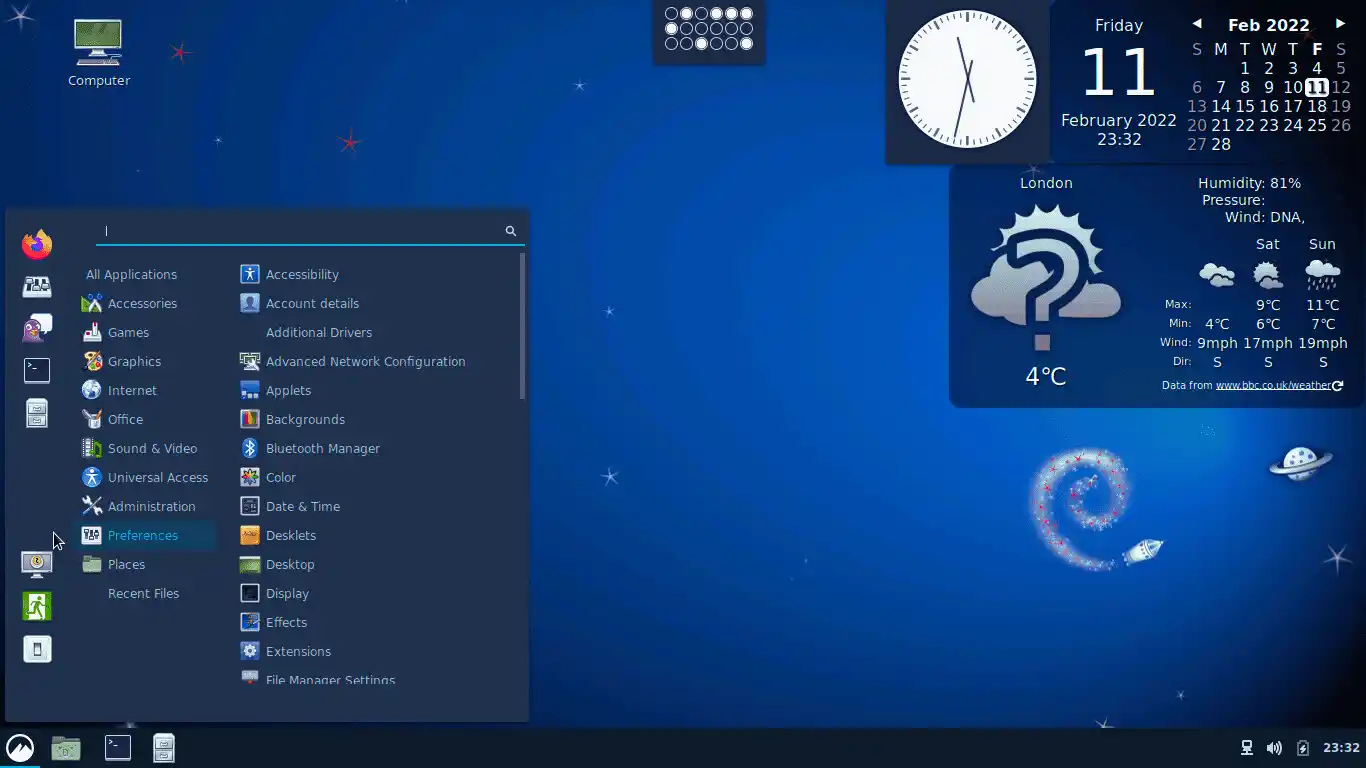
Debian draws open-source users with its focus on free software rules. It gives many install choices to match different needs.
Plus, it works with many types of computers, making it very flexible.
4. Arch Linux
With its constant update model, Arch Linux always stays current without doing a complete version upgrade.

This way, our systems stay current with the newest releases so that users can personalize right away. That’s why this makes it an excellent choice for experienced users.
Arch uses a simple approach, giving the freedom to install only the needed parts. In this way, this allows users to tailor their systems to their exact needs.
5. Linux Mint
Linux Mint is known for being easy for beginners and casual users. Primarily, it gives a good desktop experience, mainly for those moving from Windows.

Its Ubuntu and Debian design is strong and easy to keep. It plays videos and music without extra drivers or codecs. So, this lets us play videos and music right away.
It also has different desktops like Cinnamon, MATE, and Xfce. Its safe update method stops system problems.
The Update Manager handles safe updates. Also, it’s an easy screen, a huge app collection, and help from users keeps it popular.
6. Kali Linux
Kali Linux is for security experts, pen testers, and ethical hackers. I don’t recommend it for daily use.
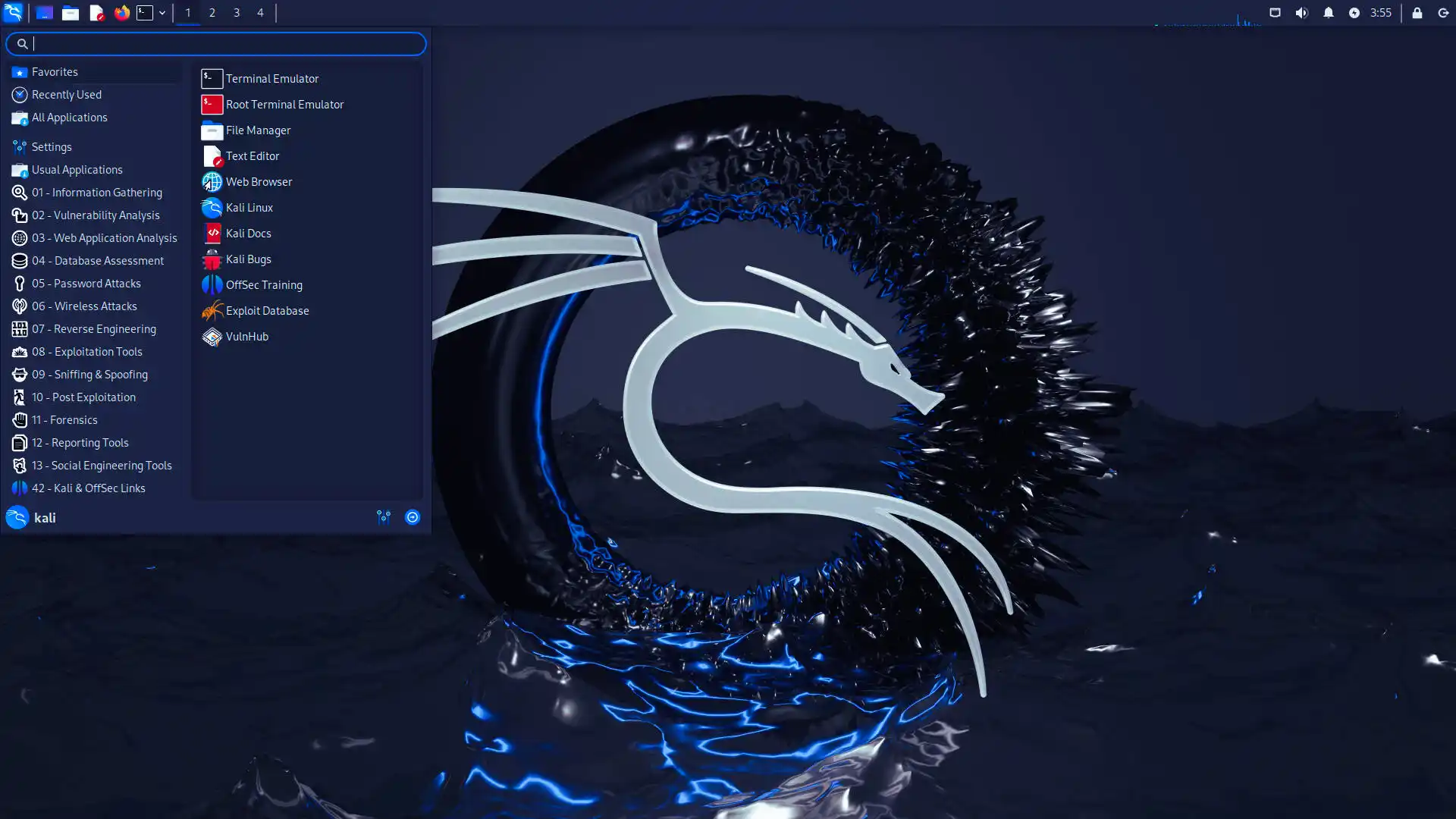
It builds on the strict security and testing versions of Debian. It comes with over 600 built-in security tools. These include Nmap, Metasploit, Wireshark, and Aircrack-ng.
It tests networks, finds clues, cracks passwords, and spots weak points. So, works with ARM computers, virtual machines, and special security tools.
But using these tools without permission can lead to big trouble. So, only test on systems you own or in safe, fake ones.
Let’s Look at Popular Linux Versions
| Distribution | Base | Target Audience | Key Features | Strengths | Weaknesses |
|---|---|---|---|---|---|
| Ubuntu | Debian | Beginners, general users | User-friendly interface, easy installation, comprehensive documentation, and different version options. | Wide community support, rich software repository, long-term LTS support. | Limited customization, Snap package discussions. |
| Fedora | Red Hat | Developers, tech enthusiasts | Cutting-edge features, SELinux security, regular updates, GNOME default desktop. | Innovative, RHEL-compatible, clean, and stable. | Short support period (13 months), difficult for beginners. |
| Debian | Standalone | Advanced users, servers | Focused on stability, 59,000+ packages, free software policy, multi-architecture support. | Excellent package management, Ubuntu Foundation, and longevity. | Lack of up-to-date software, difficult installation. |
| Arch Linux | Standalone | Experienced users | Rolling release, minimalist structure, AUR support, full customization. | The latest software, a detailed wiki, lightweight system. | Difficult installation, requires constant maintenance. |
| Linux Mint | Ubuntu/Debian | Migrants from Windows, beginners | Ready-made codec support, Cinnamon/MATE/Xfce options, conservative update approach. | Windows-like interface, stable operation, and low system overhead requirement. | Lag in innovation, limited enterprise support. |
| Kali Linux | Debian Testing | Cybersecurity experts | 600+ pentest tools, custom kernel patches, Live USB support, Forensics mode. | Built-in security tools, hardware compatibility, and active development. | Not suitable for everyday use, legal risks. |
The Future of GNU/Linux
1. Usage and Development Trends
The GNU/Linux system is still quickly growing in many fields. Recent trends show a significant move toward cloud computing, containers, and edge computing. It is also getting more used as the base of modern IT systems.
Companies often pick the Linux operating system. The main reasons for this are growth and safety.
It is also essential to know that low cost is a key factor. This trend is fueling the rise of hybrid cloud solutions. Because of that, GNU/Linux forms the foundation of these systems.
The open way lets tech improve very quickly. It also helps with new connections. Groups gain from this.
They use the latest updates in these systems. Also, they can use matching tools and languages. So, this gives them an edge over others.
2. Emerging Technologies & Their Impact on GNU/Linux
Many new tools change GNU/Linux’s future. Intelligent computers and learning code are critical. They are creating a bigger need for data work.
This means that better Linux systems are in more demand. Also, data workflows are speeding up this process.
The Internet of Things (IoT) is growing very fast. This growth is creating new needs. Simple devices need small, light systems.

In short, systems built on speed are key, and flexible ones matter a lot too.
New tools are growing more vital for the Linux system. Blockchain and shared networks are spreading. This forces the making of special versions as fresh fit needs appear.
Also, systems like Kubernetes are getting more popular. These tools give safety and speed. Also, they all use GNU/Linux.
3. The Role of Community Contributions in Future Growth
People’s help is key to GNU/Linux to grow. The open way supports teamwork, letting users and makers add things. This speeds up new ideas and makes fixing issues easier.
Group projects lead to major upgrades. Mainly, they give new tools and error repairs.
New developers are joining Linux. Mentor programs help people learn. Also, they make it friendly for everyone.
This teamwork makes the systems stronger and helps new people join. In short, the Linux system keeps being a lively community.
Frequently Asked Questions (FAQ) About the Linux Operating System
- What is GNU/Linux?
- What is the Linux kernel?
- What is the GNU Project?
- What does “free” mean in GNU/Linux?
- Is GNU/Linux the same as Windows or macOS?
Conclusion
GNU/Linux has a significant role in technology. Open source lets users freely change it, helping teamwork and new ideas.
Its robust nature makes it popular across the board. We use it on all devices from personal computers to servers. We also prefer to use it in cloud systems.
A broad group of help makes Linux stronger. So, it gives you many types of systems and tools. This way, it is essential for an online business.
I tell everyone to try the Linux operating system. If you ask why, it’s because beginners can learn a lot. Experts can also improve their skills.
This system doesn’t just build technical skills. It gives you freedom and safety so that you can be part of a global group.

Be the first to share your comment