

L2F (Layer 2 Forwarding) is a safe VPN method made by Cisco. This method helps to create private networks. It provides safety and quick entry to linked systems.
L2F wraps data packets for safe travel over the Internet. Because of this, faraway workers can reach office networks without trouble. It seems to them like they are plugged into the office network.
This is very helpful for companies with workers in many places. It also gives a strong kind of data scrambling and user checking. This keeps private data safe.
It also makes the speed of faraway links better. So, this results in better work and teamwork for staff.
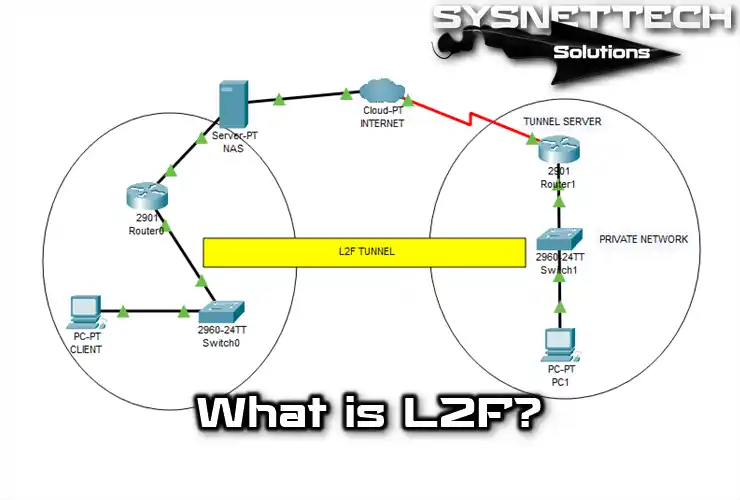
What is the L2F Protocol in a Secure Communication Network?
Cisco developed the PPTP protocol. Also, they created the L2F technology. The purpose of this tech is to tunnel traffic from remote users to the central corporate network.
The main difference between L2F and PPTP is in the tunneling process. Also, it works directly in other network environments like Frame Relay or ATM.
The L2F VPN uses PPP for remote authentication. It also employs secure methods for data transfer:
- TACACS+ (Terminal Access Controller Access Control System)
- RADIUS (Remote Authentication Dial-In User Service)
Also, L2F tunnels have many connections that are different from those of PPTP tunnels. For example, the ISP and the company check two users before making a tunnel.
So, it checks with the gateway for two-user authentication. Then, a tunnel forms between local and remote networks.
L2F is in the data link layer of the OSI model. So, it supports IPX or NetBEUI, not IP, as PPTP does.
In short, Cisco’s protocol isn’t limited to just IP; it works with others. It also works with VDU, a virtual dial-up service.
History of L2F Protocol
The history of Layer 2 Forwarding, L2F, started in the late 1990s. It offered a secure remote access method. In simpler terms, it improved data transmission.
That’s why Cisco created L2F in 1996. This protocol enabled secure access to company networks. As a result, it gained attention.
After a while, Cisco updated L2F. They made it work faster, keep data safe, and work with more things.
People might not use L2F, but it started the idea for this special Internet connection.
What are the L2F Features?
Leading the development of VPN technology, the main features of L2F are:
- Tunneling and Security
The tunneling feature helps transfer data traffic on the network safely. This method provides encryption when you try to access a remote network through the Internet.
- Authentication
Beyond checking who the user is, it also scrambles their personal details. This method keeps the network safe and gives users permission to enter.
- Data Encryption
L2F makes data safe and stops strangers from getting in. So, it keeps user info secure.
- Works on Many Networks
Ethernet works with Frame Relay and other protocols, plus it’s safe.
- Secure Remote Access
When you need to link to distant networks, pick the most secure path. This way, it safely joins your office networks from different locations.
- Protocol Compatible
It runs efficiently on most networks. It also fits nicely with other systems, which is key for large companies.
- High Performance
The L2F protocol swiftly sends secure data between networks. This method is a common pick for its excellent results.
How Does the L2F Protocol Work?
With the Layer 2 Forwarding protocol, you can create networks based on VPNs. However, it would be best if you examined how it works by reviewing some of the steps involved.
- Tunneling Process
L2F’s primary goal is to secure data transmission. It creates a tunneling channel first. Then, it connects to a remote VPN server for protection.
- Client and Server Communication
A person connects to a remote server using L2F client software. Later, the server confirms the person’s identity for safety.
- Tunneling
The VPN server checks the user and creates a safe pathway. Then, it encrypts data for security while sending it.
- Data Transmission
After making the tunnel, it encodes the info to the server. So, it creates a safe space between the local and remote networks.
- Completion of the Connection
The tunnel closes when the user wants to end the connection with the server. After that, it safely removes the connected person from the network and protects them.
What Are the Authentication Protocols Used in VPN Connections?
1. PAP Protocol
Once connected, the client sends login details and verifies the user’s identity. Then, it confirms or denies the connection request based on that info.
2. CHAP Protocol
This process regularly sends a message to the server to ensure it is you. In simpler terms, it uses special packets to talk securely between the server and your device.
Both sides check your username and password for safety. This way, they make sure it’s you connecting or disconnecting from the network.
How to Create a Tunnel?
An L2F tunnel includes the following steps;
- The remote user starts a PPP connection through an ISP. They use a PSTN or ISDN gateway for this connection.
- The NAS accepts the link and establishes the PPP connection. Then, the ISP starts using a unique code to check if everything is secure.
- The system uses only the username to establish a CHAP or PAP connection.
- After assigning a Multiplex ID (MID), it sends a connection packet to the destination of the VDU.
- After establishing the connection, the system creates a virtual tunnel for SLIP or PPP. As a result, it allows data to flow in both directions.
- In this tunnel way, devices that establish a connection using CHAP will periodically verify the link.
L2F Usage Areas
- Corporate Remote Access
People use it to work from a distance, like linking to their job’s computer network. For example, people working from their homes or workers who are on a trip can easily set up a faraway office with this.
- Intercompany Connections
Companies working together must share what they know. So, you can create a secure connection with L2F to link networks.
- Telecommunications Sector
Telecom companies use L2F to give customers broadband Internet or phone service.
- Health Service
In healthcare, they often use L2F to send patient information safely. This makes it more secure to share sensitive patient data.
- Educational Institutions
The primary reason schools use L2F is for online learning. This way, students can connect to the school’s computer system from afar and get the things they need.
- Government and Public Institutions
The big reason for using L2F in schools is to learn from far away. This way, students can connect to their school’s computer system from home and get what they need.
- Industrial Control and Automation
You can use it to make a safe network between factories or automation systems so they can manage their work better.
Layer 2 Forwarding Package Structure
| Package Components | Description |
|---|---|
| Header | Contains the transfer of the packet to its destination. |
| Data | The sender places the actual information in the rest of the packet. |
| Control Information | This part is in charge of guiding and managing the talking. |
| Encryption (Encryption) | Encryption hides information and stops people who should not see it. |
| Signature | A packet has a signature to ensure it goes the right way. |
| Protocol Compliance | Contains details about how it works with various network rules. |
Conclusion
To sum up, the Layer 2 Forwarding (L2F) method is a significant step forward. It makes safe remote entry technology better. Cisco created L2F in the 1990s.
This method allows for secure talks across different network settings. Also, it has set the base for many modern VPN tools.
L2F provides strong tunneling features and safe login checks. What’s more, it can work with different systems. This lets companies keep secure links for their faraway workers.
As the world of online talking keeps changing, the ideas behind L2F stay key. They are vital for groups that put safety and speed first in their networks.

Be the first to share your comment