
DVI, or Digital Visual Interface, is a type of connector. It has 24 or 29 pins and is semi-rectangular. This connector transmits graphic signals from a computer to a screen.
As a result, users can see clear images. DVI helps improve display quality and performance. Overall, it enhances the viewing experience for everyone.
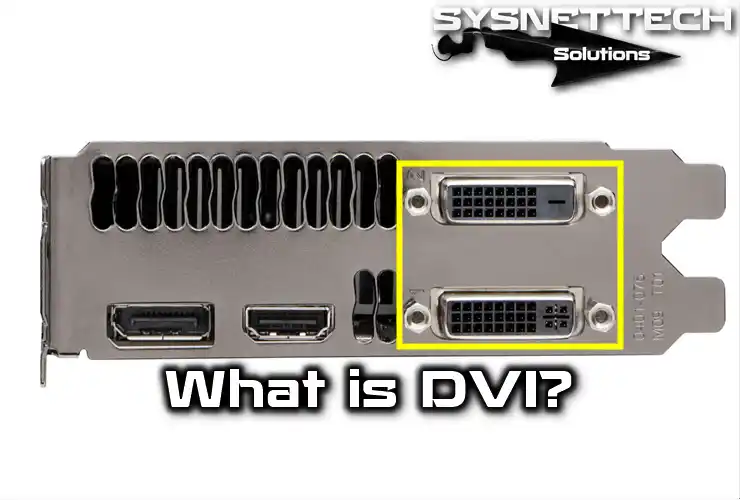
What is a DVI Port?
Data can flow between a computer and an external device. This includes peripherals like monitors and projectors. Standard VGA connectors connect these devices.
They compete with S-video and HDMI connectors for usage. Each connector has its benefits and challenges. Understanding these options helps you choose the right one.
Specifications
The DDWG designed the semi-rectangular connector. Its main goal is to enhance visual quality on flat-screen devices.
This connector is Plug and Play. Connect your device to the computer, and it will work automatically. No drivers are needed.
Additionally, it uses the PanelLink data format called TMDS. This stands for Transition Minimized Differential Signaling. Importantly, TMDS does not use compression.
The port sends signals from the computer to the display. You can usually find it on graphics accelerator cards and video capture cards.
DVI Port Specifications
The DVI connection uses a special format from Silicon Image Inc. It consists of four twisted-pair cables.
Each cable carries one primary color: red, green, or blue. One cable is for the clock. The signal timing resembles analog video signals.
Images are sent line by line. There are blanking intervals between each line and each frame. This format does not use compression or packet transmission. Therefore, the entire screen broadcasts continuously.
A single DVI connection, or Single Link, offers a maximum resolution of 2.6 megapixels at 60 Hz. To increase bandwidth, a second connection, known as Dual-Link, is available.
It has another set of twisted pairs for each color. When extra bandwidth is needed, both links can send alternate pixels.
The DVI standard allows up to 165 MHz for single links. Thus, display modes needing lower frequencies should use single-link mode.
However, higher frequency modes should utilize dual link mode. With dual links, each can exceed 165 MHz. This is also useful for images needing more than 24 bits per pixel.
Additionally, the DVI connector has pins for the display data channel (DDC 2). This feature allows the graphics adapter to read EDID (Extended Display Identification Data).
Overview
VGA and similar standards are analog and designed for CRT devices. They vary the output brightness for each line emitted.
This helps represent the desired brightness on a CRT display. The display assigns intensity as the beam moves across the screen.
However, digital displays lack this beam. Instead, they use an array of pixels. Each pixel needs a specific brightness value. The decoder takes samples of the input voltage regularly.
When the source is digital, like a computer, problems can occur. If samples are not centered on each pixel, distortion may happen. This often causes high noise between adjacent pixels.
DVI uses a different method. It transmits brightness as a list of binary numbers. When set to its native resolution, the display reads each number. This applies the brightness to the correct pixel.
As a result, each pixel in the output buffer matches a pixel on the screen.
In contrast, analog signals can affect a pixel based on its neighbors. Electrical noise and other analog distortions can also change appearance.
Monitors
The IBM T221 monitor launched in early 2003. It features four single-link DVI connectors. Its resolution is 3820×2400, totaling about 9.2 million pixels.
When connected to a single-link graphics card, the refresh rate is only 13Hz. However, if you connect all four connectors to graphics cards, you can boost it to 41Hz.
Additionally, some models can work with dual-link graphics cards. This setup allows a frequency of 24Hz. Yet, it requires an external splitter box. This box converts the dual-link signal into two single-link signals for the monitor.
In mid-2004, Apple released the 30-inch Cinema HD Display. This display was among the first to use a dual-link connection. Its native resolution is 2560×1600, which equals about 4.1 million pixels.
Digital Features
- Minimum clock frequency: 21 Hz. Maximum clock frequency for a single connection: 165 MHz
- Maximum Clock Speed for Dual Connection – Cable Only Limited
- Pixel per clock cycle: (single link) or 2 (double link)
- Number of bits per pixel: 24
- Display modes (single connection):
- HDTV (1920×1080) at 60 Hz with 5% LCD erase (131 MHz)
- 1920×1200 at 60 Hz (154 MHz)
- UXGA (1600×1200) at 60 Hz with GTF erase (161 MHz)
- SXGA (1280×1024) at 85 Hz with GTF erase (159 MHz)
- Display modes (dual connection):
- QXGA (2048×1536) at 75 Hz with GTF erase (2×170 MHz)
- HDTV (1920×1080) at 85 Hz with GTF erase (2×126 MHz)
- 2560×1600 (on 30-inch LCD screens)
GTF (Generalized Timing Formula) is a VESA standard.
DVI Advantages
Not long ago, the DVI port became popular for graphics cards. This connection quickly gained traction.
Today, most graphics cards have DVI connections alongside VGA connections. However, high-end graphics cards are now emerging.
This raises an important question: What are the differences between these two ports? Which one is better?
To answer this, we will explore the types of ports. We will also discuss how they work. Finally, we will look at the types of monitors used with each port.
VGA Connector
The VGA connector links a graphics card to a monitor. Despite being called VGA, modern connectors don’t follow the original VGA standard.
This standard displayed a maximum of 256 colors from a palette of 262,144. It also allowed a maximum resolution of 720×480 and a refresh rate of 70Hz. In contrast, SVGA supports higher resolutions and larger color palettes.
Both systems use a 15-pin D-sub VGA connector. However, this connector suits CRT monitors better. It fails to deliver good image quality for TFT monitors and similar types.
The connection between the graphics card and monitor is analog. Color depth depends on simple voltage signals. Therefore, theoretically, SVGA or VGA monitors can display numerous colors.
The brightness of each color changes as the beam moves along a line. However, TFT monitors operate differently.
They use a pixel matrix instead of a cathode ray system. Each pixel needs its brightness value assigned. A decoder receives voltage inputs regularly to manage this.
This setup prevents noise and color distortions. However, it poses challenges when both the emitting and receiving sources are digital.
Accurate sampling in the pixel center is crucial. Consequently, surrounding pixels can affect a pixel’s tone and brightness.
DVI Connector
DVI is a digital format. It transmits brightness for each pixel using binary code. When a TFT screen connects via DVI, each output pixel matches the screen pixel.
This ensures accurate colors, quality, and brightness. For this to work, both the screen and source must use digital connections like DVI or HDMI.
However, not all monitors have DVI connections. That’s why DVI-VGA adapters are available.
Most graphics cards now prefer DVI connections and often remove VGA ports. This shift is because DVI connectors can transmit both analog and digital signals, especially with the DVI-I model.
Connector Types
There are several types of connectors, depending on the types of signals they can transmit:
- DVI-D broadcasts only digitally.
- DVI-A transmits a single analog signal.
- DVI-I transmits both digital and analog signals.
In contrast, DVI-D and DVI-I types can be dual (DL or Dual-Link). That is, it can support two links.
The Battle Between DVI and HDMI
The battle between HD-DVD and Blu-ray is well-known. However, the struggle between DVI and HDMI has been quieter. This battle seems to favor HDMI as the clear winner.
HDMI has overtaken DVI in consumer devices. You can find HDMI in televisions, consoles, and cameras. Moreover, it carries audio in the same cable. Its connectors are small and resemble USB plugs, making them easy to handle.
In computer use, DVI connects to monitors. However, HDMI is likely to replace DVI and may also challenge DisplayPort. DisplayPort includes several innovations that HDMI already offers.

TolgaBagci
Hi, I'm Tolga, a computer expert with 20 years of experience. I help fix computer issues with things like hardware, systems, networks, virtualization, servers, and operating systems. Check out my website for helpful info, and feel free to ask me anything. Keep yourself in the loop about the newest technologies!