

Processor selection remains the most critical hardware decision in 2026. Most users look only at core count. However, architecture and CPU cache make the real difference.
A CPU acts as the execution brain of a system. It fetches, decodes, and runs every command. So picking the right processor model determines performance.
In this guide, I share field-tested data with you. I also explain hidden costs in the US market. This way, you avoid picking the wrong processor.
Manufacturers no longer explain 2026 architectures using only raw frequency. Hybrid cores, NPU units, and advanced packaging now enter the picture. So this CPU choice requires a multi-layer calculation.
Therefore, I will explain desktop, laptop, and server classes separately. Plus, I will discuss benchmark tricks and thermal calculations.
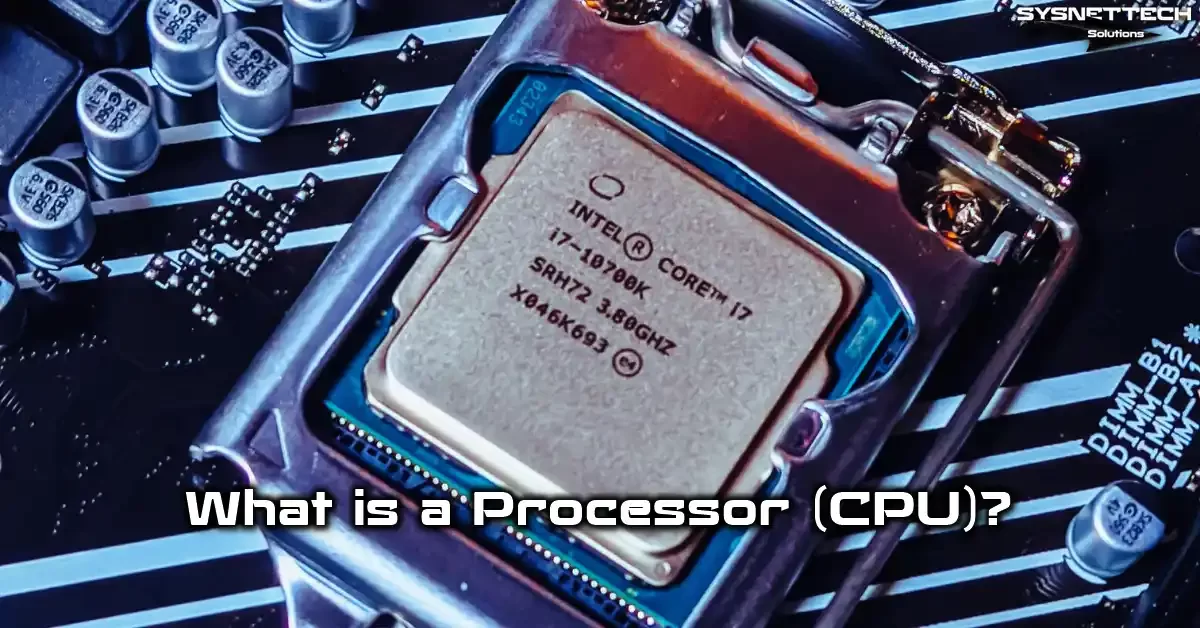
What Is a Processor (CPU)? Basic Definition and the Computer’s Brain
A processor acts as the execution brain of a digital system. It reads, interprets, and carries out each command. In short, this hardware component manages the heaviest traffic in a computer.
My experience has always shown one thing. Users put all their focus on the graphics card. Yet the processor provides the real smoothness.
Now I will cover the processor definition, its tasks, and its brief history. This way, you build a solid base for the technical sections ahead.
What Is a CPU? Central Processing Unit Definition
CPU stands for Central Processing Unit. We call it the central processing unit or processor for short. This chip pulls commands from main memory.
Then it interprets the commands and writes the results. In short, this CPU runs all the logical work of software. That is why we also call it a microprocessor in the hardware world.
A single chip holds billions of transistors. These transistors form logic gates. As a result, a massive integrated circuit appears.
These days, a processor does more than just calculate. It also handles graphics, security, and AI tasks. In fact, a modern CPU works almost like a full SoC.
What Does a Processor Do? Its Tasks and Daily Role
A computer processor works behind every digital action. Your mouse movement, file copying, video playback, and web tab switching all depend on it. So it shapes the user experience directly.
For example, typing a letter in a text document makes the operating system send a command. This command reaches the central processing unit. Then the system updates the relevant memory cell.
In games, physics, AI, and hit calculations rest on this CPU’s shoulders. Video editing tasks like encoding and effect previews also belong to it. So the processor plays a key role in heavy production work, not just office tasks.
In daily life, even smartphones, cars, TVs, and appliances depend on processors. Modern vehicles actually contain dozens of embedded CPUs. Therefore, processors work everywhere like invisible managers.
A Short History of the Processor: From Transistor to Multi-Core Chip
Early computers used circuit boards. Intel 4004 hit the market in 1971. Thus, the commercial microprocessor era began.
During the 1980s, the x86 instruction set became standard on desktop computers. By the 2000s, multi-core CPU designs spread widely. Naturally, they pushed past single-core limits.
- 1978: Intel introduced the x86 architecture with the 8086 processor.
- 2005: AMD launched the dual-core Athlon 64 X2 CPU.
- 2017: AMD Ryzen series heated up the processor core race.
- 2024: Intel Core Ultra and AMD Zen 5 opened the hybrid CPU era.
- 2026: TSMC 3nm and Intel 18A processor production processes spread widely.
As you can see, transistor counts keep rising. Moore’s Law still holds partially true. Still, shrinking nanometers alone no longer works.
In the end, manufacturers turn to chiplet design and 3D stacking. For instance, AMD boosts game performance greatly with 3D V-Cache. This development stands as a key factor in CPU selection.
How a Processor Works: Internal Architecture, Instruction Set, and Fabrication Process

In this section, we go behind the curtain. We inspect the processor’s internal structure step by step. We also examine CPU architecture differences and the production process.
Even if you plan to buy only one, this info gives you a big edge because you learn the real meaning behind marketing terms.
CPU Working Principle: Fetch-Decode-Execute Cycle and Pipeline
This CPU basically follows a four-step cycle. First, it fetches the command from memory. Next, it decodes the command. Then it runs it in the relevant unit. Finally, it writes the result back.
We call this the fetch-decode-execute cycle. Modern processor designs process these steps in parallel inside a pipeline. This way, the system finishes more work per clock cycle.
Deeper pipelines increase command delay. Yet branch prediction and out-of-order execution ease this problem. As a result, the CPU execution unit rarely stays idle.
Speculative execution lets the CPU guess ahead and work. However, this method also opened security holes. Meltdown and Spectre serve as the best-known examples.
ALU, FPU, Control Unit, Registers, and Memory Hierarchy
A CPU contains different specialized units. The ALU, the Arithmetic Logic Unit, handles integer operations. The FPU, the Floating Point Unit, runs decimal calculations.
So, the control unit directs the flow of commands. Registers hold temporary data inside the processor. This way, you avoid going to main memory every time.
Memory hierarchy balances speed and capacity. Registers are fastest but smallest. L1 cache is slower but larger. Then come L2 cache and L3 cache.
Thanks to this hierarchy, your frequent data stays close to the CPU. Thus, memory latency drops. In the end, you get a smooth user experience.
The program counter holds the next command’s address. The instruction register stores the active command. These two registers act as the control unit’s compass.
What Is Processor Architecture? x86, ARM, RISC, and CISC Differences
Architecture describes the CPU’s instruction set design and work philosophy. x86 uses the CISC approach. That means it processes complex commands in one go.
ARM sits on the RISC side. It uses simple, fixed-length commands. Therefore, energy efficiency runs high.
RISC-V is an open-source instruction set. It appears in more embedded systems every day. However, it is not as common as x86 on the desktop yet.
| Feature | x86-64 | ARM64 | RISC-V |
|---|---|---|---|
| Instruction set | CISC | RISC | RISC |
| License | Closed | Licensed | Open |
| Energy efficiency | Medium | High | High |
On the other hand, Apple M series is an ARM64-based CPU family. Qualcomm Snapdragon X Elite follows the same path. So mobile architecture has entered laptops with real strength.
Still, x86 app compatibility remains critical on Windows. Windows on ARM offers x86 emulation. But emulation never delivers full CPU performance.
CPU Fabrication Process: NM, Angstrom, Transistors, and Moore’s Law
The fabrication process describes transistor size. In 2026, TSMC 3nm and Intel 18A lead the way. These values are no longer pure physical lengths but marketing labels.
Still, a smaller process usually means more transistors. Thus, the maker fits more logic gates in the same area. As a result, CPU performance and efficiency rise.
Photolithography is the most critical step in this process. EUV machines carve fine patterns onto silicon. For this reason, semiconductor production costs a fortune.
Moore’s Law predicts that transistor counts double every two years. Today, that pace has slowed. Manufacturers now seek gains through advanced packaging.
Processor Specs: Cores, Threads, GHz, and Cache

Now I explain the four specs you see most during the buying process: core count, threads, frequency, and cache. Read these four correctly and you will not pick the wrong processor.
What Is Core Count and How Many Cores Do You Need?
A core is an independent processing unit inside the CPU. More cores mean more work at the same time. Yet not every app can use all processor cores.
For example, old games use a single core heavily. New games usually fill 6 or 8 CPU cores. Therefore, your use case matters most.
For office and web work, a 4-core processor works fine. But, for gaming, 6 cores make sense. For heavy rendering and virtual machines, a CPU with 8+ cores becomes a must.
Meanwhile, server workloads demand far more cores. Platforms like EPYC or Xeon offer processor models with over 64 cores. In such jobs, core count directly sets the capacity.
What Is a Thread? SMT/Hyper-Threading and Core vs. Thread
A thread is a software work stream. On the CPU side, a thread is the logical channel a core processes at once. Chip maker Intel calls this tech Hyper-Threading. AMD Inc. uses the name SMT.
Most modern processor cores run two threads. Thus, an 8-core CPU offers 16 threads. But this does not mean performance doubles.
The real gain usually lands between 20 and 35 percent. In some workloads, turning off SMT gives steadier results. So the core vs. thread question changes with your hardware scenario.
In short, a core is the physical CPU resource. A thread is the logical share of that resource. When buying a processor, look at core count first.
What Is Processor Speed? GHz, IPC, and Clock Cycle Relationship
Clock speed shows how many billion cycles the CPU makes per second. GHz measures this speed. Higher frequency means faster cycles.
But frequency alone does not set processor performance. IPC, or instructions per cycle, tells how many commands finish per cycle. Multiplying the two gives real work power.
For example, an old CPU running at 5 GHz stays slower than modern hardware at 4 GHz because modern architecture offers higher IPC. So do not fall for GHz ads alone.
Dynamic frequency lets the CPU boost its speed under load. Intel calls it Turbo Boost, and AMD calls it Precision Boost. Thanks to frequency scaling, single-core processor performance rises.
What Is Cache? L1, L2, L3 Cache, and 3D V-Cache
Cache keeps the CPU’s frequent data close by. L1 cache is smallest and fastest. L2 cache follows it. Finally, L3 cache serves as the shared pool for all processor cores.
L3 cache size plays a key role in games specifically. A large cache gives faster data access. Thus, the CPU goes to main memory less often.
AMD grows L3 cache capacity vertically with 3D V-Cache. This method brings major gains in game performance. Still, it creates a more thermally sensitive processor structure.
| Cache Type | Location | Typical Size | Role |
|---|---|---|---|
| L1 cache | Per core | 32-80 KB | Fastest data path |
| L2 cache | Per core | 512 KB – 2 MB | Mid-speed buffer |
You can also explore the cache hierarchy topic in depth. In that article, I explain L1, L2, and L3 differences in far more detail.
In short, the GHz vs. L3 cache question has no single answer. For gaming, a large L3 cache holds great value. Yet in production workloads, processor core count and IPC stand out.
Processor Types, Generations, and Brand Comparison
The market holds dozens of different processor families. Desktop, laptop, server, mobile, and embedded CPU models differ from each other. In this section, I will help you pick the right class.
Desktop, Laptop, Server, Mobile, and Embedded Processor Differences
A desktop processor runs with a high power budget. A laptop CPU focuses on energy efficiency. So even same-named models show completely different performance.
Server processors offer many cores and ECC memory support. Mobile CPUs target low watt use in smartphones. Embedded CPUs aim for long life in industrial settings.
Workstation processors bridge the gap between desktop and server. Threadripper stands as a powerful example of this class. Plus, they provide multi-channel memory and plenty of PCIe lanes.
So define your use case before you buy. The same budget gives different results across CPU classes.
Intel or AMD? i3, i5, i7 and Ryzen 3, 5, 7, 9 Differences

The Intel and AMD rivalry still heats up in 2026. Intel has moved toward hybrid processor architecture. AMD responds with chiplet design and 3D V-Cache.
Intel i3 represents the entry level. i5 is the balance point of the mid segment. Meanwhile, i7 and i9 offer high CPU cores and frequency.
On the AMD side, Ryzen 3 is entry, and Ryzen 5 is mid-class. Ryzen 7 is upper mid, and Ryzen 9 is the flagship class. The gap between these classes goes beyond just core count. Cache, frequency, and power limits also change.
| Scenario | Intel | AMD |
|---|---|---|
| Office | Core i3 / Core Ultra 3 | Ryzen 3 / Ryzen 5 |
| Gaming | Core i5 / Core Ultra 5 | Ryzen 5 / Ryzen 7 X3D |
| Production | Core i7 / i9 | Ryzen 7 / Ryzen 9 |
| Server | Xeon | EPYC |
On the gaming side, Ryzen X3D models usually lead. For production, the processor with more cores wins. Yet Intel Core Ultra series stands out in power efficiency.
So do not be a brand loyalist. Make a real CPU comparison based on your budget and software.
What Are Processor Generations? Alder Lake, Raptor Lake, and Zen 4/5
Intel started the hybrid processor era with Alder Lake. Raptor Lake matured this architecture. Arrow Lake arrived on desktops after 2024. Lunar Lake focused on laptop energy efficiency.
AMD moved to DDR5 and the AM5 platform with Zen 4. Zen 5 brought major IPC gains. Plus, Zen 5 X3D models kept the gaming crown.
Current fabrication processes line up as follows: Intel 7, Intel 4, and Intel 18A. AMD uses TSMC 5nm and TSMC 3nm.
- Intel Alder Lake: P-core and E-core introduction.
- Intel Raptor Lake: High frequency and mature hybrid CPU.
- Intel Arrow Lake: New LGA 1851 socket and efficiency.
- AMD Zen 4: AM5, DDR5, and PCIe 5.0 support.
- AMD Zen 5: Improved IPC and renewed chiplet structure.
Generation choice affects platform cost, not just performance. AM4 is cheap but stays limited to DDR4. AM5 is future-proof but pricey.
Apple M Series, Snapdragon X Elite, and Copilot+ PC: The ARM Difference
Apple M series brought ARM64 architecture to desktop performance. The line started with M1 and matured with M4. This CPU family offers high efficiency and silent operation.
Qualcomm Snapdragon X Elite started the ARM era on Windows laptops. This processor promises a strong NPU and long battery life. It also requires over 40 TOPS NPU for Copilot+ PC certification.
The Copilot+ PC concept means an AI-assisted computer. These systems run local AI tasks without waiting on the cloud. Thus, you gain privacy and latency advantages.
Still, x86 app compatibility remains a big problem. Windows on ARM offers emulation, but some drivers fail to work. So verify your critical software before you buy.
Hybrid Architecture, NPU, and AI Processors

A 2026 processor is no longer just a CPU. It holds different core types and AI accelerators inside. In this section, I clarify that structure.
What Are P-Core and E-Core? What Does Hybrid Architecture Mean?
P-core means performance core. It offers high frequency and strong IPC. E-core is the efficiency core. It handles background tasks with low power.
We call this structure hybrid architecture. Intel brought this concept to the desktop. AMD stayed more loyal to single-type CPU cores. Yet some AMD designs also try big.LITTLE-like approaches.
Thanks to hybrid processors, the chip runs the foreground game on P-cores. E-cores take on background updates. As a result, energy efficiency and multitasking performance both rise.
But old software sometimes struggles with E-core scheduling. This issue can cause brief stutters in games. Current operating systems manage this CPU scheduling much better now.
What Is an NPU and What Does an AI Processor Do? TOPS
NPU means neural processing unit. It speeds up AI workloads with low power. Image processing, voice recognition, and language models run here.
TOPS means trillion operations per second. This unit measures AI accelerator power. For 2026 AI PC standards, makers require at least 40 TOPS.
With the NPU active, the CPU and GPU relax, and battery life extends. You also finish local AI tasks without cloud delay.
| Platform | NPU TOPS | Key Feature |
|---|---|---|
| Intel Core Ultra 7 | 48-50 | Low-power AI |
| AMD Ryzen AI 9 | 50-55 | Zen 5 + XDNA 2 |
| Qualcomm Snapdragon X Elite | 45 | ARM efficiency |
| Apple M4 | 38 | Tightly integrated AI |
As you can see, NPU now sits at the center of marketing. Yet software support is still maturing. AI will run locally after 2026.
Intel Core Ultra, DL Boost, AVX-512, and AI PC Transformation
Intel Core Ultra is the new-generation brand. This series strengthens the iGPU, adds an NPU, and boosts energy efficiency. We now talk about whole CPU acceleration, not just high GHz.
DL Boost speeds up deep learning commands. AVX-512 powers heavy vector calculations. But in hybrid architecture, AVX-512 stays disabled in some processor models.
AI PC transformation speeds up with Windows 11 and Copilot. These systems process AI tasks locally. Thus, data privacy stays protected and CPU response time shortens.
Meanwhile, Intel Quick Sync Video remains very valuable for video encoding. AMD offers AI acceleration through AMX. These technologies make clear differences in production work.
Socket, Motherboard, Memory, and PCIe Compatibility

Choosing the wrong socket ruins the whole plan. So clarify platform compatibility before you purchase anything.
LGA, PGA, BGA Socket Differences; LGA 1700, LGA 1851, AM4, AM5
A processor socket is the physical slot where the CPU meets the motherboard. In LGA types, pins sit on the motherboard. In PGA types, pins sit under the processor. BGA, however, solders the CPU permanently to the board.
Intel used the LGA 1700 socket for 12th and 13th gen. LGA 1851 arrived with Arrow Lake. On the AMD side, AM4 served for a long time. AM5 brought DDR5 and PCIe 5.0.
The LGA and PGA socket difference shows up in pin handling. On LGA, motherboard pins are delicate. On PGA, processor pins risk bending.
BGA sockets usually appear in laptops and embedded systems. So can you replace a laptop processor? The answer is mostly no. The maker has fixed the CPU to the board.
How to Check Motherboard Compatibility: Socket and BIOS
First, learn your motherboard model’s socket type. Then open the maker’s official support page. There you will see the supported processor list.
Next, check the BIOS version. Some motherboards need a software update to recognize a new CPU.
- Open the motherboard box or system info.
- Note the socket type.
- Find the CPU support list on the maker’s page.
- Download the required BIOS version.
- Apply the update carefully.
Memory Controller, DDR4/DDR5, PCIe Lanes, and ECC Memory
Modern CPUs hold the memory controller inside. This unit talks directly to RAM. Thus, data path delay drops.
DDR4 still costs less. DDR5 offers higher bandwidth. You cannot use both in the same system, though.
PCIe lanes matter a lot for graphics cards and NVMe drives. PCIe 4.0 and PCIe 5.0 speeds deliver high bandwidth. Therefore, new processor platforms offer more lanes.
ECC memory means error-correcting memory. People prefer it in servers and pro workstations. AMD Ryzen offers unofficial ECC support on some models.
Dual-channel memory doubles bandwidth. So two RAM modules always beat one module. The CPU difference becomes clear in game performance.
Windows 11 Compatibility, TPM, and BIOS Updates
Windows 11 requires TPM 2.0 and Secure Boot. These hardware security features exist in modern CPUs. You must set the BIOS options correctly, though.
fTPM provides software-based TPM on AMD platforms. On Intel, we know it as PTT. If this option is off in BIOS, setup fails. Finally, turn on UEFI mode. Old CSM mode turns off some security features.
Processor Selection by Use Case

Best Gaming Processor 2026 and Bottleneck Calculation
Game performance comes from the balance between CPU and graphics card. If the processor stays weak, the graphics card cannot work at full power. We call this situation a bottleneck.
A bottleneck does not cause lasting hardware damage. But it drops frame rates and causes stutters.
Use monitoring software to calculate the bottleneck. During gaming, if GPU usage sits below 95 percent, the CPU limits things. In the opposite case, the graphics card limits things.
For a 2026 gaming processor, 8 cores and strong single-core performance are a must. Ryzen 7 X3D models lead in games specifically. Intel Core Ultra 7 offers a strong efficiency alternative.
External graphics card selection needs the same balance. You should think about both together.
CPU Selection for Video Editing, Rendering, and 3D Modeling
Video editing and rendering jobs require many cores. Here, the CPU takes on encoding and effect previews. Thus, you save time directly.
Adobe Premiere Pro and DaVinci Resolve perform best with high-core processors. 3D modeling also needs single-core performance. So you need a balanced CPU structure.
For example, Blender scales almost linearly in multi-core rendering. Going from 8 to 16 cores cuts time greatly. Yet the modeling viewport runs on a single processor core.
Therefore, choose Ryzen 9 or Core i9. Even Threadripper class works well for heavy users. But platform cost rises sharply.
Virtual Machines, Software Development, and AI Training
A virtual machine scenario demands many cores. Each VM shares a set number of CPU cores. For this reason, total core count runs out fast.
Software development needs a strong processor to cut compile time. The compiler benefits from parallel work. So multi-core models speed up your tasks.
AI training usually runs on the GPU. Yet data prep and model editing stay on the CPU side. Therefore, a strong processor still matters.
- For 2 virtual machines, an 8-core CPU works.
- For 4 virtual machines, go above 12 cores.
- For compiler-heavy work, 8 cores are ideal.
- For local AI tests, pick an NPU-supported processor.
- For pro virtualization, think about an ECC memory-supported CPU platform.
In this scenario, you should enable virtualization technology. Set BIOS options correctly. Otherwise, processor performance will not meet your expectations.
How to Calculate Price-to-Performance Ratio
Price-to-performance ratio equals the value you get divided by the cost. Use a real benchmark score to figure this out. Then divide it by the sale price.
- Find the Cinebench R23 multi-core score.
- Convert the score to thousands.
- Divide the sale price by that unit.
- A lower value means better processor price-to-performance.
- Repeat the same test for alternative CPU models.
For example, a processor scoring 30,000 points at $180 gives a value of 0.006. A CPU scoring 40,000 points at $300 gives a value of 0.0075. So the first model is more advantageous.
But do not trust this calculation alone. In short, you also factor in platform cost, cooler, and memory. Plus, energy use makes a difference over time.
Processor Benchmark and Test Programs

Benchmarks measure the CPU’s real power. Test results speak, not marketing copy. In this section, I explain the most reliable tools.
What Are Cinebench, Geekbench 6, PassMark, and CPU-Z?
Cinebench R23 measures multi-core render power. Geekbench 6 tests single-core and multi-core daily scenarios. PassMark offers a wide score database.
CPU-Z shows hardware identity. It also includes a quick benchmark tool. These programs are free and portable.
| Tool | Focus | Use |
|---|---|---|
| Cinebench R23 | Rendering | Multi-core comparison |
| Geekbench 6 | Daily work | Single-core analysis |
| PassMark | General | Wide database |
| CPU-Z | Info | Quick test |
Plus, 3DMark CPU Profile produces game-specific scores. This test makes more sense for game-focused purchases.
When reading test results, question the cooling conditions. The same processor scores higher with good cooling.
Processor Test Programs: Prime95, AIDA64, HWiNFO Stress Testing
Stress testing confirms CPU stability under the hardest conditions. Prime95 pushes the processor with heavy math operations. This test reveals heat issues fast.
AIDA64 measures memory and cache bandwidth. HWiNFO tracks temperature, voltage, and power draw. These three tools form a solid CPU test routine.
- Open sensors with HWiNFO.
- Run the Prime95 small FFT test.
- Watch temperature and clock speed.
- Let the test run for at least 30 minutes.
- If crashes or overheating occur, adjust processor settings.
During stability tests, temperature should not approach the TJMax value. Otherwise, thermal throttling begins. This situation lowers CPU performance.
What Is the Mobile vs. Desktop Benchmark Trick?
Laptop CPUs can share the same name as desktop models. For example, a Core i7 laptop model is not the same as a desktop i7. So looking at names alone misleads you.
Mobile benchmarks score high in short tests. Yet under long load, the power limit drops. Thus, processor performance falls sharply.
PL1 and PL2 differences cause this. Short-term burst power runs high. But the long-term power limit sits much lower.
Therefore, when buying a laptop, look at sustained load tests. In other words, do not trust CPU scores from marketing slides alone.
Processor Temperature, Cooling, and Power Management

Thermal management sets both CPU lifespan and performance. In this section, I explain temperature limits and cooling choices. We also calculate the electric bill impact.
What Should CPU Temperature Be? TJMax and Thermal Throttling
Idle temperature should normally sit between 95 and 122 degrees Fahrenheit. Under load, 158 to 185 degrees Fahrenheit is normal. TJMax is the CPU’s safe upper limit.
Modern processors tolerate 203 to 212 degrees Fahrenheit. Yet constant work at that level shortens life. Plus, thermal throttling kicks in.
Thermal throttling cools the CPU by lowering its speed. Thus, the hardware stays protected. But performance drops in that moment.
Use HWiNFO to track temperature. Watch values during games or renders. Constant readings above 194 degrees Fahrenheit point to cooling weakness.
| State | Ideal Temperature | Risky Temperature |
|---|---|---|
| Idle | 95-122°F | Over 140°F |
| Gaming | 149-176°F | Over 194°F |
| Rendering | 167-194°F | Over 203°F |
Choose your thermal solution based on this. A good cooler keeps processor performance high at all times.
Cooler Selection: Air vs. AIO, Thermal Paste Replacement
Air cooling uses a large cooler block and a fan. AIO liquid cooling uses a radiator and pump. Plus, air cooling causes fewer failures.
AIO spreads high heat more quietly. But it carries pump failure risk and costs more.
Thermal paste fills the gap between CPU and cooler. It dries over time and loses conductivity, so replacement becomes necessary.
- Shut down the computer and unplug it.
- Remove the cooler carefully.
- Clean old paste with isopropyl alcohol.
- Apply new paste in a pea-sized amount.
- Place the cooler with even pressure.
People often ask when to replace thermal paste. If temperature suddenly rises under load, replacement time has come. Also, a routine change every two years is good.
If you are wondering how to reduce fan noise, adjust the fan curve in BIOS. Lower fan speed at low temperatures. This way, you get quiet operation.
What Are TDP, PL1, PL2? Undervolting, PBO, and Curve Optimizer
TDP means thermal design power. It shows the heat the cooler must dissipate. Yet real power draw can exceed the TDP value.
PL1 is the long-term power limit. PL2 offers short-term burst power. These two limits set how many watts the CPU draws.
Undervolting lowers the processor’s voltage. Thus, temperature and power draw drop. Meanwhile, performance mostly stays the same or rises.
On AMD, PBO means Precision Boost Overdrive. This feature stretches the CPU’s power limit. Curve Optimizer fine-tunes the voltage curve.
- Undervolt: Less heat, less power.
- PBO: Higher multi-core processor performance.
- Curve Optimizer: Core-based voltage balancing.
- PL Setting: Managing sustained CPU performance in laptops.
You make these settings in BIOS or motherboard software. Not every processor shows the same tolerance, though. The silicon lottery comes into play here.
How to Calculate Energy Use Impact on Electric Bill
We measure CPU power draw in watts. To find the electric bill impact, know your daily use time. Then multiply by the unit price.
- Track average power draw with HWiNFO.
- Convert the value to kilowatt-hours.
- Multiply by daily hours.
- Find the monthly use.
- Multiply by the electricity unit price.
For example, a 150-watt system runs 6 hours a day. It uses 0.9 kWh daily. That makes 27 kWh monthly. At $0.15 per kWh, it adds about $4 to your bill.
Energy efficiency matters in the long run because of this. A high-TDP processor brings cooling and electric costs. On top of that, the carbon footprint enters the picture.
Overclocking and Performance Optimization

Overclocking pushes the CPU past its factory frequency. This process gives extra performance but carries risks too. Now I explain the informed approach.
What Is Processor Overclocking? How to Overclock and Its Risks
Overclocking raises clock speed and voltage. Thus, you get higher frame rates or shorter render times. But heat and power draw rise.
Basic steps go as follows: First, install quality cooling. Then raise the multiplier in BIOS. After that, increase voltage in small steps.
- Enter BIOS.
- Increase the core multiplier.
- Raise Vcore voltage carefully.
- Apply a stress test.
- Watch temperature and CPU stability.
Overclocking risks include processor burnout. You may also lose your warranty. For this reason, I suggest moving in small steps.
You should balance processor overclocking risks and gains. Modern CPUs already ship with high factory frequencies. So manual gains have shrunk compared to the past.
Undervolting, Silicon Lottery, and Stability Testing
Undervolting is safer than overclocking. You lower voltage to cut heat. Plus, you keep CPU performance in most cases.
The silicon lottery means same-model processors have different quality. Some CPUs run high frequency at low voltage. Others are more sensitive.
Therefore, stability testing is a must. Stress the system with Prime95 or AIDA64. If errors appear, raise voltage slightly or lower frequency.
Remember, a stable system matters more than looking fast. Sudden crashes lead to lost work.
Frequency Locking and XMP Profile
Frequency locking keeps the CPU speed at a set level. This method reduces fluctuation. It gives frame-time consistency, especially in games.
XMP profile raises memory speed with one setting. DDR4 and DDR5 modules carry this profile. In short, just turn on the XMP option in BIOS.
- Enter BIOS.
- Select the XMP profile.
- Check frequency and voltage values.
- Save and exit.
- Run a memory stability test.
Yet XMP sometimes causes instability. In that case, you adjust voltage manually or turn off the profile. Also, verify the motherboard memory compatibility.
Processor Troubleshooting, Maintenance, and Security
You often confuse hardware issues with software issues. Let us clarify failure signs and fixes, and talk about CPU vulnerabilities.
Why Does a Blue Screen Error Happen?
A blue screen means the system stopped due to a critical error. This issue may come from the processor, memory, or drivers. Yet RAM mismatch is among the most common causes.
If you are wondering how to spot RAM mismatch, first test the modules one by one. Then turn off XMP profiles. If the error continues, swap the memory slots.
A CPU fault usually shows crashes or freezes under load. System lockups are also a frequent sign. In that case, check temperature and voltage values.
Also, current BIOS and microcode updates fix many stability problems. So follow the maker’s release notes.
What Happens If a Processor Pin Bends? How to Fix It
On PGA sockets, CPU pins are delicate. If a pin bends, the system will not start. Yet most bent pins can be fixed.
Fixing a processor pin requires patience. Use fine tweezers or a mechanical pencil tip. Align the pin slowly.
- Inspect the CPU under good light.
- Find the bent pin.
- Straighten it gently with tweezers.
- Place the processor into the socket without force.
- Test the system.
Pin inspection matters a lot for second-hand purchases. Always check the pins before you buy. Return any processor with bent pins.
Meltdown, Spectre, and Downfall Vulnerabilities; Microcode
Speculative execution gives modern CPUs their performance. Yet this method can leak private data. Meltdown and Spectre are the best-known examples.
Downfall is a newer hardware vulnerability. These holes let bad software steal data from memory. Manufacturers ease these issues with microcode updates.
But some fixes lower CPU performance. So you balance security and speed. Using a current operating system and BIOS is a must.
On the server side, these patches cause more serious consequences. In multi-user settings, data isolation can break down. For this reason, updates are mandatory in enterprise systems.
How Long Does a Processor Last? Thermal Cycling and Electromigration
A CPU works for over 10 years under proper conditions. Yet extreme heat and voltage shorten life. Thermal cycling is the fatigue from constant heating and cooling.
Electromigration is the displacement of metal atoms under high current density. This event slowly breaks thin paths over time. As a result, lasting damage forms.
For this reason, keep temperature under 185 degrees Fahrenheit under load. Also, avoid extreme overclocking. A stable undervolt positively extends processor lifespan.
Second-hand CPU lifespan is hard to judge. Ask the seller about usage conditions. Pin damage and burn marks are bad signs.
Processor Buying Guide and Hidden Costs in the US
In the US market, currency shifts and tariffs move prices all the time. So buying timing matters as much as model choice.
Boxed or Tray? Should You Buy a Used Processor?
A boxed processor comes with packaging and a cooler. A tray CPU sells as just the chip. Boxed models usually offer a warranty and accessories.
We prefer tray models for bulk system builds. The price is a bit lower, but there is no cooler or box.
The question of buying a used processor relates to risk management. CPUs usually stay solid. Yet pin damage or a bad overclock history causes trouble.
- Ask the seller for a load test video.
- Inspect the pins and IHS surface.
- Verify the CPU-Z output.
- Choose a product with receipt and warranty.
- Be suspicious of extremely low prices.
Always clarify the return policy for second-hand purchases. This way, you avoid problems in case of issues.
Processor Buying Timing: Currency, Tariffs, and Stock Cycles in the US
Exchange rates affect import prices instantly. Therefore, buying before prices rise gives an advantage. Sudden drops also create opportunities.
Tax brackets and stock levels swing prices. During new generation launches, old models go on sale. This price cycle repeats a few times yearly.
Watch these points for buying timing. Follow the new generation launch. Then wait for discounts on old stock. Processor prices drop especially during big e-commerce campaigns.
Yet waiting too long carries risk. Stock may run out or the exchange rate may rise. So catch a fair price when you need it.
How to Tell If a CPU Burnt Out
Processor burnout is rare but serious. Signs include the system never turning on. You may also smell burning or see color changes on the IHS. First, do a visual check. Look for dark spots on the socket and chip surface. Then test in a different system.
Keep your receipt ready for the warranty process. Store the product in its original packaging. Physical damage or delid marks void the warranty.
Manufacturers usually do not cover user-caused overclock damage. So read the warranty terms carefully. Know the risk before you overclock.
A Journey Through Hardware Architecture
The options below help you understand this hardware unit’s operation and internal structure better.
Each one offers competent content from a different angle.
- DigitalOcean – Structure of Hardware Components: Explains the stages of the data processing cycle. It also covers subunit task distribution in technical yet clear language.
- Trusted Reviews – Control and Data Flow Mechanism: Shows the interaction between the arithmetic logic unit and control unit through sample scenarios clearly.
- ExtremeTech – Chip Architecture and Performance Factors: Goes deep into the system from physical layers to cache and core layout.
- TechSpot – Design and Fabrication Process Stages: Covers many advanced topics from instruction set design to pipeline optimization.
- University of Vermont – Basic Command Cycle Explanation: Explains the fetch-decode-execute cycle in a clear academic format.
FAQ About Processor Selection
What is a CPU in short?
What should you look for when buying a processor?
How many cores should a processor have?
Intel or AMD?
Is GHz or L3 cache more important?
Can you replace a laptop processor?
What should processor temperature be?
Should you overclock a processor?
How long does a processor last?
How do you spot a bottleneck?
Conclusion: 2026 Processor Selection Summary
You now have a clear roadmap for selection. The key is not finding one best CPU. The key is finding the processor that fits your workload best.
3 Concrete Recommendations Based on Your Use Case:
I give my recommendations based on three main scenarios. This way, you can go straight to shopping.
- Office and daily use: AMD Ryzen 5 7500F or Intel Core i5-13400. Fair price, enough cores.
- Gaming and streaming: AMD Ryzen 7 7800X3D or Intel Core Ultra 7 265K. High frame rate, strong single-core.
- Heavy production and rendering: AMD Ryzen 9 9950X or Intel Core i9-14900K. Many cores, high memory bandwidth.
On the laptop side, Apple M4 or Snapdragon X Elite models stand out in efficiency. Yet test software compatibility in advance.
In 2026, CPU selection is a multi-sided calculation. Looking only at cores or GHz is not enough. Cache, NPU, socket, and energy efficiency also matter greatly.
Also, watch the price cycle in the US market. Do not rush, but do not miss the chance either. An informed choice carries you for years.
My final word is this. Build the system for your use case. Trust test data, not marketing phrases. Then you will not regret it.

Be the first to share your comment